
Feedback & Followups
- More evidence of the dangers of Agentic Browsers: ChatGPT Atlas Browser Can Be Tricked by Fake URLs into Executing Hidden Commands — thehackernews.com/…
- Related Article: Be Cautious with Agentic Web Browsers — tidbits.com/… (by Adam Engst)
- 🇪🇺 The EU’s latest misguided attempt to destroy End-to-End encryption is dead (again, for now): Danish Presidency backs away from ‘chat control’ — www.euractiv.com/…
Deep Dive — Apps Asking for Network Access?
I want to start with some important context for this entire discussion.
When Apple launched the iPhone, it was initially completely locked down, with no apps at all, and even when it did add 3rd-party apps a year later, those apps were extremely locked down. Apps were trapped in individual sandboxes and could interact with just a few OS services, and there was no way for apps to interact with each other. Over time, Apple expanded the functionality available to apps, but they never released them from their sandbox. Instead, Apple provided proverbial gates to the available features that were protected by one or two locks:
- App Entitlements granted by Apple during App Store Review
- User permission prompts
Apple’s original focus was on just app entitlements — if you wrote an app and you wanted to access the user’s contacts, you requested that entitlement in your app store submission, providing a justification for the entitlement. Apple’s reviewers would then judge whether that was a reasonable thing for your app to do. And then grant your app the entitlement if they deem it appropriate. Your app could then just read users’ contacts.
These simple app entitlements succeeded in stopping egregious abuses, like flashlight apps hoovering up all your contacts and selling them, but they provide no visibility to us users, let alone control!
Entitlements have not gone away; they are still a big part of an app submission, but a lot of entitlements no longer grant apps direct permissions, but instead grant permission to ask the user for access via an ever-growing collection of standard OS prompts.
Flashlight apps that ask for the contacts entitlement still get stopped before even going live on the app store via the entitlements process, but even apps that do get the contacts don’t actually get that access until the user approves it.
Over time, Apple has been delegating more and more control to users, even adding fine-grained options like granting access to just some photos or to different levels of precision for location access.
Meanwhile, the Mac app started off with completely unsandboxed apps, basically free to do whatever they wished. When Apple added the Mac App Store, they also added optional app sandboxing to the Mac using the same entitlements model pioneered on the iPhone. Over time, app sandboxing went from optional to suggested to all but mandatory, and the number of entitlements switching from direct access to permission to ask for access grew to align ever more closely with iOS/iPad OS. Today, Mac apps have more entitlements available to them, but every app that just runs (without the user needing to open the settings app to add an exception) is sandboxed, and the Mac now shares many of the same permission prompts users see on their iPhones and iPads.
The LAN Permission
As of iOS/iPadOS 14, the entitlement apps need to access devices on your local network (LAN) has joined the ever-growing lists of indirect entitlements, i.e., permission to ask for permission rather than direct permission.
Here’s an example from Apple’s iOS support article about these prompts:
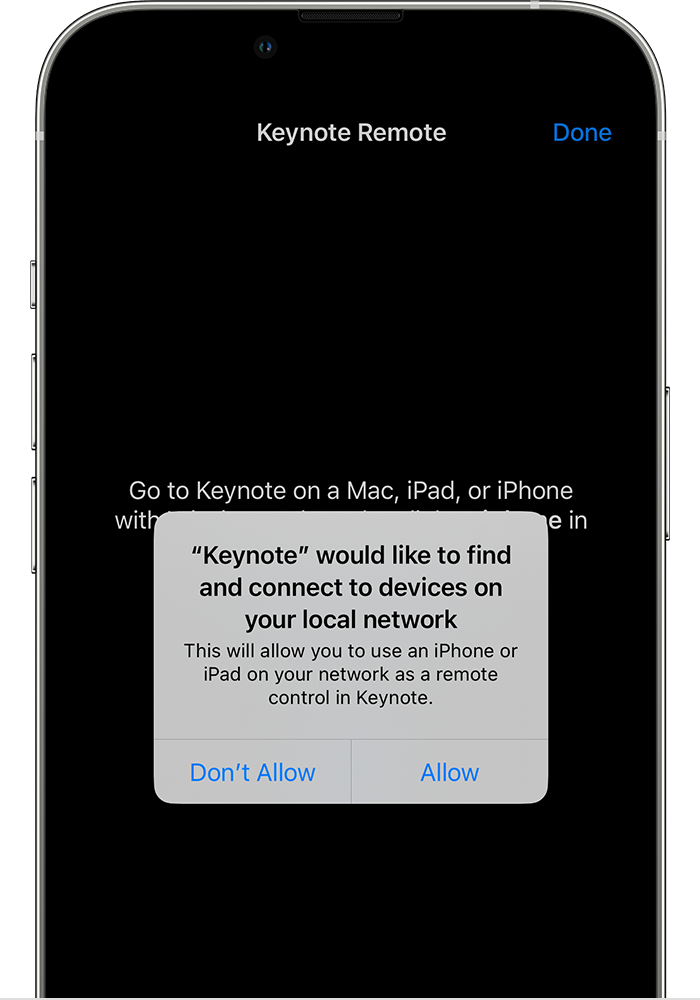
Apple added the same prompt to the Mac in macOS Sequoia, though the support article is much sparser. I can only assume it works the same way (as is the norm these days).
This request causes confusion, especially from people who are technically savvy but not developers or networking specialists. In other words, it confuses many NosillaCastaways! My theory is that when you understand enough about how the internet works to realise that every app connecting to the internet must be making use of your LAN to get to and from the internet, you assume that means the apps must have access to the LAN anyway. But that’s a false assumption.
Developers familiar with the networking APIs provided to apps by OSes, and network engineers familiar with how TCP/IP network connections work under the hood, are not confused because they understand the difference between endpoints and transit points when it comes to network connections. Every network connection has two endpoints, but passes through arbitrarily many transit points. Network connections transiting through the LAN can’t access devices on the LAN because the packets are like people on a train between stations — they move across rails they can’t see and have no control over where they go or how they get there!
When apps ask an OS to establish a network connection for them, they have to provide the desired remote endpoint (the local device is the other endpoint), and the OS is free to apply some rules before returning a connection object or an error object. That means Apple can provide two entirely different entitlements for internet connections and LAN connections, which is exactly what they do.
These prompts are asking for more than just permission to connect to a specific endpoint on the LAN; they are asking for permission to scan the LAN for possible endpoints to connect to! This is vital from a usability perspective, because without the ability to probe the network and discover devices, users would need to provide local private IP addresses to connect to devices, and that’s utterly impractical — they change all the time thanks to DHCP, and what regular person would even know where to begin to find those addresses‽
How Do We Answer?
OK, so now we know what the prompts are and what they mean. How should we answer?
As with every prompt, that depends … — if there was a clear universal answer, there would be no prompt! Apple are asking because for some people in some situations, some apps should be given permission, and for other people in other situations, permission should be denied.
Not very helpful, but it’s important to understand that you are being asked to make a judgment, and there is no universally correct answer; you actually need to stop and think. Sorry!
We are being asked to trade off risks in exchange for functionality, so that’s the right structure for the remainder of this discussion.
Why Might I Want to Allow Access?
Firstly, Apple allows apps requesting this permission to describe why they need it in the smaller text on the permission prompt. The most important questions are always “does that even make sense?”, followed by “do I actually want the functionality described?”. If you can’t answer “yes” to the first, and at least “maybe” to the second, just say no!
As Apple describes in their support document, rejecting the permission is no big deal:
If you don’t want to allow access, or if it’s not clear to you why the app needs access, you can tap Don’t Allow. The app can still use the internet or interact with the local network using a system service, such as AirPrint, AirPlay, AirDrop or HomeKit.
Notice that Apple’s own LAN services are explicitly excluded, and that gives us a clue as to why we might want to grant this permission — third-party alternatives to those services do need this permission to discover and connect to other devices on your LAN!
This is by no means an exhaustive list, but here are some legitimate uses for this permission:
- 3rd-party AirPlay alternatives like:
- Google’s Chromecast
- Samsung’s Smart View
- Networked speakers that don’t use AirPlay as their communication protocol
- Console game streaming protocols like Xbox Console Streaming or PlayStation Remote Play
- Accessing content on home media servers like Plex or Emby
- Accessing IoT (Internet of Things) devices that connect to your LAN but don’t communicate over the HomeKit or Matter protocols.
- Accessing printers using protocols other than AirPrint
- Accessing files shared on the LAN from PCs or NAS devices
- Games with multi-player features that can work over the LAN
- Apps with support for remote control via hardware devices or companion apps like hardware clickers or smartphone companion apps for PowerPoint.
I think Chromecast explains a lot of these requests, certainly on iOS, because streaming to smart TVs other than the AppleTV is definitely something a lot of apps like to support these days.
What are the Risks?
We have many reasons we may want to grant access. Why might we push back?
In a word — privacy!
The devices you choose to connect to your home network say a lot about you, so they can really help advertising companies expand their profiles of you. They could see you have HP printers, Dell laptops, Samsung TVs, a home weather station, a 3D printer, a smart fridge from Electrolux, and so on and so forth.
The Bottom Line
Don’t stress too much about this one. If you deny access, most apps will work fine, with the obvious exception of apps whose sole purpose is to be companions to LAN devices, of course. You can also change your mind at any time in the security and privacy section of the relevant settings app for your OS.
The risks are small, so I don’t think you should lose too much sleep over these requests. If you trust the developer, it seems reasonable to trust their apps 🙂
Personally, when I’m not sure if the functionality will or will not be useful to me, I tend to just grant that access, especially if the app itself has earned my trust in some way (long-time user/customer, reputable developer, recommended by someone I trust …).
❗ Action Alerts
- Apple Patches Everything, Again — isc.sans.edu/…
- The OS 26.1 updates are more than just bug fixes!
- Some Older OSes patched too: Apple releases iOS 18.7.2, iPadOS 18.7.2 updates — appleinsider.com/…
- ⚠️ Twitter/X Users: X: Re-enroll 2FA security keys by November 10 or get locked out — www.bleepingcomputer.com/… (remove and re-add your passkeys!)
- ⚠️ QNAP NAS Owners: QNAP fixes seven NAS zero-day flaws exploited at Pwn2Own — www.bleepingcomputer.com/…
- ⚠️ Windows 10 Users: next Tuesday will be the first Patch Tuesday you get left un-patched unless you activate an ESU (Extended Security Updates) license on your machine, even in Europe where this is free you must take action to enable further updates
- An excellent explainer on what is needed and all available options — www.bleepingcomputer.com/…
Worthy Warnings
- HIBP adds 2 billion leaked emails from credential stuffing dataset — cyberinsider.com/…
- These are username+password pairs gathered together by cyber criminals from various breaches, key loggers, and goodness knows what else that were discovered circulating online by security researchers
- A lot of this data appears to be old, so it may be a good time to refresh some of your older credentials!
- The full technical details of how Troy Hunt was able to process that much raw data: 2 Billion Email Addresses Were Exposed, and We Indexed Them All in Have I Been Pwned — www.troyhunt.com/… (It’s really quite a challenge to process such colossal data sets!)
- Beware, ClickFix Techniques Continuing to Evolve: ClickFix malware attacks evolve with multi-OS support, video tutorials — www.bleepingcomputer.com/…
- Look at the screenshot — these are now very professional looking!
- Continuing to leverage the fact that CAPTCHAs have taught us all to do really weird things to see web pages
- Advice remains the same: never copy-and-paste anything from the web into anything unless you fully understand it
- Beware a new Phishing Trick: BiDi Swap: The bidirectional text trick that makes fake URLs look real — www.bleepingcomputer.com/…
- By causing the browser to work right-to-left in a weird way, it makes the path part of the URL look like the domain part, i.e.,
https://hackersite.com/google.com/...` can look likehttps://google.com/hackersite.com…` — breaks Bart’s advice to always check the domain part of the URL! - For this attack to work the URL must contain characters from a right-to-left script in it somewhere
- For now, all the major browsers are vulnerable, but expect the browser vendors to respond soon.
- Lesson to Learn: treat any URL with any weird characters (not on a standard QWERTY/AZERTY keyboard) as malicious, even if the domain part looks legitimate
- By causing the browser to work right-to-left in a weird way, it makes the path part of the URL look like the domain part, i.e.,
- Beware LNK Files: Windows zero-day actively exploited to spy on European diplomats — www.bleepingcomputer.com/…
- This is a genuine zero-day, still no patch!
- There are no legitimate reasons to email someone an LNK (Windows Link) file, so threat every email that has one attached as malicious!
- ⚠️ World of Warships Blitz Players: World of Warships Blitz exposed player credentials in network traffic — cyberinsider.com/…
- “World of Warships Blitz players are advised to update their app to the latest version and reset their account credentials on the game, and also anywhere else they might be using the same username and password.”
Notable News
- 🇬🇧 UK carriers to block spoofed phone numbers in fraud crackdown — www.bleepingcomputer.com/…
- No mention of specific technologies
- A lot of mention of close cooperation with the government and more tracking
- Remember that cellphones are not private and never have been — this is just the taste evolution of the same network on which wiretapping was literally invented!
- There is an as-yet unpatched flaw in Chromium browsers that allows a single malicious webpage to crash your browser: New ‘Brash’ Exploit Can Crash Chrome-Based Browsers in Seconds — cyberinsider.com/…
- There is no danger of code execution; this is just a potential annoyance
- In theory, it should be easy to fix (a function needs a rate-limit attached), so expect patches soon
- The end of the insecure web is finally in sight with the rollout of two changes to Chrome:
- The Swiss privacy-focused company Proton is creating an interesting alternative to HIBP: Proton Launches Free Data Breach Observatory to Track Dark Web Leaks — cyberinsider.com/…
- HIBP uses breach notifications, both directly from companies and from security researchers, as its source
- This new observatory will proactively scan the dark web for leaked data
- This alternative view of the same problem will help us get a better handle on the number of data breaches successfully hushed up by victims, or executed so stealthily that the victims never even notice.
- More Passkey support: Microsoft Edge Adds Passkey Syncing in Its Password Manager — cyberinsider.com/…
- WhatsApp adds passwordless chat backups on iOS and Android — www.bleepingcomputer.com/… (Passkeys)
- The two sides of AI on display again:
- 😠 PromptFlux Malware Uses Gemini to Rewrite and Hide Itself in Real Time — cyberinsider.com/… (makes things much more difficult for anti-virus/end-point protection apps)
- 😀 Google’s Built-In AI Defenses on Android Now Block 10 Billion Scam Messages a Month — thehackernews.com/…
- 😀 Microsoft Edge gets scareware sensor for faster scam detection — www.bleepingcomputer.com/… (on-device AI acting as a sensor for immediate blocks and to update Defender’s block-lists for everyone)
- 😀 OpenAI Unveils Aardvark: GPT-5 Agent That Finds and Fixes Code Flaws Automatically — thehackernews.com/…
- 😀 Google’s AI ‘Big Sleep’ Finds 5 New Vulnerabilities in Apple’s Safari WebKit — thehackernews.com/… (patched now)
Palate Cleansers
- From Bart:
- 🇬🇧 The nation that famously voted to name a state-of-the-art arctic exploration vessel Boaty McBoatface redeems itself — naming the nation’s newest leaf-clearing train (leaves on train lines cause major delays when they’re not cleared before being crushed to a banana-peel-like mush) ctrl Alt Deleaf — www.networkrailmediacentre.co.uk/…
- 🎧 The BBC’s excellent Lazarus Heist Podcast is back, in a new form:
- A special episode on North Korea’s biggest cybercrime success: The Lazarus Heist Special: The biggest heist yet — overcast.fm/…
- The podcast is back for a third series with a new name and a new focus — from North Korean state-sponsored hackers, to Russia’s biggest cybercrime group: Cyber Hack Podcast — www.bbc.co.uk/…
Legend
When the textual description of a link is part of the link, it is the title of the page being linked to, when the text describing a link is not part of the link, it is a description written by Bart.
| Emoji | Meaning |
|---|---|
| 🎧 | A link to audio content, probably a podcast. |
| ❗ | A call to action. |
| flag | The story is particularly relevant to people living in a specific country, or, the organisation the story is about is affiliated with the government of a specific country. |
| 📊 | A link to graphical content, probably a chart, graph, or diagram. |
| 🧯 | A story that has been over-hyped in the media, or, “no need to light your hair on fire” 🙂 |
| 💵 | A link to an article behind a paywall. |
| 📌 | A pinned story, i.e. one to keep an eye on that’s likely to develop into something significant in the future. |
| 🎩 | A tip of the hat to thank a member of the community for bringing the story to our attention. |
| 🎦 | A link to video content. |