
The iPhone 16 Pro cameras and lenses kind of baffled me, and with the iPhone 17 Pro camera array, I am even more confused. The introduction of the “fusion camera system” is the main thing that makes me tilt my head and say, “Huh?”
I asked Bart to come on the show to explain it to me. I created most of the notes below before our discussion. This gave us a framework to talk to, but we by no means kept on track with the notes. Nothing here is invalid, and I think the tables are interesting, but you’ll get a lot more out of the audio than you will out of these notes. Look for it in NosillaCast #1063
What We Know
- There are 5 camera lenses on the back of the 17s Pro
- 48MP Fusion Main
- 48MP Fusion Ultra Wide
- 48MP Fusion Telephoto
- There are 5 optical (quality) zoom options
- .5x, 1x, 2x, 4x, 8x
-
At apple.com/iphone-17-pro when they show the different zoom options, they say something curious. They say the phones have a 16x optical zoom range (not 8):
-
… you can explore an even wider range of creative choices and add a longer reach to your compositions with 16x optical zoom range
- If you go from .5x to 8x, they’re calling that 16x range.
-
On the same page, they have a tool where you can select different focal lengths, and it shows you the level of zoom for each one. Here’s a table for the corresponding zoom levels and focal lengths. I wanted to prove the numbers, so I calculated the focal length based on the quoted magnification, and I also calculated the magnification based on the quoted focal length. They’re all close, but I’m curious which one is real
-
For example, we know that 24mm is 1x, so with that as our baseline, how can 8x be 200mm? It should only be 192mm. Or maybe 200mm is correct, so it’s actually 8.333x and they’re rounding down?
-
So how do 1.2x (28mm) and 1.5x 35mm get created?
-
And what do we know about the Macro option?
-
As much as that bothers me, let’s see if we can figure out this fusion thing. Apple says that they’re using a 48MP sensor and cropping it to 50% which isn’t 24MP, it’s 12MP, since you crop in both dimensions.
From DPReview:
Apple’s math: three real, physical lenses (ultra-wide, wide, telephoto), plus two main camera crops to emulate a 28 or 35mm focal length, the “2x” center crop of the main camera and “8x” center crop of the telephoto camera and the ultra-wide’s macro mode equals eight options.
They’re calling Macro one more option.
| DP Review says | Quoted Focal length |
Quoted Magnification |
Calculated focal length |
Calculated Magnification |
|
|---|---|---|---|---|---|
| Macro | ? | ? | ? | ? | ? |
| Ultra-Wide Camera | 48MP | 13 mm | .5x | 24 ÷ 2 =12 mm | 13 ÷ 24 =0.542 |
| Main Camera | 48MP | 24 mm | 1.0x | 24 ÷ 1 = 24 mm | 24 ÷ 24 =1 |
| emulated from main | 28 mm | 1.2x | 24 x 1.2 = 28.8 mm | 28 ÷ 24 =1.167 | |
| emulated from main | 35 mm | 1.5x | 24 x 1.5 = 36 mm | 35 ÷ 24 =1.458 | |
| Crop from Main? | 12MP | 48 mm | 2x | 24 x 2 = 48 mm | 48 ÷ 24 = 2 |
| Telephoto | 48MP | 100 mm | 4x | 24 x 4 = 96 mm | 100 ÷ 24 =4.167 |
| Crop from Telephoto? | 12MP | 200 mm | 8x | 24 x 8 =192 mm | 200 ÷ 24 =8.333 |
Outstanding questions
- What are the specs on the macro (focal length and magnification), and how is it created?
- How are the 28mm and 35mm images created? are they a digital zoom?
- Are the native (1x) fusion camera options really 48MP? On the iPhone 16 Pro, I have a choice between 24MP and 12MP.
- If you take an 8x photo, we know it takes the middle 50% of the 48MP sensor, which makes it 12MP. Is that identical in all ways to if you took a 4x photo at 48MP and cropped it in post to 50%? Or is there more magic going on?
- Definitions
- What is pixel binning in this context?
- Bart explains that’s the terminology used for taking middle 50% of the sensor
- Multi-lens merging?
- Bart explains that macro modes are created using two cameras (why the iPhone Air can’t do macro)
- What is pixel binning in this context?
Comparing to iPhone 16 Pro
Not much to go on here other than MacTracker:
3 – 48 MP Main, 48 MP Ultra Wide, and 12 MP Telephoto (Rear), 1 – 12 MP (TrueDepth)
“5x optical zoom in, 2x optical zoom out; 10x optical zoom range, 25x digital zoom”
And from Apple:
- 48MP Fusion: 24 mm, ƒ/1.78 aperture, second‑generation sensor‑shift optical image stabilization, 100% Focus Pixels, support for super‑high‑resolution photos (24MP and 48MP)
- Also enables 12MP 2x Telephoto: 48 mm, ƒ/1.78 aperture, second generation sensor‑shift optical image stabilization, 100% Focus Pixels
- 48MP Ultra Wide: 13 mm, ƒ/2.2 aperture and 120° field of view, Hybrid Focus Pixels, super-high-resolution photos (48MP)
- 12MP 5x Telephoto: 120 mm, ƒ/2.8 aperture and 20° field of view, 100% Focus Pixels, seven-element lens, 3D sensor-shift optical image stabilization and autofocus, tetraprism design
- 5x optical zoom in, 2x optical zoom out; 10x optical zoom range
- Digital zoom up to 25x
| iPhone 16 Pro | Pixels | focal length | magnification |
|---|---|---|---|
| Ultra-Wide | 48MP | 13mm | .5x |
| Main | 48MP | 24mm | 1x |
| 2x Telephoto assume cropped from main | 12MP | 48mm | 2x |
| Telephoto says tetraprism, so true optical? | 12MP | 120mm | 5x |
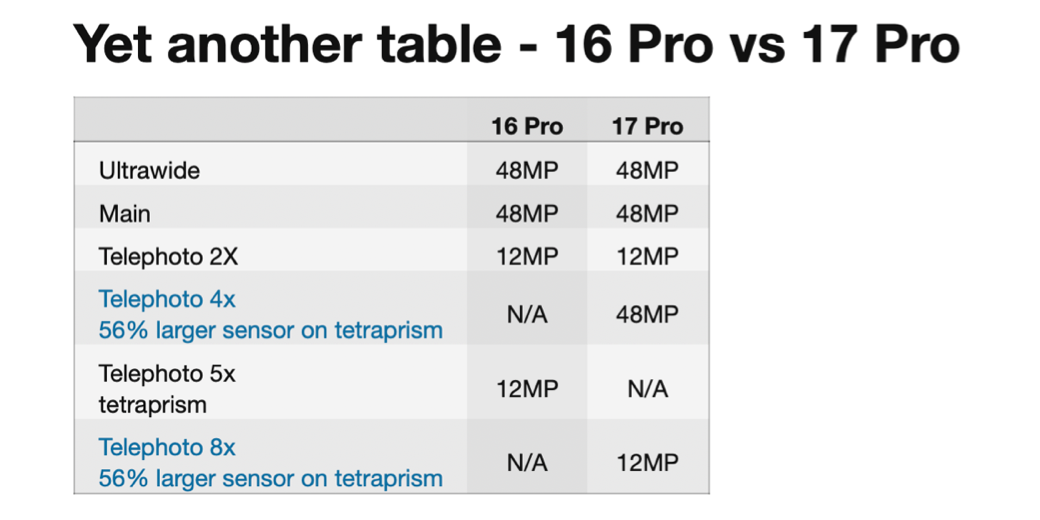
Using info from Apple Insider 17 Pro vs 16 Pro:
Yet another table – 16 Pro vs 17 Pro
| 16 Pro | 17 Pro | |
|---|---|---|
| Ultrawide | 48MP | 48MP |
| Main | 48MP | 48MP |
| Telephoto 2X | 12MP | 12MP |
| Telephoto 4x 56% larger sensor on tetraprism |
N/A | 48MP |
| Telephoto 5x tetraprism |
12MP | N/A |
| Telephoto 8x 56% larger sensor on tetraprism |
N/A | 12MP |
From Bart
The 16x zoom range of the iPhone 17 Pro is from 0.5x to 8x, so that math ads up perfectly — ½ x 16 = 8, so the telephoto does indeed zoom 16 times more than that ultra-wide.
As for the 1.2x and 1.5x, you don’t have to use exactly half the sensor in a crop, you can use arbitrarily much of it. As long as there is at least one physical pixel for each pixel in the final image, Apple seem to call that Optical Quality. This makes sense because it means you’re consolidating data in the conversion, not inflating it through extrapolation.
Apple also use fudge words for the megapixel counts in some situations, so some of the zoom levels may not be exactly 12 or 48MP.
As for the macro modes, we know from various keynotes over the years that Apple combine frames from multiple sensors and from multiple exposures on the same sensor to pull that off — focus stacking is a common technique for high-end macro work, but in the past you had to do it in a studio with a controlled rig so you could avoid any movement of anything between frames, and fancy software to combine the in-focus parts from each frame into a single image with a deeper depth of field than is optically possible.
Apple use machine learning and digital signal processing circuitry in Apple Silicon to take all the needed exposures in fractions of a second, auto-align them, and process them, so one click of the on-screen shutter gives one photo, but could well have fired multiple sensors multiple times and crunched a heck of a lot of numbers in that short gap between the tap and the preview. It’s not for nothing they brag about their image pipleline — it’s some impressive applied computer science!
IMO the key point is that Apple make use of some or all of the following three techniques as and when needed to get the image you want:
- Pixel Binning and Sensor Cropping — when they can, they use multiple physical pixels for each logical pixel, ideally, exactly 4 because the math is easiest that way, but anything more than a 1:1 ratio between physical logical will give quality greater-than-or-equal-to the raw data.
- Exposure Stacking — multiple exposures on the same sensor, perhaps at different focus distance to expand DOF, or different exposures to expand dynamic range, or perhaps even a mix of both in a single image, say a low-light macro! This requires auto-alignment of frames and then some serious math to do, and Apple do it all in hardware within Apple Silicon, that’s how they do it so fast!
- Multi-sensor Blending — data from more than one sensor through more than one physical lens can used to produce a single photo, especially for macro modes and in-between zooms, but perhaps also to handle low-light situations. Because each lens has a different aspect ration this takes a lot of computation to pull off, much more difficult than regular exposure stacking.
All this means that the same zoom setting when focusing near or far, and in low or good light could result in entirely different treatments by the camera app — exactly which of the three techniques to apply when doesn’t simply depend on the zoom level you choose, but also on the properties of the scene you’re shooting. This is why everything Apple say is inevitably a little fuzzy, and why performance varies from situation to situation, even for the same “lens”.