
History
I start a lot of my articles with the phrase, “You may remember…” and this is another one of those times. You may remember back in 2022, when the delightful Bill Reveal helped me rebuild podfeet.com from scratch with a different operating system, new web server software, and more. My server was getting hammered, and it was time for a big update. My victory dance post showed how fast the new server was and how, by moving the database to a dedicated server and increasing the capacity of my web server, all was good.
Well, those were the good old days. A few months back, I was perusing the performance graphs for my web server at my hosting company, DigitalOcean. What I saw concerned me — periodic episodes lasting an hour or more where my CPU was hitting 100%. I asked around a bit to see if anyone wanted to help me poke into this and got a few suggestions, but nothing particularly actionable.
Ask AI
I hated to lean on Bill again, and Bart is crazy busy these days, so I thought I’d try using AI to help me diagnose what could be happening. I used ChatGPT for this effort, and it was pretty fun. I know enough of what I’m doing to be able to mostly tell when I’m changing something vs. just looking at something, so even knowing how often it returns correct answers, I was pretty confident I could keep from damaging anything.
For example, the command cat is what you use when you want to look at the contents of a file, but vi or nano would mean going in to actually edit a file. The command tail means to watch a log file that’s changing in real-time. Nothing destructive there.
For the most part, I felt that ChatGPT was very helpful. We looked at a lot of logs, which suggested many possibilities that we systematically eliminated, and I found the experience pretty instructive.

That is, until at one point when it suggested I create a tiny php file and drop it into some top-level directory. I don’t know how to read or write php, so I had no business following these instructions. But it looked like a little “Hello World” kind of thing, so I thought, what harm could it do?
I tried to open podfeet.com in a browser, and instead got redirected to beds.com! I raced back to ChatGPT and told it what happened, and my little friend rang the 3-alarm fire bell. It yelled “AWOOGA!” and told me I’d been hacked, my whole system was ruined, that I should shut the server down, burn all of my documentation, and maybe join a convent.
I asked, “Could it maybe be that little file you had me put up there?” And ChatGPT said, “Oh, yeah, that could be it. Maybe try deleting that file.” And deleting the file fixed the problem.
After that, I was a lot more cautious when ChatGPT would tell me to do things. Whatever it told me to do, I’d ask it if that was safe or what could go wrong. With that prompt, it often came back with something like, “Yeah, that could mess things up. Want to try a less dangerous path?” Sheesh.
After many, many hours, we ran into a curious problem. ChatGPT asked me to run some commands that I knew were harmless, and yet I couldn’t run them.
We first came across it when ChatGPT suggested I run the command strace to monitor some log files. My server responded with “command not found”. No worries, we’ll just install it. ChatGPT suggested we use the yum package manager to install strace. Think of a package manager like an app store.
But when I tried that, I got a surprising result. It turned:
CentOS Stream 8 - AppStream
Errors during downloading metadata for repository 'appstream':
and
Could not resolve host: mirrorlist.centos.org
My operating system was CentOS Stream 8, so why couldn’t it see the repository at centos.org? It turns out, unbeknownst to me, that CentOS of all versions had been deprecated more than a year! When they fully deprecated it, they shut down access to all of the package managers. There was no way I could install any new commands.

More importantly, I needed to get off this operating system.
Migrating off CentOS
I put out the call to the Programming By Stealth channel in our Slack and didn’t get much of a reaction. I think it’s like when the teacher starts to scan the classroom to look for someone to call on, and everyone ducks down and pretends to be doing something else really important.
Eventually, Bill Reveal said something along the lines of, “I can help if need be if none of the young bucks step up.”
Enter Tage Bushman
Not too long after that, I interviewed Tage Bushman for Chit Chat Across the Pond to learn about his work as a professor at a technical college. After we finished recording, we talked for a long time about all kinds of things. I’m not sure how I worked it into the conversation, but I ended up telling him about my server woes and how I needed to migrate to a supported version of Linux.
He got very excited and said he’d love to help me. He teaches server admin and networking, and he sounded like he knew what he was doing, so I gladly said yes. We set a play date for a few weeks in the future to start working on the migration.
As I awaited our scheduled play date, and I was out of the glow of the fun of talking to Tage, I started thinking, “What do I really know about this guy?” He’s literally some guy I met on the Internet who sounded smart and knowledgeable. What did I really know about this guy? Would he even show up? Does he actually know what he’s talking about?
Now here’s the funny thing. At the same time that I was doubting the wisdom of going ahead with him, Tage was having his own doubts. This will sound funny as you hear more of the story, but he had this huge fear that he would tell me to do something that ended up completely and irreparably borking up my server. He was more worried than I was.
Luckily, both of our fears were unfounded. A few days before our play date, Tage sent me a huge document with not just an outline of a plan, but step-by-step instructions on how to do it!

I knew right then that I was in good hands. He sent me the document as a PDF, but I immediately converted it to a Markdown document so I could do things like put little checkboxes next to each line item as I completed each step.
One of the reasons Tage was trepidatious, and he was right to be fearful, was that I hadn’t told him hardly anything about my current setup, nor what operating system I was hoping to migrate to. All he knew was that I was running WordPress on CentOS, and I think he knew I used DigitalOcean for my servers.
His directions were so good that with a little help from the Internet, I was able to complete the entire first two sections of his document all on my own before we got together.
DigitalOcean Droplets & Database Servers
One of the magical things about technology today is the ability to stand up a virtual machine with literally a click of a button and a credit card. Step one of Tage’s instructions said to create a new droplet, which is what DigitalOcean calls their virtual machines, because they love their little water theme.
He suggested I use Ubuntu, but since that’s a Debian variant of Linux and I was used to the Red Hat variants, I chose to go with Rocky Linux. To be perfectly honest, I couldn’t tell a Red Hat Linux from a Debian Linux if you threatened to harm Kepler, but I sound all nerdy when I say that, don’t I?
Luckily, Tage appears to be agnostic when it comes to his ‘nixes, so he didn’t care which way I went. His instructions to set up the new OS included installing tools using the package manager apt, but Rocky Linux uses the package manager dnf. It was pretty easy to keep an AI running by my side to do the translations for me between the two package managers. For example, in Debian, Tage asked me to run:
apt update && apt -y upgrade
But with Rocky Linux, the command is:
dnf check-update && dnf -y upgrade
I made the decision to go with Rocky months ago, but it made me particularly happy because I just finished rereading the Andy Weir book, Project Hail Mary, in which one of the heroes is named Rocky. If you haven’t read it, drop everything and make that happen. Weir is the author of The Martian, and they’re making Hail Mary into a movie that’s coming out next year!
Anywho, before getting together with Tage, following his amazing instructions I was able to create the droplet, install the web server nginx, do some configuration stuff, and install some helpful tools that Tage recommended.
I was very proud of my little self, and Tage appropriately patted me on my little punkin’ head when he saw all of my progress. I stopped at the next section, which was starting to deal with WordPress.
Which Way WordPress?
We had a decision to make here. Since something is hammering my server, and the only information we have is that the top processes are related to WordPress (php-fpm), Tage was thinking we should set up WordPress from scratch. Bart, on the other hand, thought just copying the whole WordPress directory over would be fine.
Remember, Tage had close to no information about how I had set up other folders for documents that show up on my website (for example, my travelogues), and Bart had the luxury of knowing I had more to my site than the root WordPress directory. When Tage and I got on our play date, we went back and forth with the pros and cons.
In the end, we decided to copy over the WordPress directory and all other files and see how it went, with a contingency plan to build it from scratch at a later date if necessary. For the nerdlings listening, we copied my entire directory from the old droplet to the new one using rsync , and it was wicked fast. I think the infrastructure between virtual private cloud services on DigitalOcean is a big part of that, and the rsync protocol is super fast too.
Note Taking
Once we were in the thick of it, I created a new Markdown file and took copious notes as we went along. Tage said he’d never seen anyone do such good documentation while learning, and I again felt chuffed at the praise.
One of the things that made this whole process so joyful was that Tage is a terrific instructor. I know this was his occupation, but not all teachers are good teachers. He was great at explaining what we were doing, and telling me what to type (often character-by-character since every space and hyphen means something), and going at a perfect pace for me to keep up. We really worked well together.
At one point, we wanted to see if my website would render on the new Rocky installation. We hadn’t yet flipped over the DNS to point to Rocky, though. There’s a little file on your Mac called hosts , and you can trick it into changing your destination when you type in a URL. You could change podfeet.com to go to lets-talk.ie, if you wanted to by changing the hosts file to go to Bart’s server’s IP address instead. But that would be weird. For our first test of the new installation, we pointed podfeet.com to the new IP address for Rocky.
Unsurprisingly, it didn’t work on the first try. nginx, (the web server), returned a permissions error, but at least it was serving up the generic webpage for nginx.
This was probably the first time I saw Tage actually get stuck for a while and not immediately know what to do. He eventually figured out that it was Security-Enhanced Linux enforcing some security policies, and he figured out how to fix it.
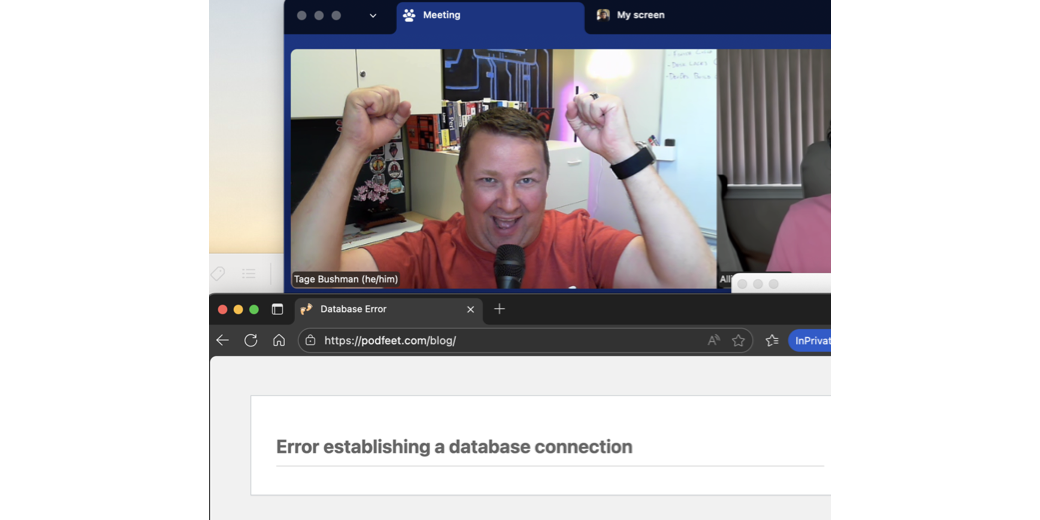
When he finally got the permissions error fixed, we got a new error that said, “Error establishing database connection”. That’s the classic error you see when your WordPress and your database aren’t communicating.
This was possibly my favorite moment of our whole time working together because Tage’s reaction was to throw his arms up in the air to celebrate and say “Yay!” … because it was a different error message and it meant he’d conquered the previous one. That’s a person who loves playing this game.

Flipping the Switch
One of the scariest (and yet easiest) things to do is to flip the switch on DNS. One wrong move, and when people type in podfeet.com, there will be nothing there. I’ve done it many times but I don’t think I’ll ever have the nerve to do it without someone holding my hand.
When Tage and I changed what’s called the “A Record” in DNS to switch from the old server I’d named Ghez to the new Rocky server’s IP address, I held my breath. But as you can see in the shownotes, the web traffic dropped to zero on Ghez right around the same time it fired up on Rocky. And nobody knew it had happened but me and Tage.

Bottom Line
The bottom line is that with Tage’s superhuman efforts, Podfeet.com was completely rebuilt and moved between servers … and you probably didn’t even notice. That, of course, delights me, but what delights me even more is what Tage posted on Mastodon after we were done.
Worked the afternoon helping @podfeet with tech stuff! What an awesome documenter of things. Great experience, would do again. ⭐️⭐️⭐️⭐️⭐️ Also, go check out her podcast at podfeet.com!
Isn’t he awesome?
When we realized we were finished, he was actually a little bit sad that we didn’t have any excuse to play any longer. I told him that there’s a good chance that, since we dragged over my entire WordPress installation from the old server, there’s still hope that whatever was ailing it on CentOS came along to the new server. I will probably still end up needing more help.
Tage looked delighted at the idea as he started musing on what scripts he could write to try to figure out where the problem could be. If he’s good, I may let him do this as his reward.
I would be remiss if I didn’t give Bart a shoutout at the end here. Just a few weeks before Tage and I got together, Bart moved lets-talk.ie to a new server too, and he took copious notes along the way. He gave us several documents ahead of time, and we used the one on how to set up a new Cert and get it to auto-update. The rest of it looked like Klingon to me, so I ignored the other documents.
However, now that I’ve been through the process with Tage, Bart’s other documents have been very helpful. I don’t understand all of them, but I’ve set up automatic OS updates, I may have successfully set up email sending, and I’ve got the timezone on my server set to Los Angeles.
Many thanks to Bart and especially to Tage for doing yeoman’s work helping me move my server and for being a delightful human all around.
One More Thing
But that’s not the end of the story. Tage and I forgot to test at least one thing. Whether I could write new posts with embedded images on podfeet.com. Two days after we did our victory laps at the success of our adventure, I tried to push this very post up to podfeet.com from MarsEdit … and I got an error saying I couldn’t upload the image!
I alerted Tage right away, and we started to noodle a couple of things. I won’t drag you through all of the gory details, but there were at least two problems. As I perused my notes from when the glorious Bill Reveal helped me, I found where he had me change a configuration file to allow large file uploads, which matched the advice Tage was giving me. While that definitely had to be done, it didn’t solve the problem.
I’m not the knowledgeable person here, but I checked file permissions for my uploads folder in the WordPress directory, and it all looked hunky dory to me — it showed that my user name had read/write/execute privileges.
But writing images to a WordPress directory isn’t actually executed by my user. There’s a tool called php-fpm that controls the users, and it was set by default by the author to the user apache. Well, I’m not running the Apache web server, I’m running Nginx. We did a few more things to create a group that included my user and nginx, and then changed the php-fpm config file to match.
And finally, I was able to bring you this post, exactly 45 minutes before showtime!
Tage suggested that my initial fears about “some guy on the Internet” helping me were well-founded, but he was there for me to clean things up when I needed him so he’s still a hero in my books.