
I have a quick but important public service announcement brought to you by listener Jane. A few weeks ago on Security Bits, Bart Busschots explained how a vast number of printer models (mostly from Brother but also from Fujifilm, Toshiba, and Konica Minolta) had default admin passwords that were easily generated by hackers. The problem was that these printers’ default passwords were generated using a custom algorithm based on the device’s serial number.
The advice was to make sure that you’re not using the default password on your printer. That’s great advice under any circumstances, but was good wisdom yet again.
As this kerfuffle went across the Internet, I sat idly by with a smug look on my face because I distinctly remember my Brother laser printer asking me to set up my own password. I used Bart’s XKPasswd tool to generate a long, strong, random password for me and went on my merry way.
But my smugness was misguided, and that’s where Jane’s PSA comes in. Like me, she knew she’d set her own password on her Brother printer, but decided to double-check, and discovered that it had reverted to the default password. She researched the problem and found a Brother support article linked in the shwonotes that says,
A recent firmware update for your Brother machine has enabled the following default password on your machine’s network settings. You may try one of the following default passwords: initpass, access, admin
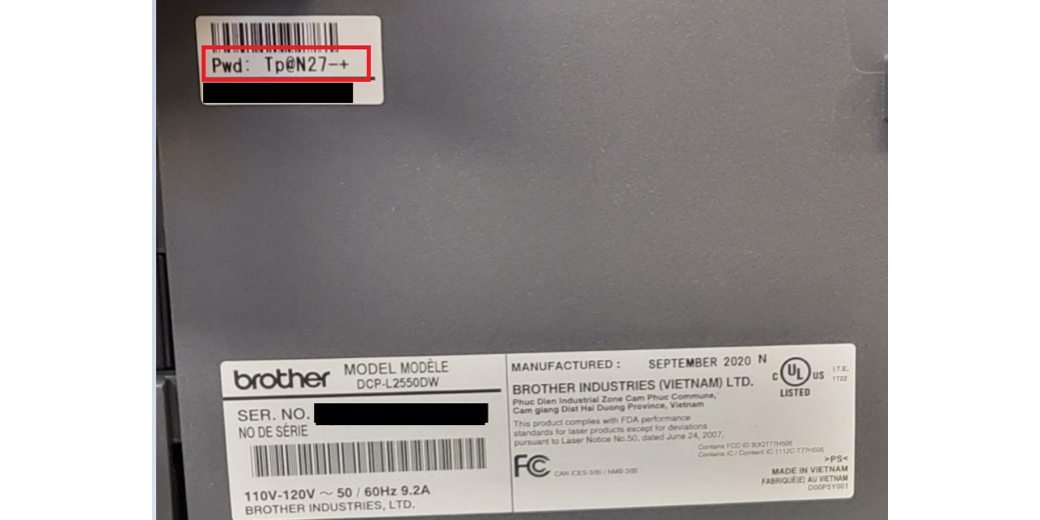
It also helpfully shows where to find the default password from a sticker on the printer.
When I received Jane’s email, I tried logging into my Brother laser printer’s WiFi interface, and luckily for me, the password had not been reverted to the default password. But if I were you, I’d take a quick swing by that interface and see if they reset your password during a firmware update in the past. Obviously, I think this is pretty smelly, and I am not pleased with Brother.
However, I am pleased with Jane for bringing this to our attention.
Brother sucks – password printed on printer does not work and they want me to reset it, but then the printer cant connect to network – I have bought a lot of Brother printers over the years – this is definitely the last one
Yep, today I just couldn’t get my Brother MFC-J1010DW’s interface to accept the admin password I had dutifully created and had a record of. Now, the reason I wanted to access the admin options it wasn’t all that important, so I wasn’t about to reset to factory settings just to get the default pw on the back of the machine to work again. But I thought I’d try the default pw without resetting, fully expecting that to fail. But instead it worked! Now my first thought was that the firmware update I did a couple months ago (to 1.20) probably reset the pw without telling me. (How much sense does that make when the change to a custom pw and then the firmware update were for security purposes?) Funny thing is, I have another MFC-J1010DW in a different location, where I did the same firmware update, and in that case the custom pw was not lost.
I wish I had something more intelligent to add than, “This stinks.”