
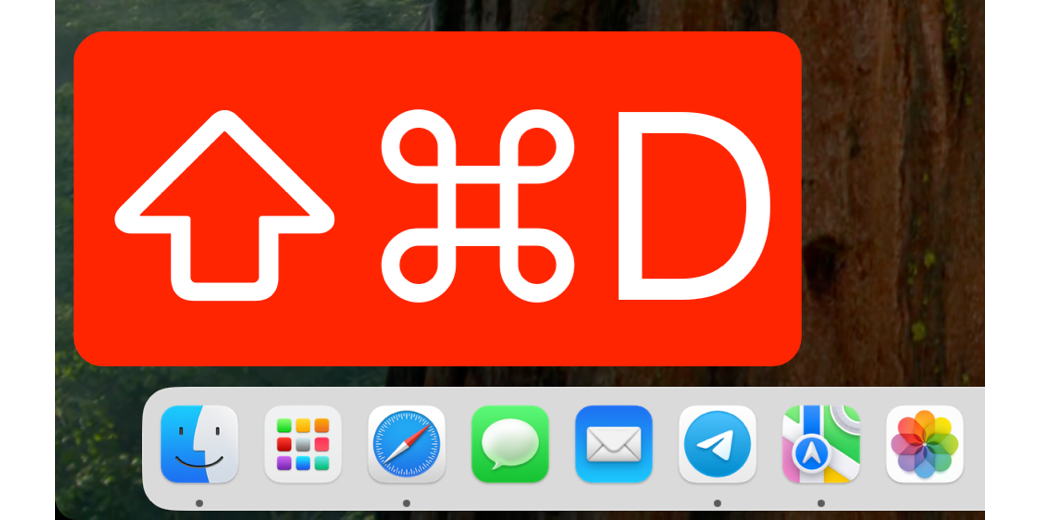
I recently explained how I used the app Presentify to annotate my screen during a workshop I taught at the Macstock conference. The problem to be solved was that the audience was spread out in a large room and I needed them to see the detail I was showing on screen. While using the built-in accessibility of control-scroll to zoom in on the screen combined with Presentify did a lot to help the audience, there was one more thing I needed to solve.
The workshop was teaching my Tiny Mac Tips series and a lot of the tips involved using keyboard shortcuts. I’m pretty good about saying things like, “Hold down control-t with your cursor between two characters you want to swap”, it would be more vivid if they could see the keystroke when I was talking about it.
I’ve used various tools over the years to display keystrokes, but they were generally inside tools for creating screencasting tutorials. I needed a tool that was independent of any other application. In my hunting, I found an open source, free tool called Keycastr.
I don’t want to scare you off if you’re not a programmer, because the way you get Keycastr is a teeny bit nerdy. However, the app itself is not one teeny bit nerdy. You don’t get Keycastr from the Mac App Store and you don’t download it from the developer’s website exactly. You have two options.
Imagine you’re on a normal site for an app. You’d see a big button highlighted that says “Download”. A single click downloads the app, perhaps as a zip file. You double click the zip file and you’ve got your app ready to move to your Applications directory.
With Keycastr, it’s exactly like that, except the website is the developer’s GitHub repository. You click a link to download the zip file, open the zip and move the app to your Applications directory.
The only difference is that there isn’t an obvious single Download button.
I put a screenshot in the shownotes of the GitHub repo for Keycastr, but let me explain what you’ll see. You’re on the Code tab in GitHub with the Releases subtab highlighted. That makes sense, right? We want the released version of the software.
The obvious attention-grabbing section on the page currently says “Fix modifier detection on Intel”. This is the name the developer gave when committing the changes to the app that fixed the latest bug. It has zero meaning to you, and might even make you give up because you’re running on an Apple Silicon Mac, not an Intel Mac. It might even say something completely different by the time you read or hear this article because it’s the notes on the latest bug they fixed in the current release.
But I assure you, you are in the right place.
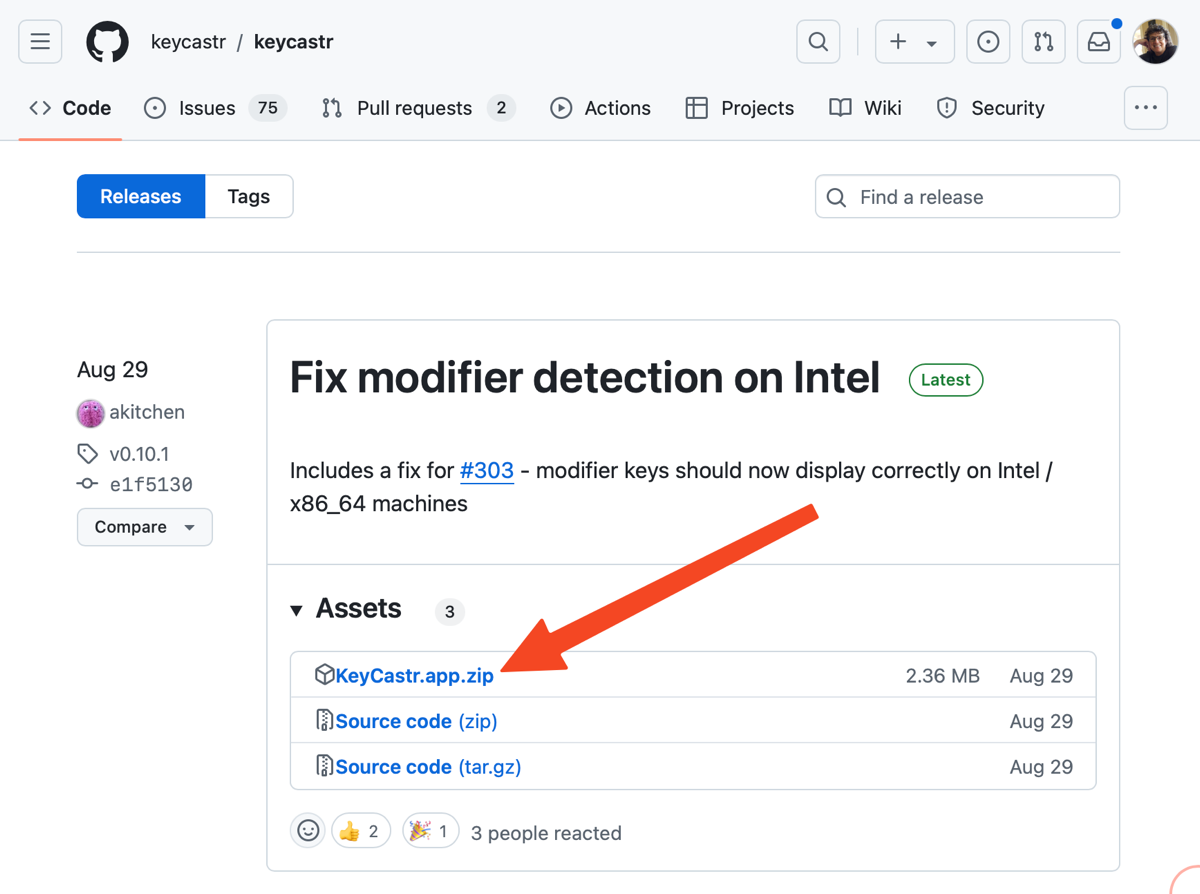
Below this headline, you’ll see a section called Assets. Under Assets, you can see three links. The second two both say Source Code and unless you’re a developer who wants to change the tool, you don’t want Source Code. That leaves the first option which says, “KeyCastr.app.zip”. This is the link you want to click.
Remember that all you’re really doing is going to the developer’s “site” and clicking a link to download the app’s zip file. I went to such lengths to describe the page because I used to run away when I was sent to a GitHub repo because I didn’t know what to click or what all this glop on the page meant.
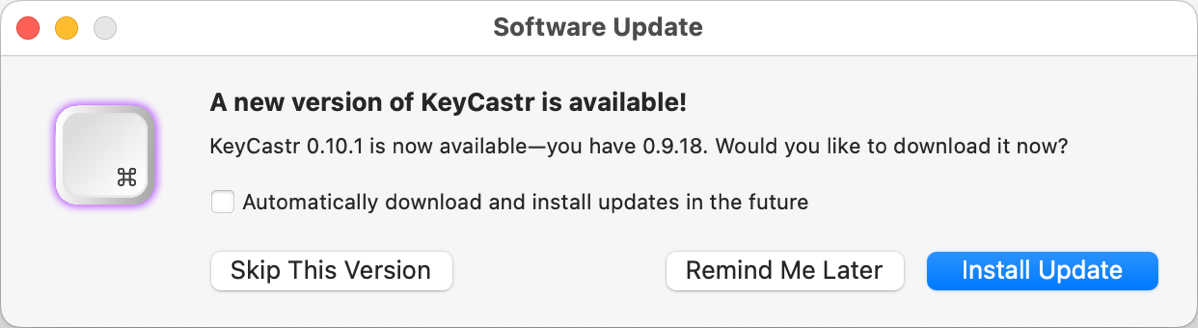
Once you have Keycastr installed, it acts like any other Mac app. In fact, today I got a popup when I launched Keycastr telling me I had an update to the app. I don’t have to go to GitHub and mess around in there, I can just agree to install the update.
The second option to install Keycastr is through Homebrew. We’ve talked about Homebrew before and how it’s nerdy but easy. If you have Homebrew installed, the command on the Terminal is:
brew install cask keycastr
Instead of starting at the installation page for Keycastr, you can take a look at the home page of the Keycastr repository where they explain a bit about the project and include some cursory usage information. The home page for the repo is at github.com/keycastr/keycastr.
What Does Keycastr Do?
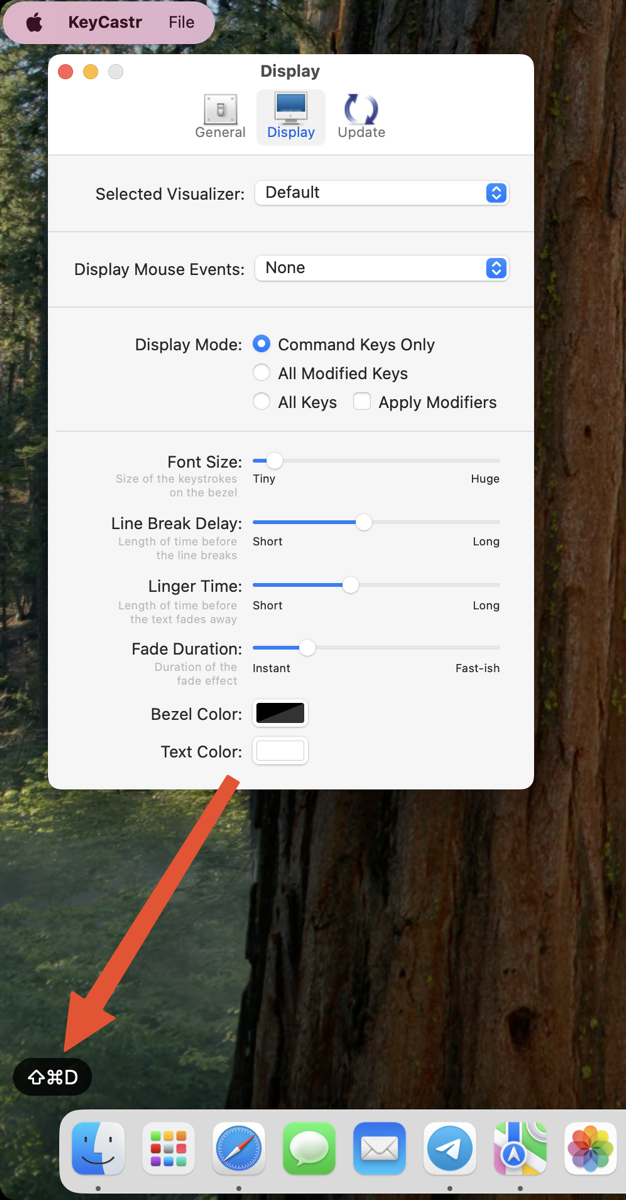
That was an awfully long lead up so let’s finally have some fun with Keycastr. Once you launch the app, It can run as a menu bar app or as a “normal” app. As soon as you choose to “Start Casting”, when you use a keystroke using a kind of modifier key, in the bottom left corner of your screen you’ll see the keystroke. It’s very small and subtle by default. The tiny white font is on a black bezel background. After you type the keystroke, it fades away in about 2 seconds.
While technically Keycastr has fulfilled its promise of showing our keystrokes on screen, I don’t find the default settings to be nearly as dramatic as I need them to be so that Dr. Drang can see what I’m typing from the back of the room at Macstock.
Preferences
That’s where the Preferences for Keycastr come into play. The first tab in Preferences is the General tab where you can choose whether to run Keycastr as a menu bar app, as a regular app (which is referred to as “in the Dock”), or as both. I like it as a menu bar app since there’s not much to it.
By default, you can toggle capturing/casting using the keystroke control-option-command-K. Also by default Preferences will show at launch and of course, you’d want to turn that off almost immediately. The second tab, Display, is where the meat of Keycastr lives.
Color, Font Size, and Other Sliders
At the bottom of the Display Preferences, you can change the color of the bezel and the text. ScreenCastsONLINE tutorials are created using an app called ScreenFlow, which can record and display keystrokes automatically. We use a nice transluscent very dark grey with white text, and that’s great for these professional recordings.
But to keep the Macstock audience awake, I changed the bezel color to dark red. By default, the Font Size slider is almost all the way to Tiny, so I dragged it up to Huge. Now on my 13″ MacBook Air, the keystrokes are more than 20% of the height of the screen. Anyone watching my demos would be able to see these keystrokes from the International Space Station.
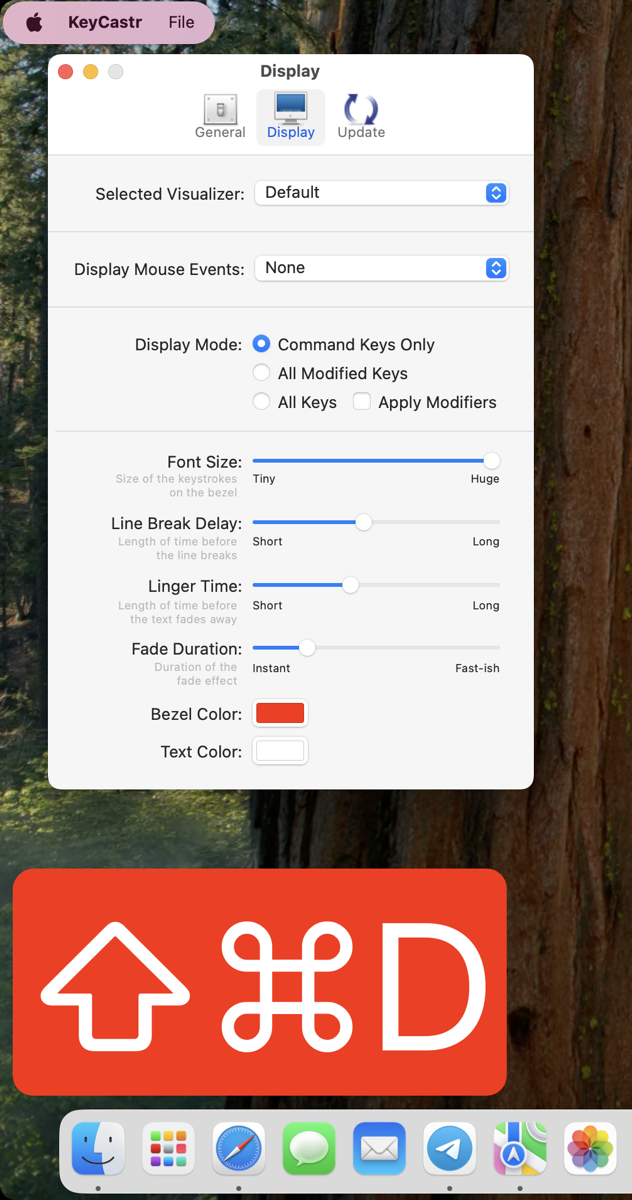
I explained that the keystrokes fade away after about 2 seconds. You can change how quickly they fade using the Linger Time slider. You can slide it all the way down to Instant, which isn’t very useful, or all the way up to Long, which is around 7 seconds which could be very distracting. I find the default around the middle is just right, but you can mess around with it to see what works for you.
While you’re messing around with the Linger Time, you might as well play with the slider for Fade Duration. You can have your keystrokes blink off instantly, or you can make them fade, and I’m quoting here, “Fast-ish”.
There’s one slider in Display Preferences that baffles me. It’s entitled Line Break Delay, it goes from short to long, and the tip says “Length of time before the line breaks”. Ok, what line? And why is it breaking?
Display Mode
To try to crack the code on this critical line break issue, I played around with some other useful settings.
Command Keys Only
Display Mode by default has the radio button selected for Command Keys Only. I’m not sure where they got the definition for “Command Keys”, but this means if you use either the Command Key or the Control Key with any other key, it will be displayed on screen.
If you just hold down say, Option-D, Keycastr won’t display anything onscreen. But if you hold down Command-Option-D, both the Command and Option symbols will be displayed along with a capital D (even though you held down just “d”.
All Modified Keys
If you switch the Display Mode to All Modified Keys, now any modifier key you use will be displayed. In addition to Command and Control, Shift and Option both display when you add a character to the keystroke.
All Keys
Want to really drive yourself and your audience nuts? Choose All Keys under Display Mode. Keycastr will literally display every single key you hit. If you type fast enough, you can type out entire sentences that will fill your screen. You’ll even see the symbol for the space key between your words.
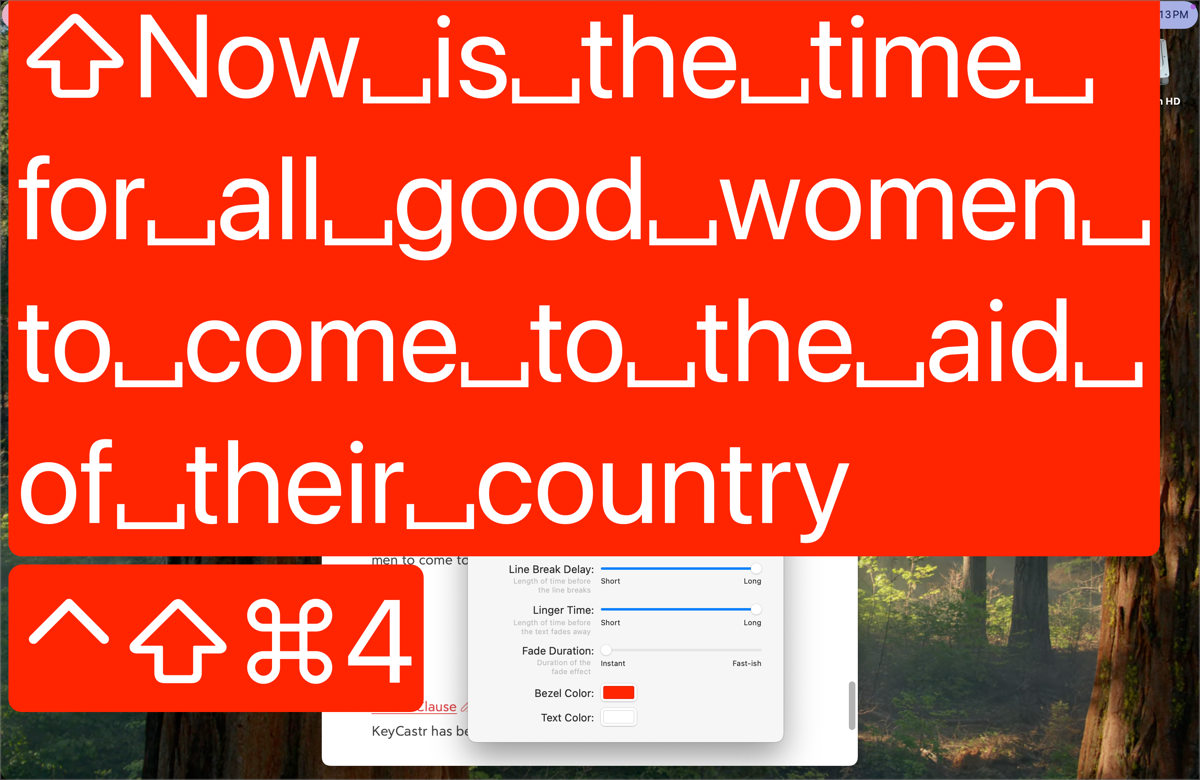
This option was the one I thought might give me a clue on what Line Break Delay changes. I hypothesized that if I set it to Long, when I typed so much text that the characters went to the edge of the screen, there would be a delay before it broke to the new line. Nope. Short and Long on the Line Break Delay slider had no effect. I think it’s going to be left a mystery.
I’m glad I experimented with the All Keys Display Mode, though because I thought of a use for it. I have to get my eyes dilated twice a year and I hate how long it takes for my pupils to shrink back to normal. I even make them give me a half dose because the medicine is so effective on my eyes. One of the main reasons I find it irritating (other than that I can’t go outside because the sun hurts too much) is that it’s hard to play on my computer because I can’t see small text.
With Keycastr, I could at least have my own text blown up huge on screen as I type so I could see if I was making typos. If I see a problem while I’m typing, I could use the Control-Scroll accessibility setting I told you about to find the mistake and fix it. It’s worth a try as a solution.
Apply Modifiers
There’s another option I don’t understand from the Display Mode Settings. It’s a checkbox that says “Apple Modifiers” and this checkbox can be added to any of the three Display Modes we just talked about – Command Keys Only, All Modified Keys, and All Keys.
I tried toggling Apply Modifiers on and off with the other three options and for the life of me I can’t see what it’s supposed to be changing.
Move Onscreen Display
One thing you might expect to find in Display Preferences is a way to tell Keycastr where onscreen you’d like to display the keys. It’s a hidden feature, but you can simply drag the display anywhere you want on the screen and Keycastr will remember it for the next time it’s invoked.
You might want to slide the Linger Time up a bit so you have enough time to drag the display into your desired position.
Mouse Events
In my review of Presentify, I explained how the app can show your cursor as a big colored ring as you move it around on screen. Maybe that’s a little too much distraction and you’d just like to highlight where you’ve clicked on the screen.
Keycastr has this option under a dropdown called Display Mouse Events. It’s off by default, but you can choose from 3 options. The first is called With Mouse Pointer means wherever you click, a thin red circle will briefly appear. I wish it would show a bit longer or at least be controlled by the linger time slider, but it has no options.
The second option is With Current Visualizer and this one is kind of odd. When you click, you see a representation of the Apple no-button mouse where you normally would see your modifier keys. It shows modifier keys as well but it’s a shared interface. I guess its job is to alert people that you’ve clicked, but it doesn’t show them where.

If you want to really confuse the audience, you can choose With Pointer and Visualizer. This will give you the thin red ring where you click and give you the representation of the mouse. It’s very busy especially if you’ve made your visualizer giant and red like I have.
Selected Visualizer
Finally, I’m going to tell you about the very first option on Display Preferences. It says Selected Visualizer and there’s a dropdown with default selected. In other words, everything I’ve been teaching you about changing is the default method of working with Keycastr.
The only other option in this dropdown is Svelte. With Svelte, you can’t change the font size, or the bezel color. You can’t change the Linger Time or Delay.
Instead, you get a medium-sized dark grey translucent box that shows the modifier key symbols across the bottom – Shift, Control, Option, and Command. When you hold down one of these keys, they light up in the Keycastr floating display.

You have one toggle to work with and that’s to display all keystrokes or not. You can also set whether to Display Mouse Events.
I have to say it’s very clean, but also whatever you type only shows for a brief instant in the Svelte display. I’d have to say it doesn’t solve the problem I was trying to solve because the keystroke isn’t up there long enough for anyone but the most alert to notice.
Bottom Line
The bottom line is that Keycastr is an open source solution under the BS3 license, and it’s been freely available for the Mac since 2009. It’s a wee bit quirky to install if you’ve not done a GitHub installation before but it’s only a matter of clicking on the right thing. Since my Workshop at Macstock was filled with keystrokes I wanted to teach, Keycastr was the perfect tool to keep the hecklers in the back row engaged.
If anyone figures out what Apply Modifiers and Line Break Delay mean, I’d love to hear from you.
This is fantastic! I’m new to macOS, and this app is incredibly helpful—it makes the transition from Windows to Mac much easier.
Забронируйте стрижку в нашем барбершоп рядом уже сегодня и преобразите свой стиль!
Барбершопы в Красноярске набирают популярность . Местные жители ищут качественные услуги стрижки и ухода за бородой .
Правильный выбор барбершопа играет ключевую роль . Необходимо учитывать квалификацию мастеров и отзывы клиентов .
Каждый барбершоп предлагает уникальный подход к клиентам . Некоторые заведения фокусируются на классических стилях, в то время как другие предлагают современные тенденции .
Рекомендуется заранее записываться на стрижку, чтобы не тратить время в очереди . Уход за волосами и бородой дома также играет немаловажную роль .
Для безопасной и комфортной езды в зимних условиях рекомендуем обратить внимание на недорогая шипованная резина.
С приходом зимы вопрос выбора шин выходит на первый план. Шипованные зимние шины пользуются огромной популярностью. Эти шины обеспечивают максимальное сцепление в зимних условиях. С шипованными шинами водители могут смело выезжать в любую погоду.
В то же время, необходимо тщательно подойти к выбору шипованных шин. При выборе следует учесть ряд критериев. Размер шин, их тип и назначение играют ключевую роль. Неправильно подобранные шины могут привести к неприятным последствиям.
Известные бренды предлагают разнообразие шипованных шин. Проверка отзывов и рейтингов поможет сделать правильный выбор. Качественные шины должны гарантировать не только сцепление, но и продолжительный срок службы. Важно учитывать этот фактор при выборе шины.
Правильная эксплуатация шипованных шин поможет продлить их срок службы. Важно следить за давлением и состоянием протектора шин. Осторожность на скользкой дороге значительно повысит безопасность. Это позволит не только продлить срок службы шин, но и повысить уровень безопасности на дороге.
Create a unique stamp with our stamp maker!
More and more people seek to streamline their tasks. Rubber stamps are pivotal in numerous situations.
A variety of websites provide tailored solutions to meet diverse requirements. Users can create stamps that embody their personal touch. The process is generally straightforward and user-friendly.
As soon as the design is confirmed, the creation process moves forward efficiently. Most online stamp creators guarantee that their products are of superior quality. Customers can look forward to sturdy products that endure over time.
To sum up, finding an efficient rubber stamp manufacturer on the internet is important for effectiveness. With numerous options available, users have the chance to find the perfect match for their needs. The advantages of using online platforms are significant.
Если вам нужна удобная и комфортабельная поездка, [url=https://arenda-avto-s-voditelem01.ru/]аренда авто с водителем[/url] станет отличным решением!
Просто свяжитесь с нами по телефону или через интернет.
Планируя летний отдых, многие туристы интересуются [url=https://otdyh-v-lazarevskom01.ru/]отдых лазаревское[/url], чтобы выбрать лучший вариант для себя.
предоставляет отличные условия для расслабления . Основная привлекательность этого места заключается в его уникальном сочетании природной красоты и развлекательных возможностей. Лазаревское известно своей возможностью насладиться водными видами спорта и экскурсиями .
Городской инфраструктура развита достаточно хорошо, чтобы обеспечить туристам все необходимое для комфортного отдыха . Здесь есть много вариантов жилья на любой вкус и кошелек . Кроме того, в Лазаревском организуются различные фестивали и культурные мероприятия на протяжении всего года .
Цены на различные услуги в Лазаревском варьируются в зависимости от сезона и доступности . Проживание в отелях и гостиницах может обойтись в десятки тысяч рублей за роскошные номера . Кроме того, цены на экскурсии и развлекательные мероприятия могут стоить дополнительно .
Для тех, кто планирует посетить Лазаревское, необходимо тщательно спланировать свой бюджет, чтобы не столкнуться с непредвиденными расходами. Это позволит максимально эффективно использовать свой бюджет и насладиться всеми привлекательностями города .
Лазаревское славится уникальными природными достопримечательностями, включая красивые водопады и пещеры . Посетители могут насладиться водными видами спорта, такими как серфинг и каякинг .
В городе имеется широкий выбор развлекательных программ, включая дискотеки и игровые центры. Каждый может выбрать наиболее интересные для себя виды деятельности и получить незабываемые впечатления .
Для путешественников, планирующих посетить Лазаревское, необходимо учитывать метеоусловия и пригодную одежду, чтобы насладиться отдыхом. Также будет неплохо иметь при себе аптечку и средства от солнца и насекомых .
Лазаревское – это место, где каждый может найти свой идеальный отдых . Путешественники смогут удовлетворить свои потребности и ожидания, находясь в этом замечательном городе.
Ищете удобство и комфорт? У нас вы можете [url=https://arenda-avto-s-voditelem1.ru/]автомобиль с водителем новосибирск[/url]!
На рынке существует множество фирм, предлагающих аренду авто с водителем, что создает определенные трудности при выборе.
Абхазия – популярное место для летнего [url=https://otdyh-abhazya1.ru/]отдых в абхазии цены[/url], где можно насладиться прекрасными пляжами, чистым морем и богатой историей.
Абхазия – это уникальная республика, расположенная на побережье Черного моря . Отдых в Абхазии позволяет насладиться прекрасными пляжами и чистым морем . В Абхазии есть много возможностей для активного отдыха и развлечений.
Республика Абхазия имеет богатую историю и культуру . Отдых в Абхазии – это возможность отдохнуть от городской суеты. В Абхазии можно насладиться прекрасными пейзажами и чистым морем.
Абхазия славится красивыми пейзажами и богатой культурой. Основные курорты Абхазии – это Сухум, Гагра и Пицунда . Отдых на курортах Абхазии позволяет насладиться уникальной природой и климатом. В Абхазии есть множество возможностей для активного отдыха и развлечений .
Пляжи Абхазии – это красивые и богатые. Отдых на пляжах Абхазии позволяет насладиться солнцем и морем . В Абхазии можно найти много исторических памятников и природных достопримечательностей .
Абхазия имеет уникальную природу и климат. Основные достопримечательности Абхазии – это водопады, Новоафонский монастырь и озеро Рица. Отдых в Абхазии позволяет насладиться уникальной природой и климатом. В Абхазии можно насладиться прекрасными пейзажами и чистым морем.
Достопримечательности Абхазии – это красивые и богатые. Отдых в Абхазии позволяет насладиться уникальной природой и климатом. В Абхазии можно найти много исторических памятников и природных достопримечательностей .
Инфраструктура Абхазии уникальна и интересна . Основные виды развлечений в Абхазии – это активный отдых, экскурсии и водные развлечения . Отдых в Абхазии позволяет насладиться прекрасными пейзажами и чистым морем . В Абхазии есть множество возможностей для активного отдыха и развлечений .
Развлечения в Абхазии – это красивые и богатые. Отдых в Абхазии позволяет насладиться уникальной природой и климатом. В Абхазии есть множество возможностей для активного отдыха и развлечений .
Если вы ищете [url=https://otdyh-v-adlere1.ru/]жилье в адлере без посредников[/url], то вам стоит рассмотреть варианты прямого бронирования, чтобы сэкономить на посреднических услугах и найти наиболее подходящий вариант для вашего отдыха.
Город Адлер давно зарекомендовал себя как один из лучших курортных направлений в России, где можно насладиться природой и отлично провести время. Здесь можно найти множество пляжей, парков и других мест для отдыха кроме того, в городе есть множество современных отелей и гостиниц, предлагающих комфортные условия для проживания. Отдых в Адлере без посредников – это отличная возможность сэкономить деньги и спланировать свой отдых по своему усмотрению бронируя жилье и экскурсии напрямую, вы сможете избежать дополнительных комиссий и сэкономить значительную сумму денег .
Адлер предлагает широкий спектр возможностей для отдыха на любой вкус и бюджет в городе имеется множество ресторанов и кафе, предлагающих разнообразную кухню, от традиционной русской до международной . Посетители могут насладиться красивыми пляжами, прогуляться по набережной и посетить знаменитый парк «Северное» это место является обязательным для посещения для всех, кто отдыхает в Адлере . Отдых в Адлере без посредников также дает возможность познакомиться с местной культурой и историей в городе имеется несколько музеев, где представлены экспонаты, рассказывающие об истории и культуре региона .
Пляжи Адлера – это одно из главных достопримечательностей города пляжи оборудованы всем необходимым для комфортного отдыха, включая шезлонги, зонтики и душевые . Посетители могут выбрать один из многих пляжей, каждый из которых имеет свои уникальные особенности также популярен пляж «Джубга», который славится своей красивой природой и чистой водой. Отдых на пляжах Адлера без посредников позволяет максимально расслабиться и насладиться солнцем и морем благодаря отсутствию посредников, можно более выгодно арендовать шезлонги, зонтики и другое оборудование для пляжного отдыха .
Водные развлечения в Адлере также разнообразны и доступны в?? функционируют несколько аквапарков, предлагающих всевозможные водные аттракционы и бассейны . Отдых в Адлере без посредников дает возможность более детально изучить все предложения и выбрать то, что лучше всего соответствует вашим потребностям и бюджету благодаря прямой бронировании жилья и экскурсий, можно более эффективно использовать свое время и средства .
Адлер предлагает широкий спектр экскурсий и культурных достопримечательностей в городе имеется несколько музеев, которые рассказывают об истории и культуре региона . Отдых в Адлере без посредников позволяет более детально изучить все предложения и выбрать наиболее интересные и доступные варианты также стоит отметить, что отсутствие посредников дает возможность более гибко планировать свой маршрут и выбирать наиболее интересные и доступные варианты .
Посетители могут совершить экскурсию по историческим местам Адлера также имеется возможность совершить прогулку по набережной и насладиться красивыми видами на Черное море . Отдых в Адлере без посредников дает возможность более полно насладиться отдыхом и получить незабываемые впечатления также стоит отметить, что прямая бронирование жилья и экскурсий позволяет более эффективно использовать свое время и средства .
Для того, чтобы спланировать отдых в Адлере без посредников, необходимо учесть несколько важных моментов сначала необходимо подобрать подходящее жилье, которое будет соответствовать вашим потребностям и бюджету . Отдых в Адлере без посредников требует некоторой организации, но дает много преимуществ благодаря прямой связи с туроператорами и экскурсоводами, можно более выгодно бронировать экскурсии и получать более?ную информацию о достопримечательностях .
Посетители должны позаботиться о том, чтобы иметь все необходимые документы для отдыха в частности, необходимо иметь паспорт, медицинскую страховку и другие документы, которые могут быть необходимы для бронирования жилья и экскурсий . Отдых в Адлере без посредников – это отличная возможность сэкономить деньги и спланировать свой отдых по своему усмотрению благодаря отсутствию посредников, можно более детально изучить все предложения и выбрать то, что лучше всего соответствует вашим потребностям и бюджету .
Планируйте свой следующий отпуск, выбрав [url=https://otdyh-abhazya0.ru/]абхазия отдых[/url] для незабываемых впечатлений!
Отдых в Абхазии — это настоящее наслаждение. Каждый год сюда приезжают тысячи туристов. Это край с великолепными пейзажами, богатой историей и мягким климатом.
В Абхазии много интересных мест, среди которых горы и побережье. Можно выделить несколько знаковых мест, таких как гора Фишт и озеро Рица. Не упустите возможность насладиться природой и запечатлеть красоту на своих фотографиях.
Еда в Абхазии — настоящая находка для гурманов. Вы сможете попробовать традиционные блюда, приготовленные из свежих местных ингредиентов. Не упустите возможность насладиться аджикой и попробовать местные вина.
Каждый найдет что-то для себя в Абхазии — будь то семья, молодежь или пожилые люди. Вы можете насладиться спокойным отдыхом на пляже или попробовать активные виды спорта. Такое разнообразие делает отдых в Абхазии поистине уникальным.
Хотите стать профессионалом в области интернет-маркетинга? Запишитесь на курс по seo бесплатно и начните свой путь к успеху!
Курсы SEO стали неотъемлемой частью цифрового маркетинга. В современном мире знания о SEO крайне полезны для успешного продвижения сайтов. Подобные обучающие программы помогают освоить основные техники и стратегии, которые дают возможность для увеличения видимости в поисковых системах.
На уроках по SEO зачастую рассматриваются ключевые аспекты: от анализа ключевых слов до оптимизации контента. Студенты учатся о том, как правильно редактировать мета-теги и использовать внутреннюю перелинковку. Практически ориентированные упражнения помогают закрепить полученные знания.
На занятиях также акцентируется внимание на аналитике. Сюда входит изучение инструментов веб-аналитики для отслеживания эффективности SEO-кампаний. Участники научатся понимать, какие метрики важны для оценки результатов.
По итогам обучения студенты обычно получают сертификаты. Этот документ подтверждает их умения и знания в области SEO. Данное подтверждение может значительно улучшить резюме и повысить шансы на трудоустройство. Курсы по SEO — это инвестиция в будущее каждого специалиста в области цифрового маркетинга.
Just used Keycastr at a workshop and it was a total game-changer! Being able to see the keystrokes really made the presentation more engaging for the audience. Definitely a useful tool to have in your arsenal.