
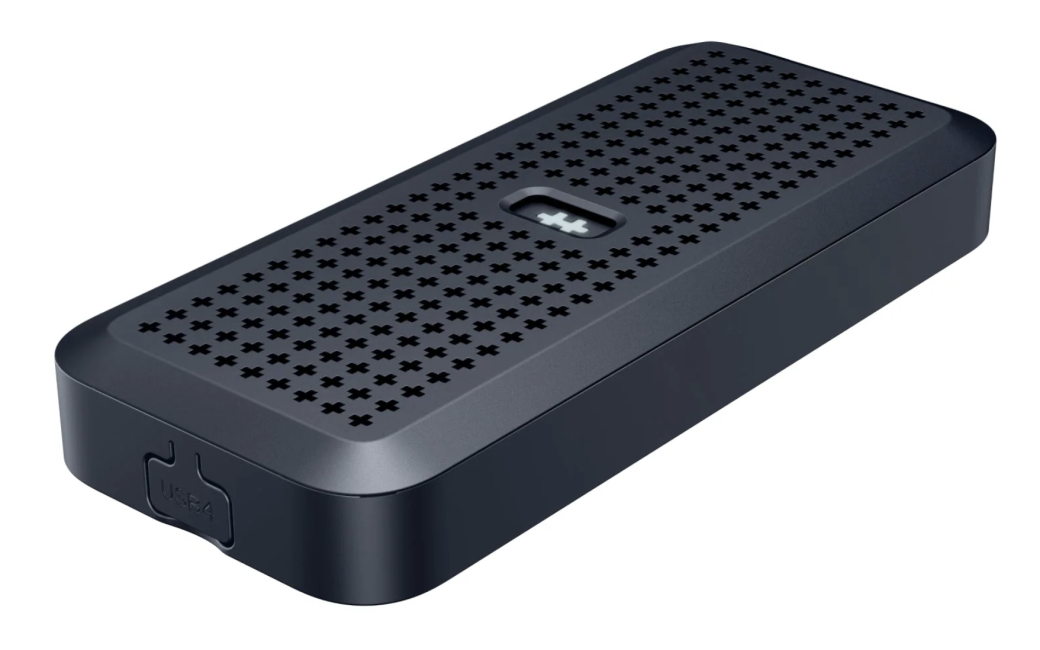
Allison interviews Gabi Iorio, Director of Global Marketing and Sales at Hyper, about a couple of their new products: an SSD4 enclosure and a haptic trackpad.
The HyperDrive Next USB4 SSD Enclosure is compatible with M.2 NVMe SSDs and supports 40Gps transfer speeds. Constructed with 100% recycled aluminum, it has an IP55 rating and provides reliable water and dust resistance. In addition to an SSD, it also supports AI accelerator cards to upgrade your PC. With an easy, snap-in installation, no tools are required for SSD installation.
Gabi also showed their HyperSpace Trackpad Pro, the first premium haptic trackpad for Microsoft Windows. This trackpad has an integrated full-force sensing matrix that recognizes pressure variations and a fast 240 Hz response rate. The trackpad is programmable, allowing users to create deep-click zones, corner shortcuts, and app-specific profiles that automatically switch based on the active application.
The HyperDrive SSD Enclosure is available for purchase at a price of $120. The Trackpad Pro will be available through Hyper’s Kickstarter campaign, which was kicked off at CES with early bird pricing of $90 and an estimated arrival in Q1 2026.
Learn more at https://www.hypershop.com/
Using a Screen Reader? click here
Transcript of Interview
Allison: Well, a long known brand for ever and ever have been Targus and Hyper, and I’m actually in their booth. I found out that Targus is the parent company of Hyper, correct?
Gabi: Yeah.
Allison: And we’ve all loved products from you for a long time. So you’re from the Hyper side, correct?
Gabi: Yeah, correct.
Allison: And I am with Gabi Iorio. Did I get it? Oh, I got her name correctly. This is great. Tell us what you’re going to show us today.
Gabi: Yeah, so this is our brand new USB 4 M.2 PCIe enclosure. So essentially what this does is it’s an external enclosure that lets you upgrade the capabilities of your device from both a speed and a performance perspective. So you can add in a range of different M.2 modules in here from 2230 all the way up to 2280. You can also do really cool things like upgrade the AI capabilities of your device. So we’ve got an AI accelerator card in here today. So rather than having to buy a new AI‑PC‑ready PC or upgrade your existing PC to make it AI kind of capable, you can use our enclosure and something like an AI accelerator card to kind of upgrade your PC without actually upgrading it.
Allison: Okay, that’s pretty crazy. I had questions on the earlier part where you gave some numbers when you said 2280. What are the units? Is that the size of the…
Gabi: So you can see it here on the screen in there.
Allison: So let me describe what she has in her hand. It looks like the size of a small cell phone that you’ve got open, and inside we can see the circuit board for the AI chip that you’ve got in there. And I don’t know what 2280 and 260…
Gabi: It’s just the size of the SSDs in there essentially. So you can get much bigger ones like we’ve got here. Um, good question.
Allison: It’s some sort of units that describe the size of an M.2, M.2 SSD.
Gabi: Yeah. So you can add this; this is a much bigger SSD and obviously that would fit in there, or we’ve got something smaller and you just add the stopper in and then obviously you’re good to go.
Allison: So PCIE is not something I’ve had a lot to do with, but my understanding is it’s like the old days when you could shove a card inside of a PC. But now they’re external and this is with USB 4. Thunderbolt 4, USB 4.
Gabi: Yes, exactly, yeah. USB 4, TB5 connections. And yeah, it’s an external upgrade to your PC without upgrading your PC essentially.
Allison: That’s crazy. Now, you mentioned PCs. Can you use this on a Mac as well or is this…
Gabi: Yeah, yeah. It’s completely compatible with any USB 4 or Thunderbolt 5 compatible PC.
Allison: Man, I hate the people who name all this stuff. I interviewed them one time and I was like, what’s wrong with you? Do you hate us? What is the deal?
Gabi: So yeah, a really nice premium build. You can feel it’s very weighty, 100% recycled aluminum. Also comes with a rubber silicone case. So this is IP55 water and dust resistant as well, and you just pop that on and you’re good to go.
Allison: Again, this looks like the size of a small cell phone.
Gabi: Yeah, it’s perfect to pop into your bag and utilize if you’re working or creating on the go essentially.
Allison: Now are these on for sale yet?
Gabi: Yeah, so these launched a couple of weeks ago. So these are available on Hypershop.com, our website, and they retail at $199.99.
Allison: And then you bring your own SSD, right? And do you bring your own AI chip or is that with the AI chip?
Gabi: No, it’s just the enclosure.
Allison: Okay. Now, where do you buy those, the AI chips? Do you sell those?
Gabi: No, we don’t.
Allison: No, that’s somewhere else. Okay. So I got to go learn how all of that works, I guess. Now, you’ve also got a trackpad here. Tell us about this.
Gabi: So this is our Hyperspace Trackpad Pro. It’s the world’s first premium trackpad that’s been designed specifically for Windows devices. So the comparable product on the market would be the Apple Magic Trackpad, but obviously that’s designed specifically for Apple devices. Ours is designed specifically for Windows devices. The key differentiator between ours and the Apple Magic Trackpad, other than the device compatibility, is the software element. So ours comes with our Hydro Connect software and essentially what that allows you to do is to create custom gestures and controls that allow you to speed up your workflow. So if you’re utilizing things like the Microsoft Office suite, so Word, Excel, PowerPoint, or any of the Adobe, you can create custom gestures and shortcuts that work specific to that application and work specifically how you want to work yourself.
Allison: So what I’m seeing in the software is the rectangular surface of a trackpad on the screen, but it’s got four distinct squares in the corners.
Gabi: So you can see here it’s split up into deep click zones and then action zones. So your deep click, you can do a one‑finger deep click, two‑finger or three‑finger set up to all do different types of actions. I can do you a quick demo here.
Allison: Can I ask while you’re setting that up, is this haptic or is it actually physically moving?
Gabi: Yeah, so I’ll show you the haptics in a second. But this is Excel. So you can see that my one‑finger deep click will create me a new sheet. Move down here. So you see a new sheet just popped up in the corner. Two fingers moves me into that sheet. And then if I click in a cell, do some numbers, and then if I do three fingers, I undid just what I did. So there’s a whole bunch of gestures pre‑built into the software that you can choose or you can create your own gestures that work specifically to how you want them to work essentially. And then your action zones just work in addition to your deep clicks.
Allison: Fascinating. Because what I was asking, is this physically moving or is it haptic only?
Gabi: Um, haptic, I think Apple calls it.
Allison: What do you mean? Does it actually physically move?
Gabi: Oh, no, yeah. No, neither. So you feel like it’s…
Allison: It feels like it’s moving, but it isn’t.
Gabi: Yeah, it’s got piezo haptics in it, third generation. So it replicates the feeling of a click to the user, but there’s no click happening.
Allison: It’s the craziest thing. I love it. I love it. I love it as a party trick to show people it doesn’t work when the power is off.
Gabi: Yeah, exactly. But if you come down here and you rub your finger down the side of the thing, you can actually feel the haptics come back to you.
Allison: I’m going in, Steve. I’m going to touch the trackpad. Oh, yeah, I can feel it’s like…
Gabi: It’s like vibrating back to you.
Allison: So what is this product called?
Gabi: It’s the Hyperspace Trackpad Pro. We’ll retail for $129.99. We’re just working through shipping and production timelines. So once that’s a little bit clearer, then we’ll be able to give an indication of when in 2026 it’s going to launch.
Allison: Now, I’m a Mac user, but I love it when our Windows brethren get to play with cool toys too. I’ve always kind of felt bad for them that they didn’t have a great trackpad.
Gabi: Well, yeah, I mean there’s 70% of all laptops globally are Windows. So it’s pretty crazy that there isn’t already a trackpad device that replicates the feasibility and the usability of what Apple users have had for years. So yeah, we’re excited about this one.
Allison: Now it’s plugged in, but I assume it’s Bluetooth.
Gabi: Yeah, you can connect it Bluetooth 5.2 or cables, completely up to you.
Allison: Very good. And again, the website is?
Gabi: Hypershop.com.
Allison: Hypership.com. Oh, sorry, we’re going to say it again. No, this is good because when you make a mistake, you have to hear it three times. Hypershop.com. Thank you very much.
Gabi: Thank you. It was great to meet you both.