
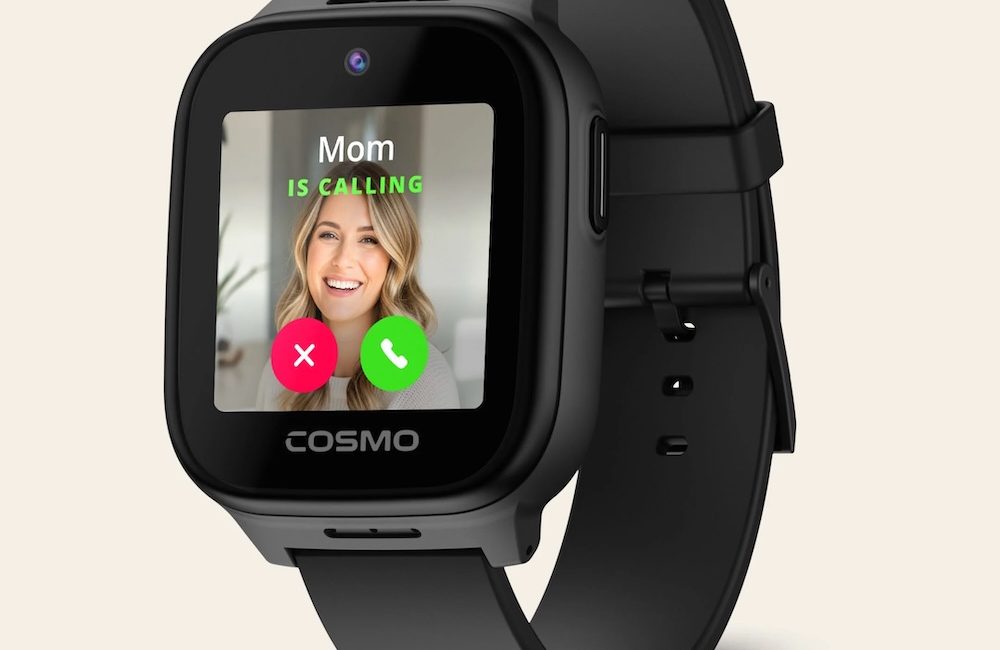
Allison interviews Marisa Lapointe from Cosmo about their JrTrack 5 Smart Watch, specifically designed for kids.
The JrTrack 5 is an all-in-one smart watch that supports phone calls, messaging, music playback, and real-time active tracking. It has a 2MP front-facing camera and supports True Texting, including text, pics, audio, and video messaging. The watch is rugged and water resistant down to 1.5 meters (5 ft).
JrTrack 5 comes with a flexible silicone band, which is available in multiple fun colors. For cases where the school has banned kids from wearing smart watches in class, the JrTrack 5 can also be removed from its band and put into the Cosmo Explorer Clip. It is a flexible silicone case that has a built-in clip for wearing on a belt and a carabiner-style clip for attaching to a belt loop or backpack.
The JrTrack 5 comes with a mobile app that the parents install on their phone. Through the Cosmo app, the parents can track their child with GPS precision and have full control of the watch. Parents can set up a Focus Mode, limit who their child can call, and set up kid-safe music with Spotify. Focus Mode is lockable during scheduled hours and is designed to minimize distractions while the child is in school.
The JrTrack 5 comes with eSIM technology that supports the Cosmo Mobile family-safe network. Cosmo cell memberships can be purchased in 6-month, 1-year, and 2-year increments and are supported in the US, Canada, and Mexico.
Learn more at https://www.cosmotogether.com/
Using a Screen Reader? click here
Transcript of Interview:
Allison: So let’s say you’ve got a kid and they’re getting to that age where maybe you kind of feel like you should get them a cell phone because you want to be able to talk to them, but you don’t want them really having a cell phone. The people you need to talk to are Cosmo. So I’m here with Marissa Lapointe from Cosmo. Tell us about your product here.
Marissa: Yeah, absolutely. So this is our Junior Track 5. This is our fifth iteration of the Smartwatch. This launched actually in July, and what we’re debuting here is our Explorer clip. So really, what Cosmo is designed to do is to fill that gap for when you want your kid to have more independence, but you don’t want them to have a smartphone yet. But as a parent, you’re looking for peace of mind. You want to send them to the park, you want to put them on the bus, but you want to know that they’re safe. So this is the JrTrack 5 and it has GPS tracking. I can show you two here. We have the watch itself with the band, and then we have the same watch, this is the same exact face, with our Explorer clip. Across the country, a lot of schools have moved to ban smartphones, but they’ve also moved to ban smartwatches. They don’t want their kid having something on their wrist because they find it distracting.
Allison: Right.
Marissa: With Cosmo, we have focus mode. You can set schedules for school, for homework, whatever it is, to limit all distracting features while keeping essential communication available.
Allison: So you can call them if you’re going to be late to pick them up, but they can’t play a game or whatever message.
Marissa: Exactly, exactly. And if they need 911 calling, you can still keep that open. You can still have the tracking available, but they’re not going to be able to pull up Spotify. So here we have the clip. This can clip onto a bag.
Allison: Basic carabiner.
Marissa: Yeah, basic carabiner. It’s also got a clip here if you want to put it on a belt, but you can also put it on a backpack or you can put it on a belt loop. It solves that need to adhere to those school policies while also being like, I want to send my kid to school and know they’re safe. Like you said, I’m late to pick up, I need to be able to reach them, I can. Or say they want to go home with a friend after school, they can reach you and ask if that’s okay.
Allison: So what kind of apps are on Cosmo?
Marissa: Yeah. So they have a couple different apps, and what’s really great is that everything can be tailored to your child’s needs and readiness through the Cosmo parent app. It’s really designed to grow with the child. Say your kid is starting to read, you can download the Week Junior app. This was a partnership that we launched in May. The Week Junior offers kid friendly news, debates, polls, things like that. Then we also have Spotify Kids. We’ve got Go Noodle, which is an activity app, and there are many apps in the app library.
Allison: So you would control this with your own phone, you would set this up with an app.
Marissa: Yes. Parents will download the Cosmo app onto their phone, and then through there you link up your kids’ watch, you link it to the app, and then you can control all that. You can also control who they call and who they text, so they’re only able to text people that you say that they can essentially.
Allison: So I assume that that’ll work with an Android or an iPhone?
Marissa: Yes, absolutely. Android or iPhone.
Allison: I see, adult. Okay. Yes. And now you have to buy a cellular plan, I imagine. How does that work?
Marissa: Yeah, so through Cosmo’s website, you can buy a data plan. Data plans differ, pricing differs if you want to go month to month, if you want to go six months, a year, two years, but it’s a fairly affordable price. You purchase that separate from the watch.
Allison: So that’s like an MVNO on top of AT&T or Verizon or one of those or T-Mobile or…
Marissa: So Cosmo has its own data plan, so it’s not through Verizon or AT&T. So yes, it’s on top of that.
Allison: Right, right. And how much does Cosmo cost?
Marissa: Yeah, so the Smartwatch costs $149.99, and then this little watch clip here is $14.99.
Allison: Oh, okay. So you buy the watch, but you buy the Explorer clip as just a way to attach it.
Marissa: Totally. Yeah.
Allison: Very good.
Marissa: Yeah, and it’s on Amazon, Cosmo’s website, and then Target online. Cosmo also offers a lot of great deals on the website, so whether it’s back to school or the holidays, there’s usually a pretty good deal you can get.
Allison: Oh, there you go. And the Cosmo’s website is Cosmo…
Marissa: It’s Cosmotogether.com.
Allison: Cosmotogether.com. Very good. Thank you so much.
Marissa: Yeah, yeah. Thank you.