
I was listening to Accidental Tech Podcast recently, and they mentioned that Apple have created an overly complex set of MacBooks Pro this year. Whenever I observe something overly complicated (that I’m interested in), I feel the urge to see if I can simplify it with one of my world-famous diagrams.
These diagrams sometimes go nowhere, either because it’s not as complicated as I first thought, or because it’s so complicated I can’t find a way to simplify it. I wasn’t sure if I could unravel the plot of the MacBooks Pro, but it sounded fun to try. I’m really glad I tackled this one because diagramming the models helped me understand the different options.
After I had it all mapped out and looking as uncomplicated as I could, I started writing this article. I took a break for the evening, went to bed, and in the middle of the night I had an epiphany. Because of where I started my model, I’d missed a HUGE opportunity to simplify the diagrams.
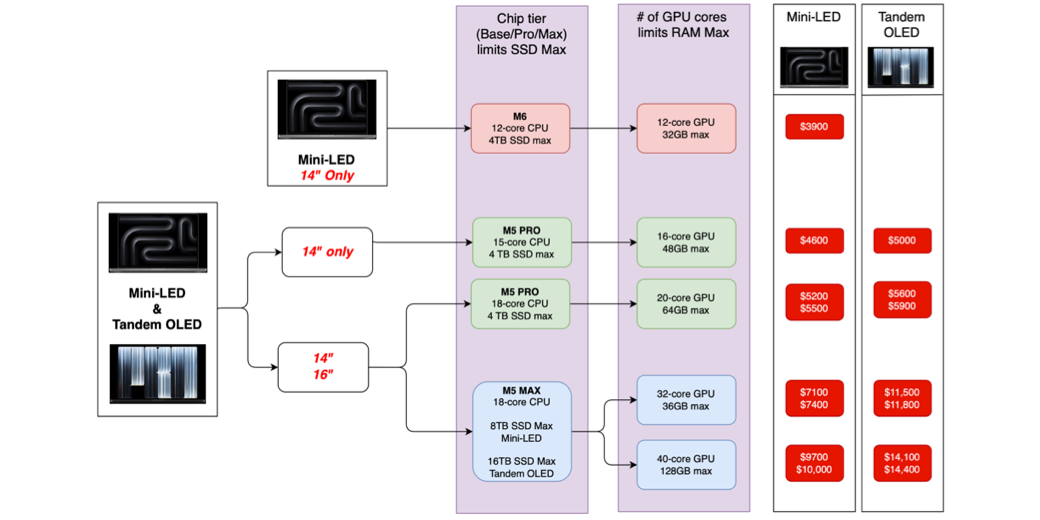
I started by having branches for the Mini-LED vs. Tandem OLED display, then branched again for each display type by size (14- vs. 16-inch), branched again by chip (M6, M5 Pro, M5 Max), and finally branched by number of cores in the GPU. This gave me 9 distinct model variations.
My epiphany was that by starting with the size of the device (14- vs. 16-inch), there were really only 5 model variations, where 4 of them were available with the two options for the display. It took me hours to redo my diagram, but it was well worth it since the goal was to simplify the landscape for you and me.
If you’d like to see the final diagrams I made to have as a handy reference while you enjoy the article, jump down to the final heading, “Bottom Line”, where you can see images of both diagrams and a single PDF. If you’d like to check my work (and make corrections back to me), my two sources were Apple’s Tech Spec pages, which are oddly harder to find than usual:
A Little Help from My Friends
As I’ve been working on the diagrams over the last few days, I’ve been pestering several of my friends for feedback on whether the diagrams were clear. David Roth, Steven Goetz, Steve Sheridan, and Jill from the Northwoods all got to participate. David Roth gave me some early advice on how to simplify the model, which became part of the final design. Steven Goetz checked my logic too, and the diagram taught him something he didn’t know, which is kind of the whole point. Quality Control Director Steve Sheridan read every word of this article and checked the screenshots for clarity and consistency. Jill from the Northwoods said that while the diagram was clear, it was depressing, and here’s why.
Since the news has been all about how expensive these machines are, I only diagrammed the max specs for each configuration. She said looking at those prices made her feel that she’d never be able to afford a new Mac.
Obviously, I couldn’t diagram every spec option, but because of her feedback, I realized I could create a second diagram of the lowest specs for the two sizes and the screen variants. The minimum configuration has only three variants for the Mini-LED version and only two for the Tandem OLED. We’ll get into that in a bit.
The final friend I enlisted was my little friend Claude — I asked it to do a sanity check on the specs and the pricing. In my initial, overly complicated diagram, it found no errors. Since I made pretty significant changes when simplifying it, I asked Claude again, and this time it found a couple of substantive errors (which I double-checked). It also gave me some advice on how to label things on the minimum configuration side. Overall, Claude was quite helpful in making this a better diagram.
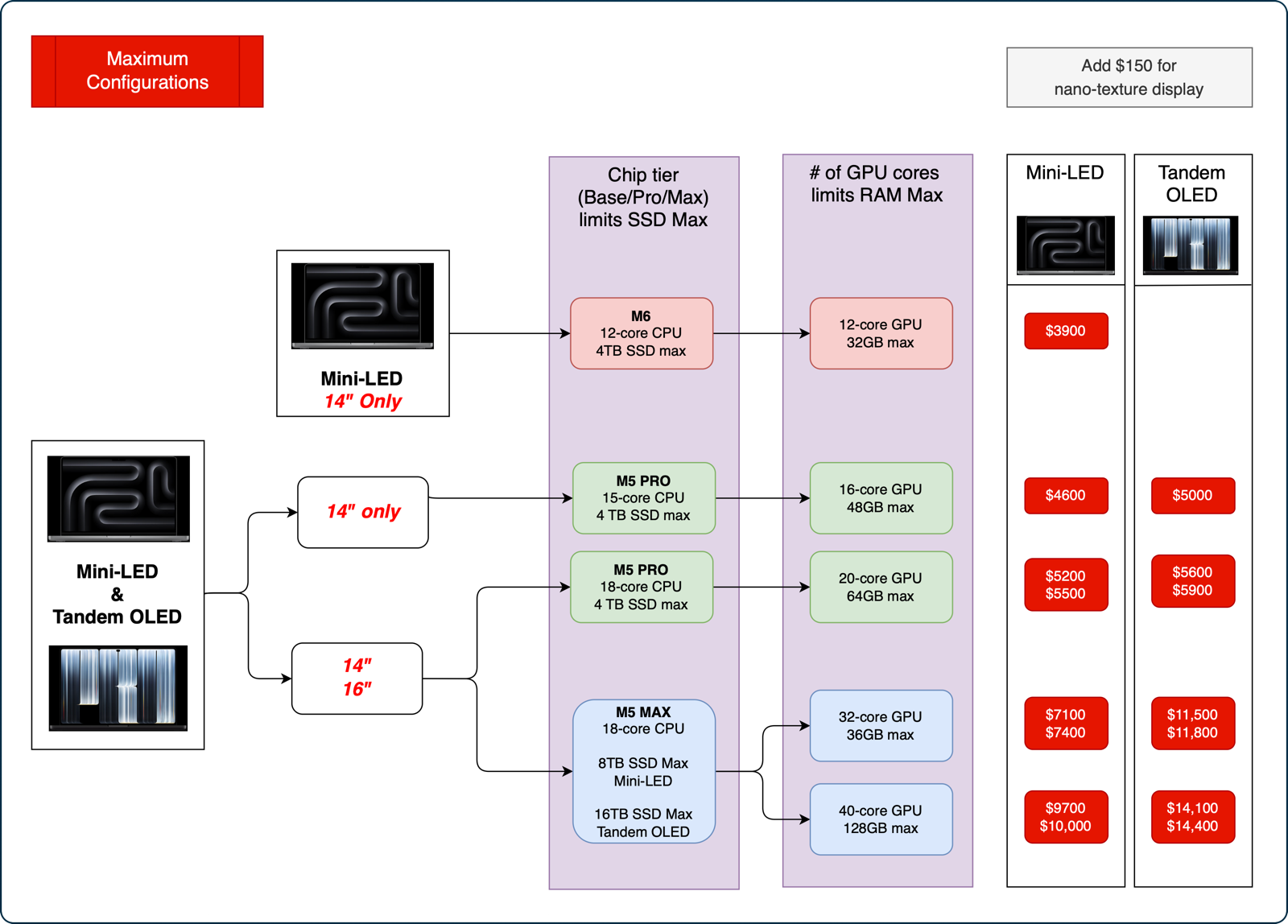
When looking at the maximum configurations, I noticed that the chip tier you choose, e.g., Base, Pro, or Max, limits how big of an SSD you can get with it. Likewise, the number of GPU cores limits the maximum amount of RAM for that particular chip. You don’t have to remember that; I’ve clearly designated this restriction in the diagram.
One last point of order. I included the prices for every combo of size, display time, and chip, but none of these prices include the $150 extra for the nano-texture display.
Ok, let’s dig into the diagram and see what we can learn. I’ll start with the max configuration version and later bring calm to Jill and you with the minimum starting point configurations.
Max Configurations
M6 — The Odd Chip Out
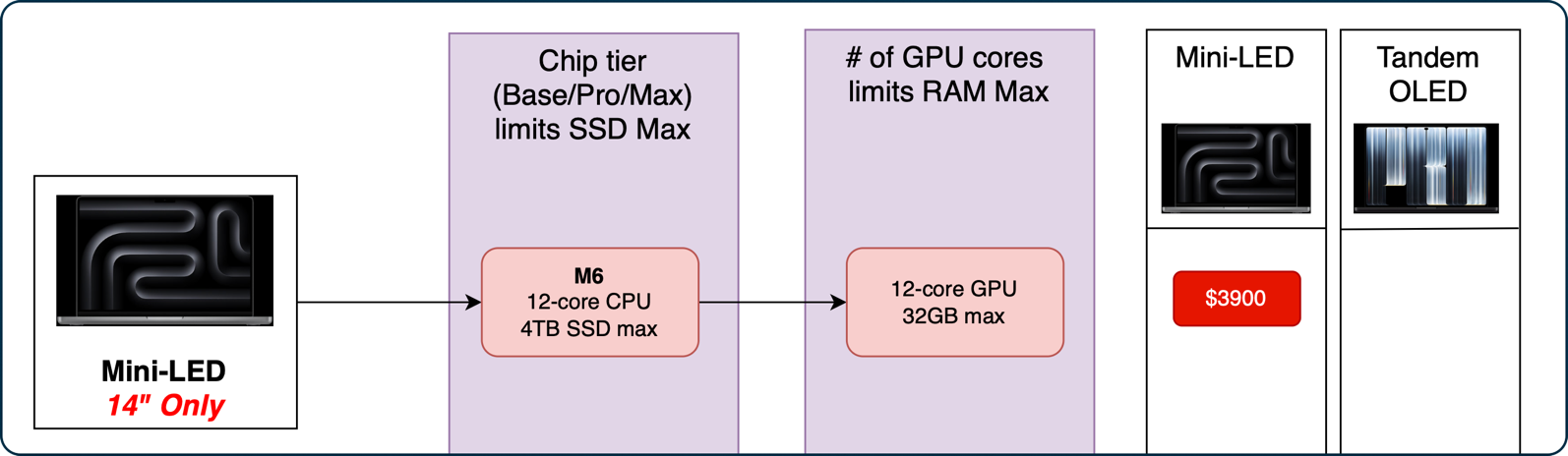
The most surprising discovery in creating the diagram for the 2026 MacBooks Pro was that the M6 chip is in only one model: the 14” Mini-LED. It’s not available in Tandem OLED, and it’s not even available in the 16” Mini-LED. This is the detail that even surprised Steven Goetz.
The M6 is faster in single-core performance than the M5 Pro and Max, but since the Pro and Max variants have so many more cores, they blow the M6 out of the water in multi-threaded operations. I had mildly wondered whether I should pursue figuring out if my workload was primarily single- or multi-threaded, but when I saw the M6 was only available on what could be described as the entry-level MacBook, I stopped worrying my pretty little head about it.
I call the 14” Mini-LED “entry-level, “ but maxed out with a 4TB SSD and 32GB of RAM, it will cost you a cool $3900.
Mini-LED vs Tandem OLED
The new hotness in the MacBook Pro lineup is the fancy new Tandem OLED touchscreen, used in the PROLED MacBook Pro. I know that’s not the official name, but the real one is too long and cumbersome. As we discussed in my article How to Justify a New Computer, the use of an OLED touchscreen allowed Apple to make it half a pound lighter than the Mini-LED version.
The second biggest surprise, and the basis of my epiphany, was that all of the M5 Pro and M5 Max models are available for both the Mini-LED and Tandem OLED. The Mini-LED version of the MacBook Pro is nothing to sneeze at — the screen is gorgeous and will keep around $400 in your pocket if you go that direction.
Size Matters
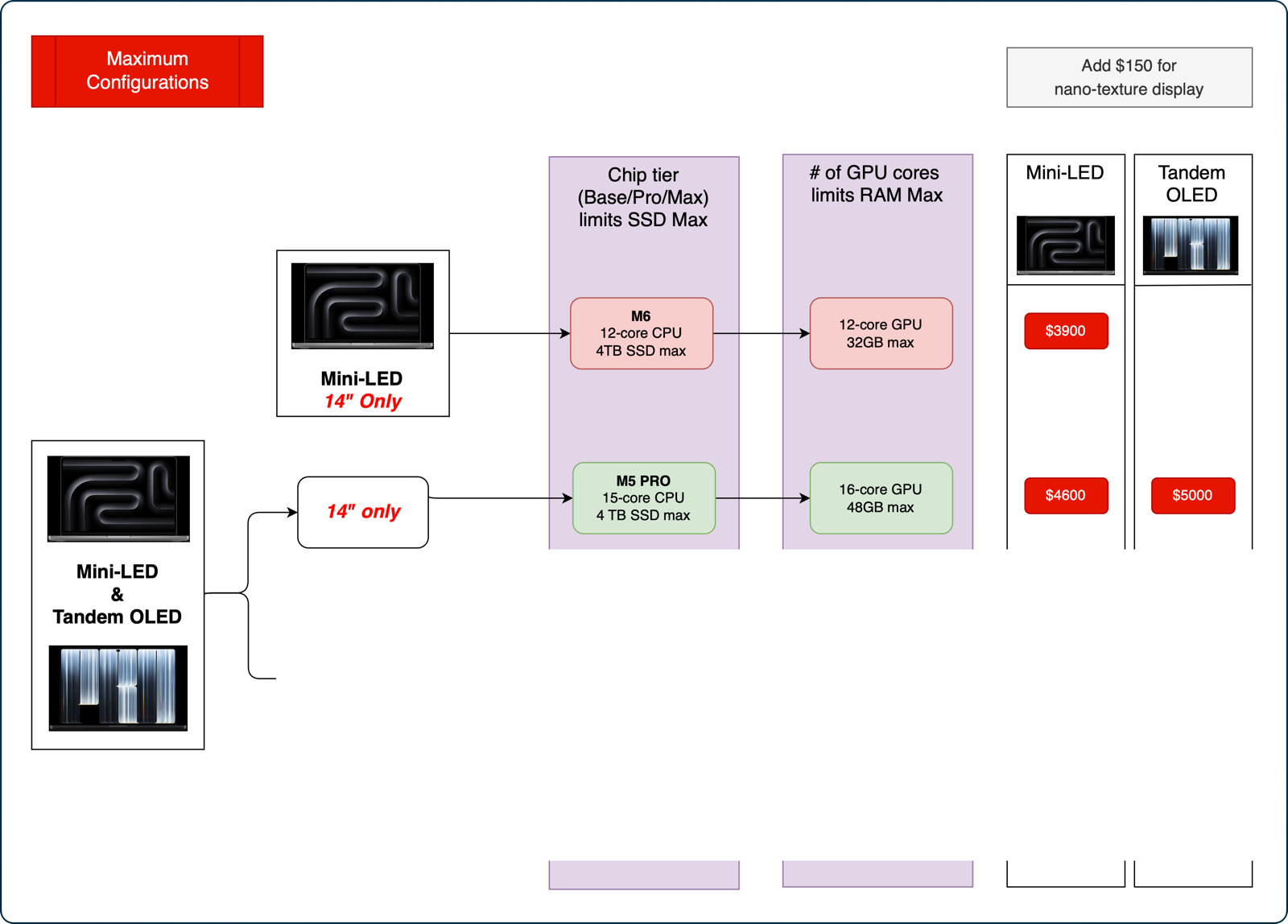
While the chip variant you desire doesn’t limit you to one display vs. the other, the chip does limit the size of the laptop. If you want the lower-end M5 Pro chip with the 15-core CPU and 16-core GPU, you can only get that with the 14” MacBook Pro.
Configured with a 4TB SSD and 48GB of RAM, the Mini-LED will run you $4,600, and that Tandem OLED will cost $400 more at an even $5000. Remember, kids, these are the maximum options!
M5 Pro for Both Sizes
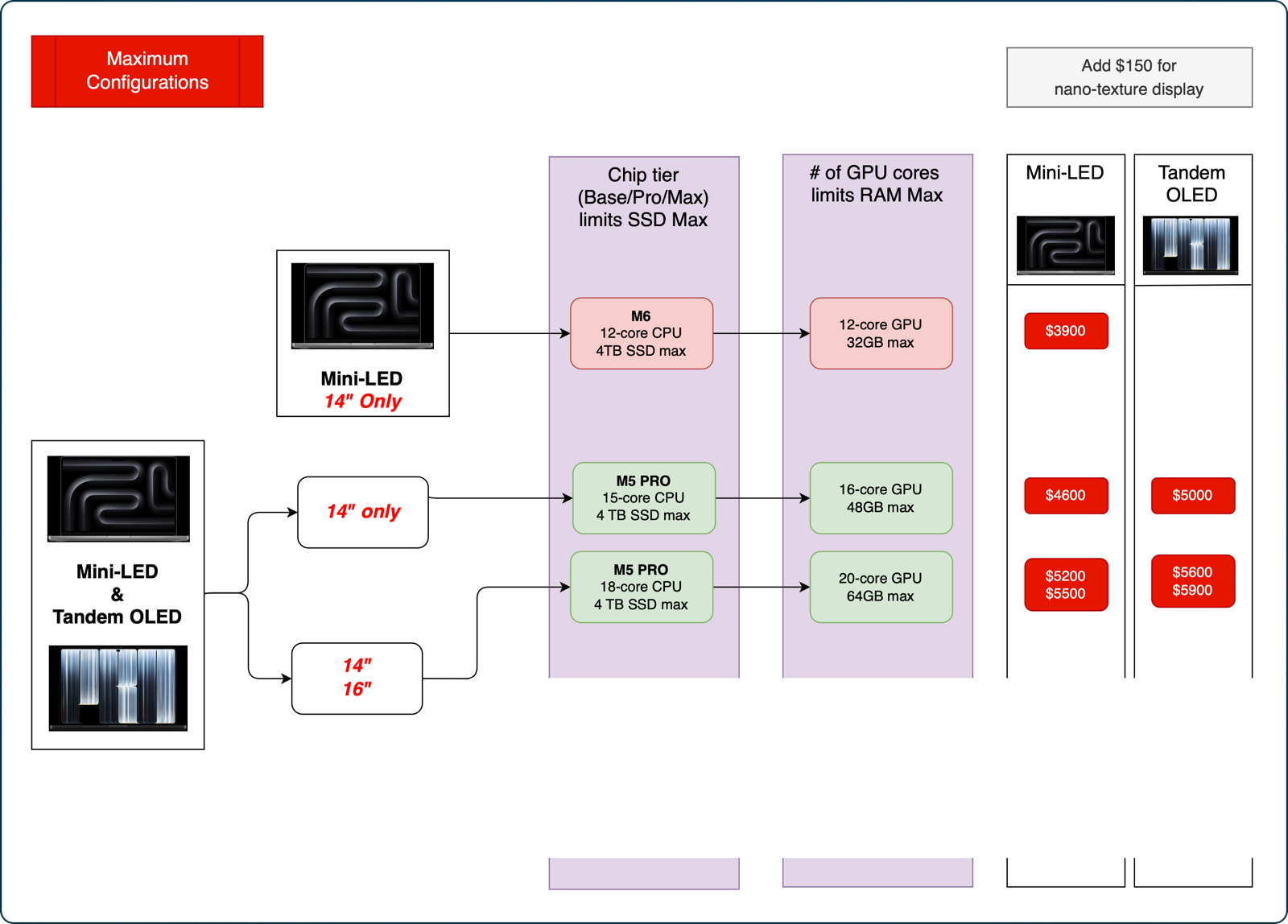
While the “low-end” M5 Pro can only be ordered in 14”, the higher-end M5 Pro with an 18-core CPU and 20-core CPU can be ordered in 14” or 16”. This higher-end chip can be configured with the same 4TB SSD, but you can bump the RAM up to 64GB. The Mini-LED in this configuration is $5200 and $5500 for 14” and 16”, while the Tandem OLED versions add $400.
M5 Max
The M5 Max chip is also available in both sizes and both screen types, but it bifurcates into more variants than the other chips. The M5 Max has an 18-core CPU, but the max SSD size depends on the screen you choose. How weird is that? If you get the Mini-LED with the M5 Max, the max SSD is 8TB. But if you buy the Tandem OLED display, then you can shell out for a 16TB SSD.
The M5 Max also comes in two different GPU options: 32-core and 40-core. That means two different maximum amounts of RAM: 36GB and 128GB, respectively.
For the first time in the diagram, the maximum you can spend on the Mini-LED and Tandem OLED are no longer just $400 apart. The 14” Mini-LED with the M5 Max 18-core CPU with 8TB SSD and 32-core GPU with 36GB will run you $7100. But if you get the 16TB SSD with the 14” Tandem OLED, that same chip will now cost you $4400 more!
Aren’t you glad there is a diagram to go with all of these numbers? My head is spinning, and I’m looking at the pretty pictures!
But wait, there’s more! The M5 Max also comes in a 40-core GPU version that will allow you to add an eye-watering 128GB of RAM. That chip, with the Tandem OLED display and configured to the top end, will bring the creditors to your door at $14,400.
Minimum Configurations
Now that I’ve walked you through the maximum configurations starting at $3900 and ending at $14,00, let’s take a much more sensible approach and talk about the minimum configurations to bring our blood pressure down.
M6 Minimum
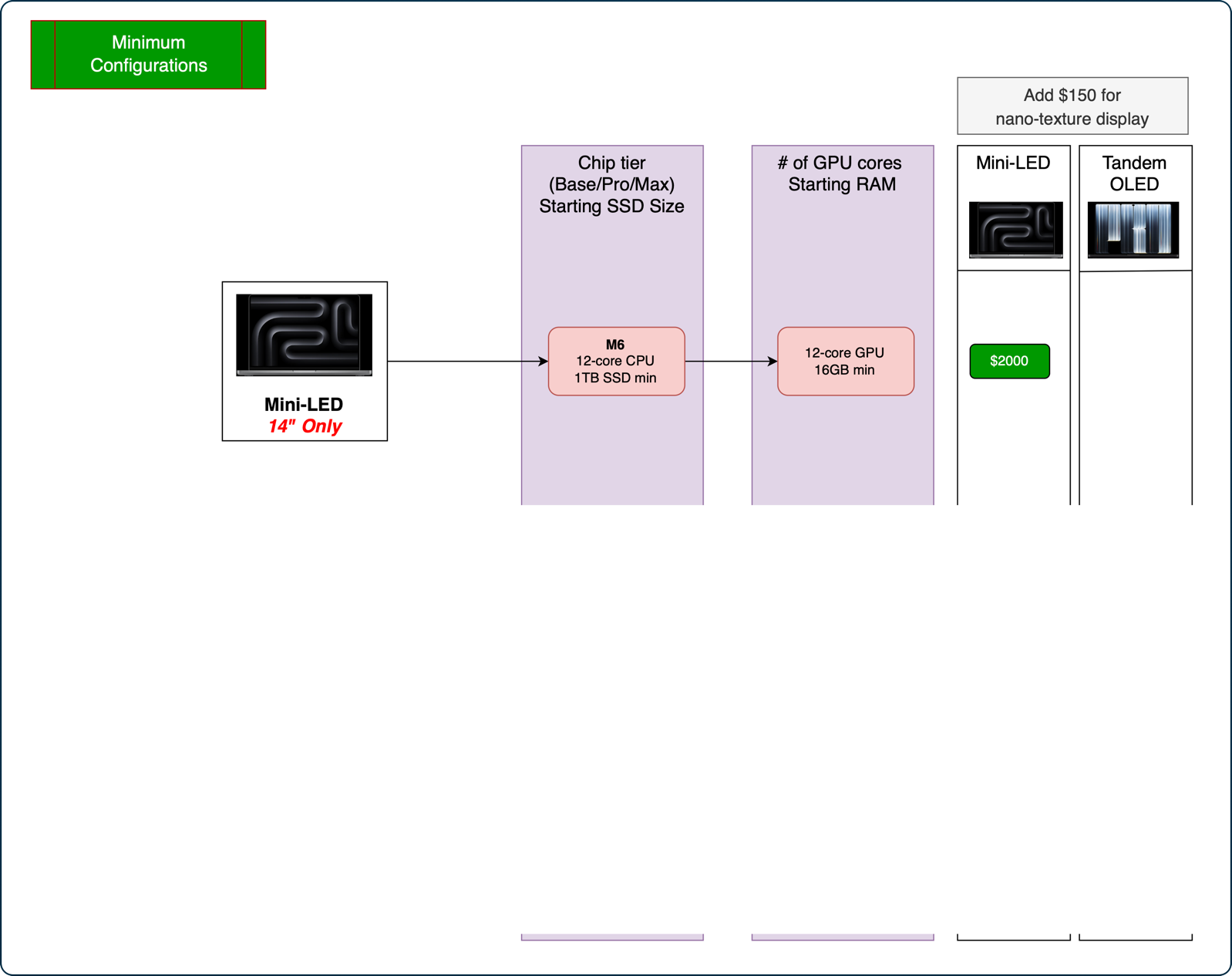
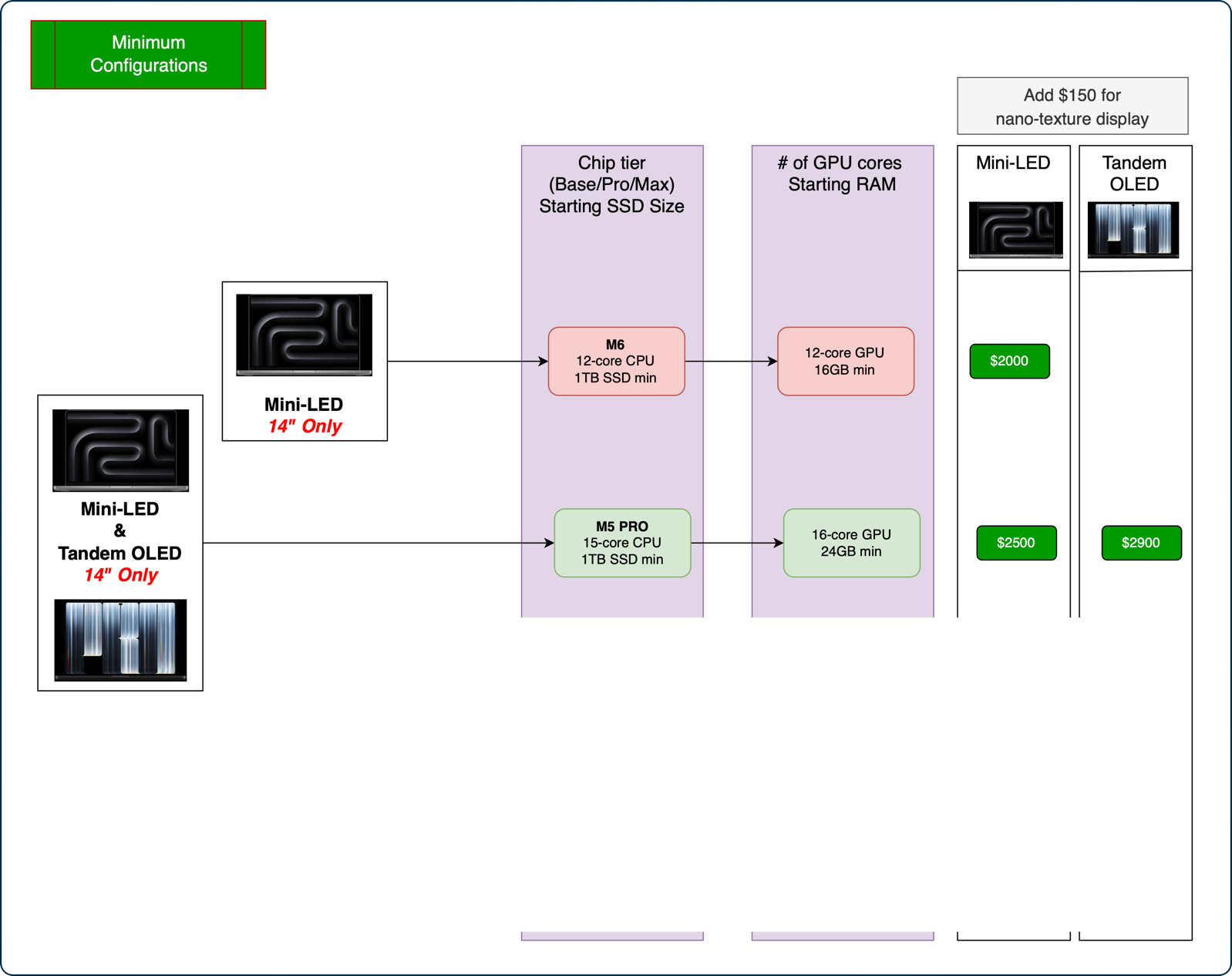
We start again with the 14” Mini-LED with the M6 base chip. This 12-core CPU/12-core GPU can be purchased with a 1TB SSD and 16GB of RAM, making it “just” $2000. That’s still a chunk of change!
M5 Pro 14” Minimum
To achieve the lowest-priced M5 Pro with the 15-core CPU and 16-core GPU, you have to get a 14” MacBook Pro. This option doesn’t exist for the 16” as we discussed with the max configuration. If you populate it with a 1TB SSD and 24GB of RAM, we’re now talking $2500 for the Mini-LED and $400 more for Tandem OLED.
M5 Pro 16” Minimum
For our grand finale, the lowest-priced 16” MacBook Pro with an M5 Pro chip is the 18-core CPU, 20-core GPU with 1TB of SSD and 24GB of RAM. Comparatively speaking, this is rather modest $3000 for the Mini-LED and $3400 for Tandem OLED.
Think about it — the M5 Pro with the lowest disk and RAM in the bigger size with Tandem OLED is $500 less than the entry-level 14” Mini-LED M6 with the max RAM and disk. That really tells you how much RAM and disk prices are driving the overall prices of everything we buy now.
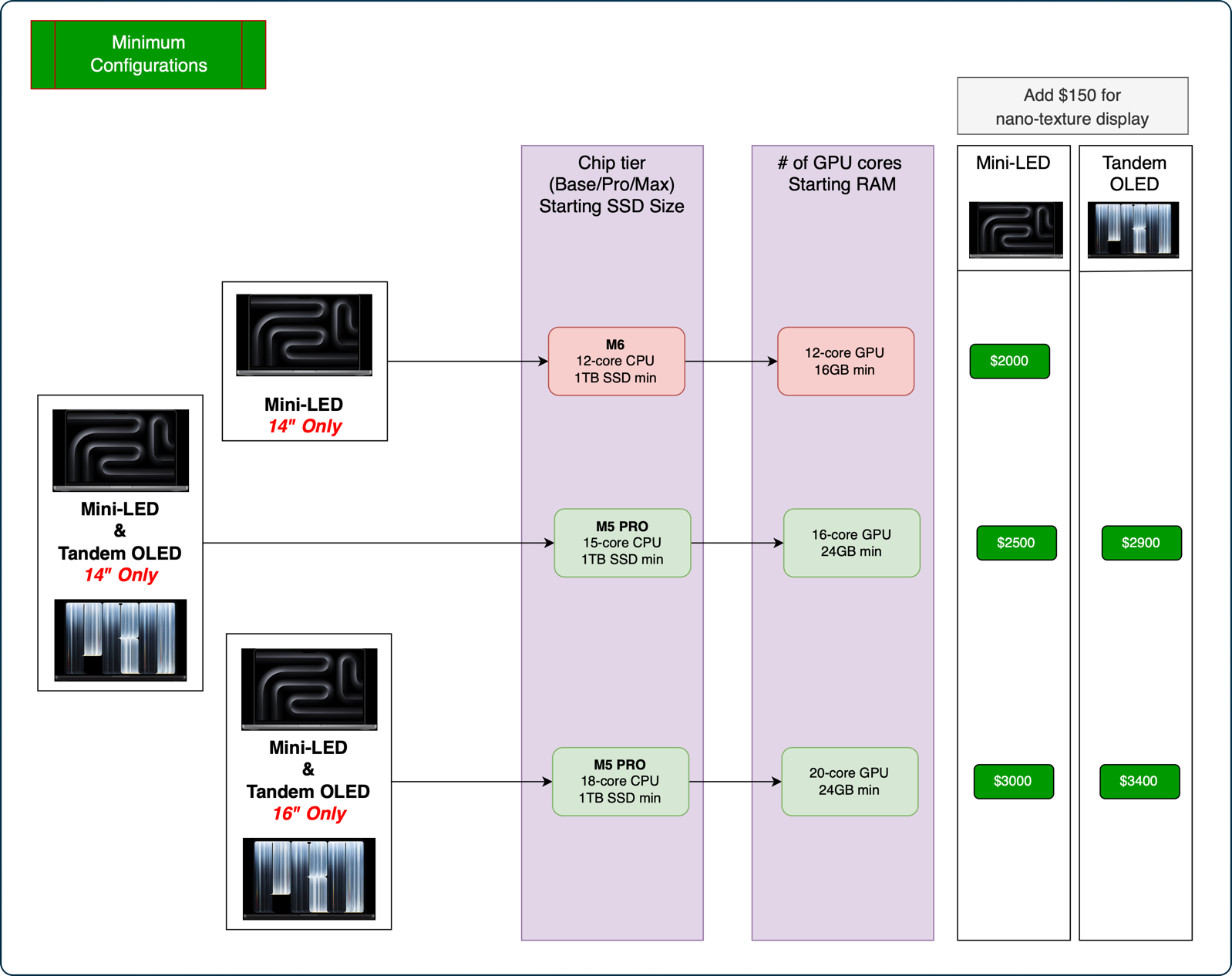
Claude suggested that I point out that you can get the 14″ with this same 18-core CPU, 20-core GPU M5 Pro, but since it was a $200 upgrade, it didn’t fit my definition of minimum configuration.
Bottom Line
I hope this walkthrough of the different options, bounded by money not being an object on one end and being a sane person on the other end, has helped you understand the 2026 lineup of MacBooks Pro from Apple. As always, I learned a lot making the diagrams.
I gave you little snapshots of specific models throughout the article, but I’ve also included both complete diagrams, both as images and as one downloadable PDF:
2026 MacBook Pro Models – Max and Min Configurations.pdf