
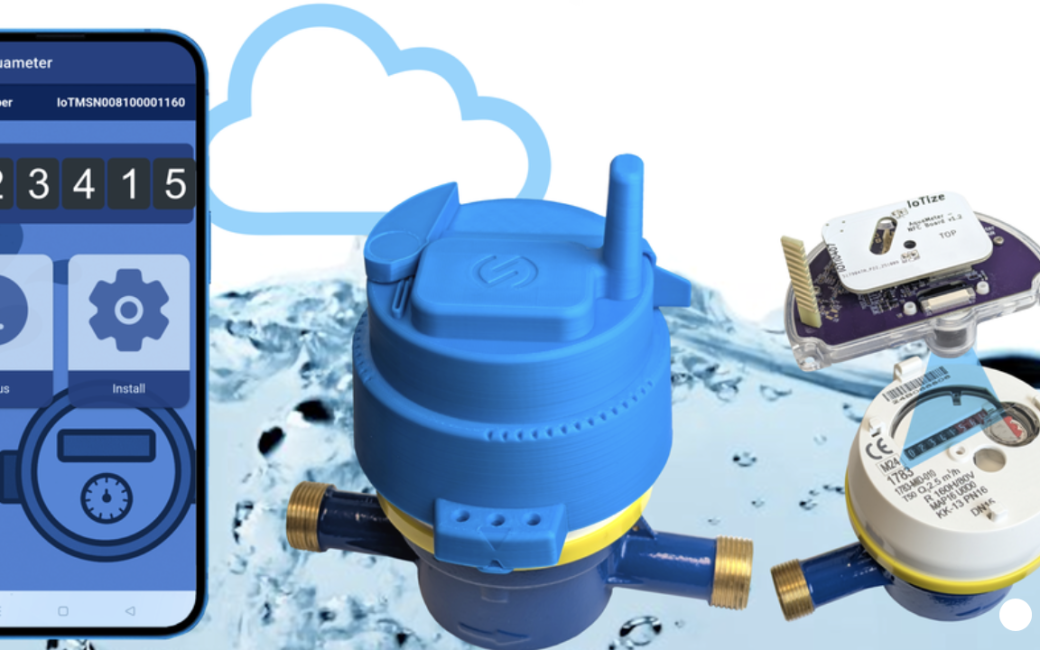
Allison interviews Steve Gussenhoven of IoTize about AquaMeter, a system that converts traditional analog water meters into connected “smart” meters without replacing the existing hardware. The idea originated from a customer in Senegal who wanted a way to remotely collect water usage data from conventional meters.
AquaMeter consists of a cap that fits over an existing water meter using a model-specific adapter. Inside the cap are a battery, radio transmitter, and camera. Rather than modifying the meter itself, the device uses optical character recognition (OCR) to read the meter’s number display and extract the usage data.
The collected data is transmitted using LoRaWAN, a long-range, low-power wireless technology well suited for sending small amounts of information. AquaMeter can also transmit a compressed image of the meter reading, providing proof of usage if a customer disputes a bill.
Installation is designed to be simple and inexpensive. Instead of shutting off water service and replacing the entire meter—which can cost hundreds of dollars plus plumbing labor—a technician can install and configure AquaMeter in about ten minutes using a smartphone app and NFC communication.
Gussenhoven explained that the product recently completed field testing in Senegal and is nearing commercial release. IoTize is targeting water utilities and municipalities looking for a cost-effective way to modernize meter reading and support digital water management.
Learn more at https://www.iotize.com/
Using a Screen Reader? click here
Transcript of Interview:
Allison: I’m with Steve Gustenhoven from IoTize, and he’s going to talk to us about a way to make water meters smart. Was that a good way to describe it?
Steve: That’s the perfect way to describe that, because originally this idea that we’re going to show you came from a customer in Senegal who had a lot of meters like this, and I hesitate to call them dumb meters because they count really well.
Allison: This is your classic analog little tiny numbered wheel that turns and tells you how much water you’ve used.
Steve: Exactly, and it’s very reliable. It counts all the time, but the only problem is it can’t communicate those other than by looking at it.
Allison: So we used to pay the water person to walk down in our alley, look at that, write it down, and then send it back. But there’s a better way?
Steve: Exactly. The problem is that we were either paying someone to come and check those out, and in some cases, you actually have vehicles that drive through your streets and will collect data using a wireless device as well. But we can actually go a step better than that. We developed, based on the request of our customer in Senegal, the creation of this device that we call AquaMeter. I think I have the wrong ring. I’m going to switch meters here.
Allison: So we’re going to describe this for the audio-only listeners as well. This is a little plastic cap that goes over your existing, we’re going to call it dumb for the sake of argument, our existing analog dial, and you’re placing this on top, and then another piece.
Steve: Exactly. And so this is the adapter. This is the one piece that we actually have to add so that AquaMeter, the device I’ll show you, can fit on any water meter, so we’re really a universal solution. This device is created for specific models of meters so that we can then come and place AquaMeter on top of this device like this.
Allison: So you just put a second cap on, and now I see an antenna sticking out of the top. You can’t fool me.
Steve: Exactly. In fact, there are two antennas here. This is the antenna that’s used for, in this case, a LoRaWAN connection. Now, there are other connections we support as well, but this one is LoRaWAN.
Allison: I don’t know what that means.
Steve: So LoRaWAN is a long-range, low-power-consumption radio technology. It allows us to send little bits of data without drawing too much on the battery that’s inside there.
Allison: So yeah, because all you need is 32, right? Or maybe a larger number than that, but you just need a number. You don’t need a lot of data to go through.
Steve: Exactly.
Allison: So inside this cap that has the antenna, you’ve got a battery inside. What else is in there?
Steve: So inside this device, as we mentioned, there’s the radio, there is the battery, and there is the camera device here. That camera device is programmed to do optical character recognition, so OCR, and it allows us to take a photo of the index of the meter, so the number in the meter, and then extract just the data and send that data via LoRa.
Allison: That’s got to be the easiest OCR job on the earth, right? It’s going to be a number, and it’s going to be no more than this many digits, but what a great way to do it. Now you’re just sending that tiny little smidge of data.
Steve: Exactly. We’re just sending that data. Now, there is one kind of interesting thing about this as well, is that sometimes, for billing purposes, your customer may, for example, contest their billing, right?
Allison: Yeah.
Steve: So we can take that photo, we downgrade the photo, and we can send the photo via LoRaWAN as well. That’s one of the special things that we developed.
Allison: There you go. Now, I think what we had done was we had this entire thing replaced with a fancier water meter put in, Steve? No, maybe we didn’t. Steve says they augmented it with a wireless read capability, but you could replace this whole unit with a smart water meter, and you get to play a plumber, so you’re out, what, the cost of a kidney, maybe?
Steve: So, a cheap kidney. No, but exactly. If you go and replace this out, that means that you, as the user at home, we go and we cut your water supply service, we remove this meter, and we replace it at a price of around 300 to 800 dollars per unit just for the replacement.
Allison: Before the plumber comes in.
Steve: Yeah, before he comes in. And so with AquaMeter, we can actually go in and, without cutting the water supply, simply place the AquaMeter on the device, configure it. It configures with a mobile app. Here’s the mobile app, and I was going to mention, actually, I’m going to put this back together here real quickly. Okay. Because we mentioned that there were actually two antennas here. There’s this antenna, the LoRaWAN, the long-range antenna, and there’s this one, which is an NFC antenna, near-field communication, which allows us to interface with your mobile phone. This is the installation application that, when we place that meter in place, then we have to go and set a certain number of parameters. So we’ll connect to the device using NFC.
Allison: You just set it on top of it.
Steve: You just set it on top, and now it’s communicating with that monitor, and the installer is guided through about 10 steps in order to set up this device so it’s communicating the data where it needs to go.
Allison: And it needs to know what’s the first number to start with at that point, I would imagine.
Steve: Well, in fact, what it needs to know is where it’s located so we know whose meter it is, in a way.
Allison: Oh.
Steve: And then what we do is we actually take a photo inside, and I can’t really do this, it’s not connected right here.
Allison: Sure.
Steve: But we’ll go to this step where we’re setting up, here we are, what in French we call the reglais photo. So we’re setting up the…
Allison: Sounds cooler in French.
Steve: It does sound cool. It’s like sautéed and… So here we’ll take an initial photo, and in that photo we will adjust a little frame that’s going to surround the numbers that we want to actually interpret. Once we’ve done that, it’s going to take an initial photo. We’re going to apply a set of settings, and then here we’re going to test that. Once we’ve done that, we’ve essentially done everything.
Allison: So this is a lot faster than removing the whole device.
Steve: Exactly. When you think about it, we’ve gone to your home, you’re not even necessarily present, place this device in here. It will be locked in place with an anti-tamper seal. The technician will come. He doesn’t have to be a plumber at plumber’s rates. He can simply, guided by this app, do the entire configuration, and it takes about, the app takes about five minutes of configuration time, so a total intervention cost of maybe 10 minutes.
Allison: So she’s in and out. She’s got the whole thing recorded, and then the benefit of this is to be able to, you can’t manage what you can’t measure, and so being able to measure water usage is a really important thing. I think this is fascinating. If people wanted to learn more about IoTize and AquaMeter, where would they go?
Steve: Go to iotize.com. You’ll find the AquaMeter in our use cases. This is a device that we’re currently promoting. We just ended our final field test in Senegal, so the first devices should be reaching the market here in the coming months. We’re looking for other water utilities and municipalities that are interested in making this digital change, making that digital transformation. So if you have that case, feel free to contact us.
Allison: There we go, and IoTize is spelled I-O-T-I-Z-E dot com. Thank you very much, Steve. This was great.
Steve: Thank you. It’s been a great pleasure.
[…] CES 2026: AquaMeter Retrofit Smart Water Meter […]