

Hi, this is Allison Sheridan of the NosillaCast Apple Podcast, hosted at Podfeet.com, a technology geek podcast with an EVER so slight Apple bias. Today is Sunday, July 26, 2026, and this is show number 1107.
We WILL have a live show next week on August 2nd, but then we’ll be gone for our European adventure to Spain for an eclipse, then Portugal, and then we get to go see Bart for the first time in 15 years! That means no live show till we get back on August 23rd.
Articles
KeyCastr & Presentify on ScreenCastsONLINE
Tesla Model 3: The Good, the Bad & the Unexpected – Live With It – YouTube
Sarah Lane of DTNS fame has a show called Live With It where she interviews people about tech they’ve been living with for a bit of time. It’s an interesting show because it’s not the “quick take” we’re used to when gadgets are new; rather it’s after the new shiny might have worn off.
She recently had me on the show to talk about my thoughts on driving Tesla EVs. I do make a point up front that I don’t agree with Elon’s political views, but we love the cars his company makes.
I put a link in the shownotes to the video interview on YouTube, and you can find the audio podcast for Live With It in your podcatcher of choice.
Tiny Tip: Using an iMac as an External Display with AirPlay
Let’s start off with a really cool tiny tip from Eddie Tonkoi.
Thanks, Eddie. This is essentially Target Display Mode for modern Macs that disappeared around, I think, 2017 when they came out with the 27″ 5K iMacs. It was such a shame that so many of those beautiful iMacs ended up recycled instead of living out their lives as spectacular displays.
I have to be honest and say that I thought Screen Mirroring was just what it said on the tin. I use it to mirror my Mac to the Apple TV in the family room on occasion, but I never noticed you could do it from Mac to Mac, and that if you choose another Mac, it lets you choose extended display. It makes sense, since I’ve done it with my Mac to an iPad, but it just never occurred to me this would work!
Learning VisiCalc with Ken Case
Support the Show
As you may have suspected, it’s not inexpensive to host podcasts like the ones we do here on podfeet.com. I try to keep the costs to a minimum, but sometimes I do have to spend more than I like. A few years ago, with Bart’s encouragement, I put my domain behind Cloudflare so they handle my DNS. This did a lot to protect the site from attackers.
Then late last year my web server started to get hammered by some bots. With Tage’s help, we turned on a rate-limiting rule in the Cloudflare interface to stop the bots.
Everything was fine until back in June when I started getting emails from my hosting company, DigitalOcean, that again my site was getting hammered. This time it wasn’t my web server; rather, it was my managed database server. The emails were titled: “DigitalOcean monitoring triggered: CPU is running high” and then maybe 45 minutes later or more, I’d get another email titled “DigitalOcean monitoring resolved: CPU is running high”.
Because it would resolve itself, it gave me the luxury of putting my head in the sand because I just didn’t have the time or the knowledge to figure out what was wrong.
I continued with my brilliant strategy until someone sent me a note telling me that podfeet.com was completely down! I wish I could remember who it was to thank them publicly, but it’s slipped my mind.
Anyway, it seemed to be time to stop with the head-in-the-sand approach. Instead of bothering Bart or Tage, I decided to see what Claude and I could accomplish. After it helped me get my site back up by restarting nginx (the web server), we started on a journey to look at log files.
Armed with a nice, interactive graph from DigitalOcean, I could use my cursor to easily pinpoint exact times when the CPU passed 90%, Claude was able to narrow the search in the log files.
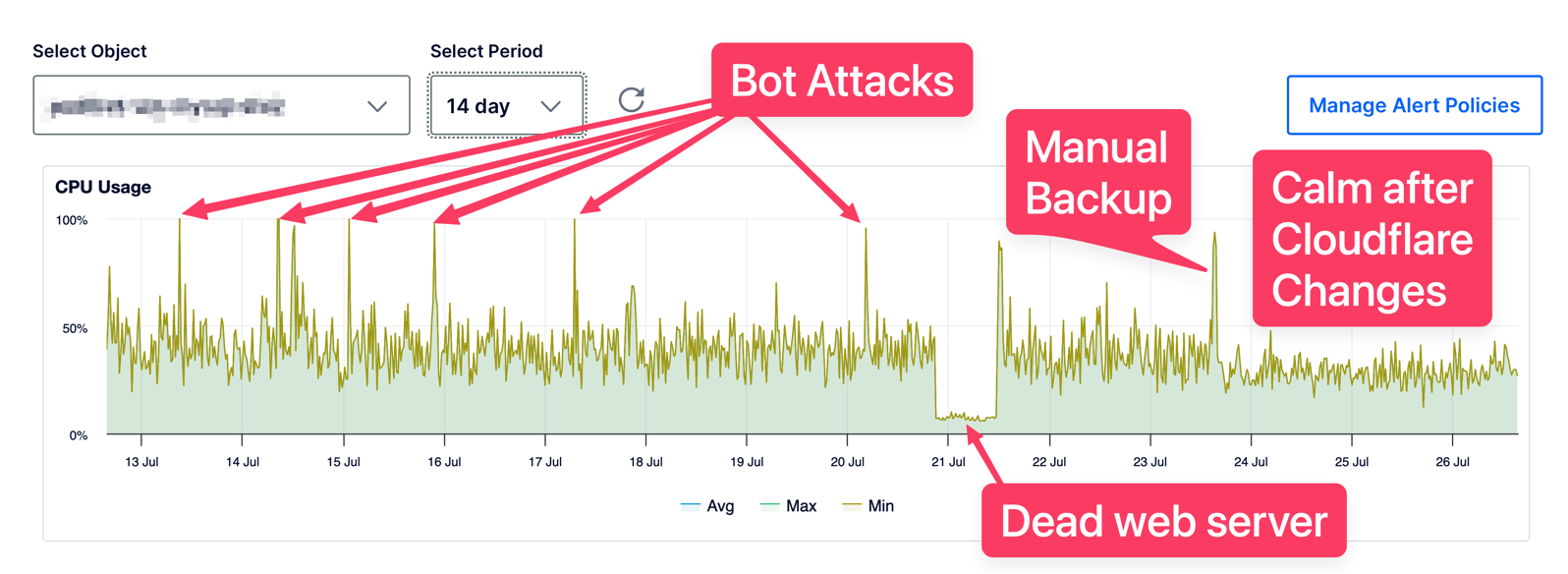
After literally thousands of words exchanged between us, we determined, as you would suspect, that bots were attacking my site. Unfortunately, the free version of Cloudflare only allows one rate-limiting rule, and Claude suggested a second one to rate limit bots in general. It also suggested Cloudflare’s Super Bot fight mode, which sounded exciting, but was also not included in the free Cloudflare plan.
I warmed up my AppleCard and shelled out $25 for a month’s worth of Cloudflare Pro, so I could enable these features. I won’t go through the gory details of the configuration, or of the tweaks we added so my own work creating blog posts from the admin panel wouldn’t get blocked, but I will tell you that for the past two days, the CPU activity on the database server has been quite a bit calmer than it has been in the last two weeks. Not only has there not been any 90+% spikes in CPU load, the curve is much more stable hovering around 35-40% where it was jumping to 50% or more pretty often before.
I don’t want to declare victory just yet, since it has gone 2 days without a spike in the past, but I’m cautiously optimistic based on how much less noisy it looks right now.
And why have I told you this whole story? One is because it’s nerd fun, but also because if this works, I’ll be changing to the annual plan of $20 per month for Cloudflare protection which is another $240 of cost to run the podcasts.
So if you have some moola to spare and you find the content we provide here entertaining or educational, please consider going to podfeet.com/patreon to help defray the costs of providing this valuable service.
CCATP #839 — Adam Engst on A Better Route Planner for Stress-free EV Trips
Transcript of NC_2026_07_26
That’s going to wind this up for this week. Did you know you can email me at [email protected] any time you like? If you have a question or a suggestion, just send it on over. Remember, everything good starts with podfeet.com. You can follow me on Mastodon at podfeet.com/mastodon. If you want to actually see Steve and my podcast work on YouTube, you can go to podfeet.com/youtube. If you want to join the conversation, you can join our Slack community at podfeet.com/slack where you can talk to me and all of the other lovely NosillaCastaways. You can support the show at podfeet.com/patreon or with a one-time donation at podfeet.com/donate with Apple Pay or any credit card, or through podfeet.com/paypal. And if you want to join in the fun of the live show, head on over to podfeet.com/live on Sunday nights at 5 PM Pacific Time and join the friendly and enthusiastic NosillaCastaways. Thanks for listening, and stay subscribed.