
Feedback & Followups
- More misbehaving AI Agents:
- 🇮🇳 CERT-In Warns AI Agents Accessed Sensitive Data at Indian Organizations During Testing — thehackernews.com/…
- OpenAI agents disabled safety monitoring, one lied about it — www.bleepingcomputer.com/… (more alignment problems!)
- Related: Anthropic warns self-replicating AI could spread to your smart devices — www.bleepingcomputer.com/… (small AI models are becoming ever more capable)
- Related: Generative AI Porn Apps Targeted in [Apple] App Review Guidelines Update — appleinsider.com/…
Listener Questions
Passkey Backups?
NosillaCastaway Kantor:
This is an interesting take on passkeys (and credential managers in general) from the guy who develops StopTheMadness. It seems that he wouldn’t mind passkeys if they were back-uppable. But isn’t their non-transferability a feature? If passkeys can be transferred to any old drive then anyone could potentially steal it or phish it. In this way, aren’t passkeys much better than private keys stored in
~/.ssh/, which are just files you can move around?
This is a difficult question to answer directly, because there seem to be some misunderstandings in the mix, so I think the best thing to do is to explain two relevant features of the passkey world — there are two types of passkeys, and one can be backed up, and websites that support passkeys support so-called modern authentication, where there is no one-to-one mapping between account and authentication method.
Reminder — What a Passkey Actually Is
Before we go any further, let’s remind ourselves that a single passkey is made up of four parts:
- A private key (stored in a vault of some kind)
- A public key (shared with the website)
- A domain name
- A username
The security of a passkey depends on protecting the private key, and the phishing resistance is enabled by the association between the domain name and the passkey.
Two Types of Passkeys — Device-Bound and Synced
Everything in cybersecurity is a tradeoff between security and convenience, and context is king.
The most secure form of passkeys is the so-called device-bound passkeys. By definition, the private keys for passkeys of this type are stored in dedicated security chips. These chips generate unexportable private keys that are physically trapped within them; only the public key and the results of using the private key are accessible through the chip’s data pins. No matter how compromised your device gets, no malware can ever possibly get those private keys out!
These passkeys generally live in one of two places:
- Dedicated USB dongles like YubiKeys
- Security chips on motherboards like the Secure Enclaves on Apple devices, Trusted Platform Modules (TPMs) on Windows/Linux devices, and StrongBoxes on Android devices.
Clearly, it’s physically impossible to make a backup of something you literally cannot access!
Device-bound passkeys are used for the highest level of security, but they’re not very convenient.
This is why we also have synced passkeys — these are stored in encrypted software vaults like the Windows Key Store, Apple’s iCloud Keychain, the Google Password Manager, and third-party vaults like 1Password and Bitwarden.
These vaults do a very good job of protecting the private keys, but they can’t possibly be as secure as dedicated hardware security chips!
What you get in exchange for this small reduction in security is the convenience of having your passkeys sync between your devices. As well as being synchronisable, these passkeys can also be exported.
Modern Authentication
To understand Modern Authentication, let’s start by looking at what we have retroactively named Legacy Authentication. On sites that use legacy authentication, there is a one-to-one mapping between accounts and passwords. Your account has a password!
With Modern Authentication, that one-to-one relationship is gone; instead, each account can have arbitrarily many authentication methods. Most sites still allow you to set a password as one of your authentication methods, but you can also add arbitrarily many other authentication methods, the strongest of which are passkeys. You can add as many passkeys as you like to a single account.
Rethinking Backup
Backing up synchronised passkeys is easy — you use your chosen vault’s supported mechanisms for ensuring you retain access when you lose a device. For most modern vaults, that’s by some kind of cloud service that supports some kind of secure account recovery process. Some vaults will also let you export your secrets to some kind of file, which you can copy to a thumb drive or hard disk of some kind and store in a safe, lock box, or bank vault.
The way you “back up” device-bound passkeys is by making use of modern authentication and adding another device-bound passkey to your account. To protect from device loss, the best solution is a dedicated hardware dongle that you can then store in a safe, lockbox, or bank vault.
The same approach also works as an extra backup for synchronised passkeys. For example, to give me an extra safety net on my most critical identities, I add two synced passkeys — one stored in my iCloud Keychain, and one in 1Password.
So What About Phishing?
Passkeys are officially described as ‘phishing resistant’, not ‘phishing proof’, and that’s accurate. Even synced passkeys, which are technically exportable, are not phishable in the same way passwords are.
What makes passwords so easy to phish is that the normal authentication flow involves users typing into text boxes, and fraudulent authentication flows are the same — users type their password into text boxes that look identical to the real ones; they’re just on a different domain. If a user forgets, or never even thinks, to look up at the address bar, game over!
The same is true of multi-factor authentication mechanisms that rely on users typing numbers into text boxes.
But passkeys are very different — users literally can’t complete authentication challenges; only vaults can, and look-alike sites do not fool vaults. Part of the standard passkey algorithm is verification of the domain name; if you’re on the wrong site, your passkey simply will not work!
That really raises the barrier to entry. Your passkey can’t be phished by tricking you into logging in to a site; instead, attackers have to resort to some serious social engineering.
Regardless of the type of passkey you use, one approach that’s always open is to trick you into adding an attacker’s passkey to your account. This generally involves tricking you into accepting dialogues that tell you explicitly that you are adding a new passkey to your account. People are tricked into doing this in the real world, but compared to regular phishing, it’s extremely rare!
If you use synced passkeys, there are two other avenues of attack open to the baddies:
- They social engineer you into adding their device to your account, then your passkeys simply synchronise over to them as if they were you!
- They social engineer you into exporting your passkey to a file and sending it to them.
Those kinds of attacks can and do happen, but compared to tricking you into typing your password into the wrong box, they’re much trickier for attackers to pull off!
All of the known attacks against passkeys involve multiple steps, none of them part of your normal day-to-day routine, and clicking past multiple warnings. Just think of how many more opportunities there are for your spidey-senses to trigger!
Deep Dive 1 — An Illustration of What Happens When Certificate Authorities Mess Up (the eMudhra mess)
(Shout-out to NosillaCastaway Abhi who took the time to email us about this story!)
Before explaining what happened, we need to take some a moment to remind ourselves of what Certificate Authorities (CAs) are and their place in the Public Key Infrastructure (PKI)
Context — The PKI, CAs, Root Certs, and Intermediate Certs
The vast majority of our online security depends on X.509 digital certificates and the infrastructure around them. We refer to the whole system as the Public Key Infrastructure, or PKI.
The core of the PKI is asymmetric encryption, where you have pairs of public and private keys, and digital signatures. A certificate cryptographically binds a public key to some kind of identity, like a domain name or an email address. HTTPS uses domain name certificates, and S/MIME email encryption and signing uses email address certificates.
A certificate is simply a digitally signed file that contains a public key and an identity. Digitally signing something requires a key pair too, and usually, a certificate authority will use their private key to sign a certificate that binds your public key to your identity. The fact that a cert is signed with another cert creates a chain of trust, and that chain has to end somewhere!
A root certificate is a certificate that was signed by the same key-pair it authenticates. Certificate authorities start by creating a key-pair, and using that same key-pair to sign a certificate that says it’s their key-pair.
Anyone can do that! The protocols and algorithms that underpin X.509 certs and the entire PKI are open, and any server or personal computer can issue this kind of certificate, also referred to as a self-signed certificate. When you install Apache on your Linux server, it generates a self-signed cert for you as a placeholder until you can get one issued by a recognised CA. You can use the Keychain Access app on any Mac, or the Windows Key Store to create your own self-signed certificates for any identity you like.
What makes your root cert different from those belonging to certificate authorities is simply trust! Every OS ships with a pre-installed set of trusted root certificates (you can view them in the Windows Certificate Store or the Keychain Access app), and only certificates signed by those root certificates are trusted by your computer. Untrusted certificates generate errors and warnings.
You’re actually free to add your own certificates to this list — I do this at home with a self-signed cert I issued on my Mac that I then use to issue certs for my local servers. I then manually add the root cert to my devices, and they all start to trust my private certificate authority. Large organisations do this too, using in-built tooling in things like Active Directory to automate the distribution of the non-standard root certificates.
So, Certificate authorities are critically important because they are the so-called trust anchors for the entire PKI. And their absolute crown jewels are the private keys that match their root certificates.
The security of those private keys is critically important — if a CA loses control of one, the emergency OS updates will be pushed to all devices, removing the matching root certificate from the device, and in the process, instantly invalidating every single certificate that root certificate issued! That’s an existential threat to CAs!
Because those private keys are so important, they’re not stored on network-connected devices. They’re literally kept offline, on a powered-down device in a safe! But to issue a cert you need the private key, so how can a key that’s offline sign anything? It can’t!
This is why CAs use so-called intermediate certificates to sign the certificates they issue to customers. Every few years, they boot up the device that holds that priceless private key and use it to issue some certificates that they will then use to issue customer certificates. The private keys for these intermediate certificates are still heavily secured, but they’re secured online, using hardware devices similar in concept to the Secure Enclaves on iPhones.
Note that these intermediate certs are not stored on people’s computers; instead, they are validated by checking them against the root certificates that are stored. If the private key for one of these certificates leaks, then it gets added to a so-called revocation list that contains just the IDs of revoked (invalidated) certificates rather than the entire certificate.
Losing the private key of an intermediate cert is still bad — every cert signed with that intermediate cert is still invalidated when the intermediate cert is revoked, but it allows CAs to spread the risk. Firstly, root certs have very long validities, often decades, while intermediate certs are usually only valid for a few years at most. Secondly, a CA will use tens or even hundreds of different intermediate certs, spreading out the risk. If you have 100 intermediates, and you lose one, you invalidate 1% of the certs you issued, making 1% of your customers very cranky, but that’s still 100 times better than losing them all!
You can see the full chain of certs between the one for a website and the root certificate for the issuing CA by inspecting a cert in your browser. When I did that on
podfeet.comwhile writing these notes, I could see that the cert Cloudflare acquired for Allison for the site was issued by Google, and the Google root certificate is valid for 20 years (from 2016 to 2036), and the intermediate cert used is only valid for six years (from 2023 to 2029).
{: .aside}
Finally, while every OS ships with a built-in set of trusted root certs, and every OS provides APIs for accessing those certs, apps are free to bundle their own set of trusted certs instead. Apple and Microsoft & Google get to dictate what certs Windows, macOS, iOS, and Android trust; that’s a small number of companies. What if you don’t trust them? Well, you simply bundle your own set right into your app. That’s what Firefox and Chrome do. No matter what OS you run Firefox on, it will trust the same set of CAs, even if Apple, Google, and Microsoft disagree on one.
So What Happened this Week?
A major Indian CA named eMudhra effectively lost control of the private keys for eight of their intermediate certificates, exposing the entire world to the risk of fraudulent certificates.
If you steal the private key matching a trusted certificate, you can sign things with that certificate, so if you steal the private key for a trusted root certificate or an intermediate certificate, you can issue your own certs with that key, and computers will trust that cert. Want to fake google.com for a really convincing AiTM attack without the usual certificate warnings, then issue yourself a cert for *.google.com, and you’re in business!
Now, eMudhra were not hacked, and no one actually stole the private keys from them; it’s more embarrassing than that!
Due to a typo in an automation script used to issue the intermediate certificates, the key length was short, not just a few bits shorter than it should be, but really short. One of the private keys was simply 4!
For context, Google’s intermediate cert used to sign the Cloudflare cert for podfeet.com uses the very latest Elliptic Curve algorithm with a key length of 256, while 4 is a three-bit number (0b100)!
The PKI was designed to be able to handle key losses; hence there being a revocation process, so as soon as this woopsie was discovered, the eight certs were revoked, and all the major browsers and OSes updated their list of block-listed certificate IDs. This means that for regular users, this is a non-issue.
The most noticeable inconvenience this caused is for owners of certificates issued by any of these eight revoked intermediate certificates. They needed to acquire and deploy new certs. In the past that would have been onerous, but in the days of Let’s Encrypt and the ACME protocol it’s nowhere near the challenge it once would have been.
I’ve been through a few less dramatic revocations over the years in work, and while they were not fun, it was just a few hours of faffing about and double-checking we hadn’t missed anything. I’ve had worse days!
A more subtle potential issue for geekier users and organisations is the apps that bundle their own trusted CA lists. Firefox is an obvious example, but they reacted very quickly. It’s the less obvious ones that are more concerning. In general, single-platform apps usually rely on their OS’s trusted CA lists, but many cross-platform apps choose to bundle their own for consistency, and to avoid needing to maintain code for each OS’s specific APIs. The popular command-line HTTP utility curl is one notable example, and Google’s Go programming language is another.
But again, this is just a simple case of staying patched so you stay secure.
Finally, the organisation with the biggest problem is eMudhra themselves. Woopsies of this scale tend to be existential crises, and that’s proven to be the case here — eMhudra are exiting the CA business!
Links
- Eight eMudhra CA Keys Compromised, Triggering Emergency Fixes Across Browsers and Software — thehackernews.com/…
- Mozilla, Google, Apple block compromised eMudhra CA certificates — www.bleepingcomputer.com/…
- Example of wider issues (other languages that bundle their own CA list are doing the same): Go Issues Emergency Update Blocking — thehackernews.com/…
- eMudhra to Exit Global SSL/TLS Business After 8 Intermediate CA Keys Found Easily Guessable — thehackernews.com/…
❗ Deep Dive 2 — Urgent Web Server Patches (PHP & NGINX)
It’s not been a good week for website owners, with emergency patches for one of the leading front-end web servers, NGINX, and the most widely deployed server-side programming language, PHP.
TL;DR if you have a web server, be sure it’s patched! Also, if you’ve made your NAS visible from the internet, patch it (and strongly consider a safer solution like Tailscale)!
The Less-Bad One — NGINX
Five critical bugs were patched in NGINX, and in situations where they were exploitable, they were bad! Most were remote code execution, and one could cause client certificates to improperly validated. Client certificates are a very cumbersome but very secure alternative to passwords — very secure websites can require users to log on using a certificate issued to them by the website owner instead of a password, and this bug allowed forged certificates to appear valid!
Thankfully, none of the exploits work on typical NGINX configurations, and it’s very unlikely any NosillaCastaways are running servers using client certificates.
NGINX patched many more less critical bugs along with these five critical ones, so everyone should still patch their NGINX servers promptly.
If you’re worried your configuration may be using one of the problematic combinations of directives, or if you just want to learn more about the issues, you’ll find a detailed description here: NGINX Fixes 5 Flaws, Including Possible RCE and a TLS Bug That May Skip Client-Cert Checks — thehackernews.com/…
For what it’s worth, none of the NGINX servers I manage with any of my hats on were affected.
The Big One — PHP2Shell
This story really illustrates perfectly how much AI has changed things. The core underlying problem in PHP’s codebase has been known about for many years, but it was non-trivial to fix, and there appeared to be no practical avenues for exploitation. It was thought of as being like a broken window in an internal courtyard no one could get access to — sure, it should be fixed some time, but it didn’t seem to pose an immediate security risk. Until AI found a way!
When AI revealed a novel path to exploitation, the PHP maintainers sprang into action, and not just on their own, in coordination with the broader web security community. Substantial changes were made to the code, and the process of managed disclosure was under way. Had that process gone to plan, news of the vulnerabilities and ready-to-deploy patches for all the major operating systems would have been released together near the end of this week. Instead, as the release date came closer, and the circle of people trusted with the information inevitably had to grow, someone betrayed the community and leaked the details on some semi-private online forums. And we now know there was limited exploitation in the days before the PHP maintainers finally went public.
When it became clear the cat was out of the bag, PHP were forced to go early — they made an announcement that 24 hours later there would be a big announcement detailing a critical vulnerability, along with patches from the core PHP project.
The fact that we got details and the so-called upstream packages at the same time was as good as it could have been in the circumstances, but by being forced to go early, the maintainers for the various software distribution mechanisms that bundle PHP were not ready with their patches. So, while you could go to the PHP website and download a manual installer, you couldn’t log into your server and get an update to the version that has been tweaked and bundled for your OS. Those came hours or even a day later. That meant that for many servers, there was a gap, and many organisations chose to power their systems down and trigger outages while they waited for the patches they needed.
The major Linux distributions all got their patches within 24 hours, many within 12, which means that the biggest websites are probably all patched by now. But there are still some gaps:
- Obsolete versions of PHP have not been patched, and since PHP has introduced many breaking changes over the years, some sites, mostly internal corporate apps, cannot upgrade without being substantially rewritten!
- Many network devices like NAS servers deliver their user interface as a website, and many of those are powered by PHP. Those patches have been particularly slow to come out, and those devices are not on everyone’s radar when you think “web server”!
There are some silver linings to all this, though.
Firstly, because of how exploitation of these vulnerabilities works, attack attempts have a recognisable pattern, so many large providers were able to implement filtering to protect their customers. A fantastic example of this is Cloudflare, who rolled out protections for all their users within hours.
Secondly, on closer inspection, it seems that while exploitation is definitely possible, and proof-of-concept exploits are out there, it’s not actually easy to reliably exploit the vulnerabilities in real-world conditions.
Unfortunately, we can’t finish on a silver lining. PHP have addressed the critical issues, but the part of the codebase at the root of all this is still not in a great state. Attackers and AI bots are almost certainly focusing their attention on it now, and it seems inevitable that more fixes will be needed.
To underline that point, PHP have released mitigations for a related bug that is not patched yet, but luckily, it only affects sites with very unusual configurations more details here: PHP shares mitigation for new RCE vulnerability with no patch — www.bleepingcomputer.com/….
Before we end, there’s also a somewhat tragic callback to a recent instalment when Allison shared a link to an excellent interactive article highlighting the small number of volunteers underpinning many major open source projects. PHP is one of those projects: The one guy who manages most of PHP distribution is a volunteer, of course — sixcolors.com/…
Finally, this is unlikely to be the last event like this while we make our way through this turbulent window where our existing code predates AI, but AI is trying to exploit it. That old code is full of vulnerabilities the AIs can, and will, find. New code is all being checked by AI before it gets published, so this period will end, but I doubt we’re through the worst of it yet!
Links
- PHP releases emergency fixes for critical PHP2Shell vulnerabilities — cyberinsider.com/…
- PHP2Shell Vulnerabilities Put 70% of Websites at Risk — tidbits.com/…
- Critical PHP Vulnerabilities Threaten Your NAS, Not Every Vendor Has a Fix — appleinsider.com/…
- Cloudflare deploys protections against php2shell vulnerability — blog.cloudflare.com/…
- Amazon says PHP2Shell exploitation began 4 days before patches — www.bleepingcomputer.com/…
- PHP shares mitigation for new RCE vulnerability with no patch — www.bleepingcomputer.com/…
- (Reliable)? php2shell exploitability — isc.sans.edu/…
❗ Action Alerts
- Another record-breaking Patch Tuesday: Microsoft October 2026 Patch Tuesday fixes 1,411 flaws, 3 zero-days — www.bleepingcomputer.com/…
- Signal fixes critical flaw that could keep audio active after hangup — cyberinsider.com/…
Worthy Warnings
- ⚠️ Google Users: Google’s updated terms of service exempt Gmail, Photos & Drive in their privacy policy, allowing all user content to these services to be processed for ad targeting — cyberinsider.com/…
- 🇫🇷 French NosillaCastaways are losing an excellent secure DNS option over misguided attempts to block sports streaming piracy 🙁: Quad9 to leave France after court orders piracy-related DNS blocking — cyberinsider.com/…
- 🇺🇸 Proton hosts map of 300,000 Flock devices amid legal threats — cyberinsider.com/… (a valuable privacy and civil awareness tool being threatened by ‘lawfare’)
- Opinion from Bart: I’m starting to see Proton in the same light as Cloudflare — a trustworthy company with a non-creepy freemium business model that behaves as good netizens whenever the need arises
- MapQuest says its new Surveillance Layer can help you spot Flock cameras. — www.theverge.com/…
- A reminder never to connect a “smart” TV to your network: Smart TV privacy study finds tracking persists even when opting out — cyberinsider.com/… (Use a separate, reputable box like an Apple TV)
- Obsolete routers are not just a danger to their owners, but a menace to the entire internet: Hackers hijack D-Link, Ubiquiti devices to resell your stolen bandwidth — www.bleepingcomputer.com/… (Friends don’t let friends run obsolete routers!)
Notable News
- 🇺🇦 🇷🇺 Sadly, Ukraine’s drone strike on Yandex did not make a measurable difference in disinformation bots: 🎧 More or Less: Did Ukrainian strikes on Russian data centres stop disinformation bots? — overcast.fm/… (Misinformation about Disinformation 🙁)
- 🇺🇸 Meta Hit with $25 Billion Penalty for Lying to Users About Privacy — appleinsider.com/… (New Mexico state case about Cambridge Analytica)
- Related (in case you thought the company has changed): WhatsApp told its AI chatbot not to mention privacy regulators — cyberinsider.com/… (intentional prompt injection — hidden text in support pages that humans can’t see but AI agents can)
- More techical debt paid down: Abandoned Popcorn Time app exposed millions of devices to RCE attacks — www.bleepingcomputer.com/…
- This abandoned BitTorrent client used insecure HTTP connections for fetching software updates
- The app was abandoned, but it was still heavily used and still checking for updates.
- Attackers could have abused the situation to send malware to these devices
- The security community stepped in and sent an update to disable the insecure updates for the still-running apps instead!
- A new open source option for organisations and enterprises: Mozilla launches Firefox Enterprise with self-hosted browser management — cyberinsider.com/… (📣 Mozilla’s Announcement)
- Small changes making us all a little bit more secure:
- Brave adds end-to-end encryption to chats with AI assistant Leo — cyberinsider.com/…
- EFF brings Privacy Badger tracker blocker to Safari on macOS — cyberinsider.com/…
- Google Chrome adds Gemini-powered scam detection, warns users of ClickFix attacks — www.bleepingcomputer.com/…
- Microsoft Teams to get AI-powered, context-aware phishing detection — www.bleepingcomputer.com/…
- Apple blocks email-based tracking infrastructure in Safari — cyberinsider.com/… (Apple have adapted their protections as the ad industry has adapted to the death of third-party cookies)
Just Because it’s Cool 😎
- Lingering unsubstantiated concerns about Elliptic Curve Cryptography put to rest: Claude solves decades-old mystery behind NSA cryptographic numbers — cyberinsider.com/…
Palate Cleansers
-
From Bart:
- 🎦 A follow-up from Allison’s pick last time, shared by Joop on Slack: The Insane Engineering of Fiber Optics — youtube.com/…
- 🎧 Why ‘rubber ducking’ coding problems works: TED Talks Daily: Why the best learners talk to themselves with Tania Lombrozo — overcast.fm/…
- 🖼️ The week’s new in one Dr. Who meme (via Allister, also on Slack): “Is Four a Lot? …” — outerheaven.club/…
- From Allison:
- In the vein of Cloudflare and the eMudhra CA flaw (if you know you know): www.threads.com/…
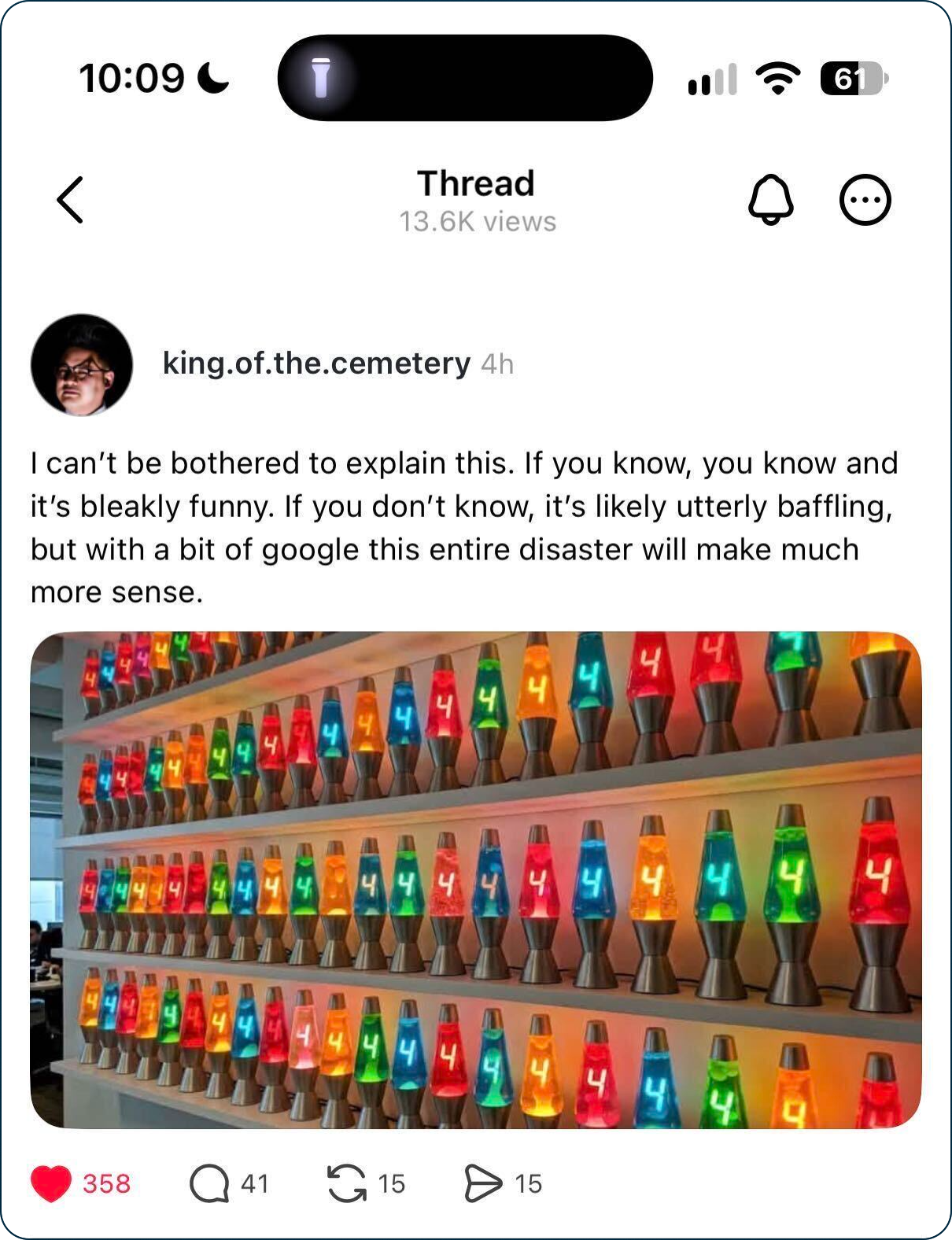
- In the vein of Cloudflare and the eMudhra CA flaw (if you know you know): www.threads.com/…
* CPG Grey video (from a year ago) explains how postal codes work in the US and why you need them _and_ the address, but the last part is all about how Ireland threw away their entire method and started over: [Your Post Code Is the Directions, Not the Destination](https://youtube.com/watch?v=1K5oDtVAYzk)
Legend
When the textual description of a link is part of the link, it is the title of the page being linked to, when the text describing a link is not part of the link, it is a description written by Bart.
| Emoji | Meaning |
|---|---|
| 🎧 | A link to audio content, probably a podcast. |
| ❗ | A call to action. |
| flag | The story is particularly relevant to people living in a specific country, or, the organisation the story is about is affiliated with the government of a specific country. |
| 📊 | A link to graphical content, probably a chart, graph, or diagram. |
| 🧯 | A story that has been over-hyped in the media, or, “no need to light your hair on fire” 🙂 |
| 💵 | A link to an article behind a paywall. |
| 📌 | A pinned story, i.e. one to keep an eye on that’s likely to develop into something significant in the future. |
| 🎩 | A tip of the hat to thank a member of the community for bringing the story to our attention. |
| 🎦 | A link to video content. |