
In December 2016, when the very first AirPods came out, Steve bought me a pair as a surprise. They worked great, and I documented my excitement with an article entitled Apple AirPods – Bluetooth With Less Fiddling?. In March 2019, I bought the 2nd gen AirPods because, why not?
Just a few months later, in November of 2019, I “upgraded” to a pair of AirPods Pro, and in my article entitled AirPods Pro – Worthy Upgrade from AirPods 2?, I was fairly bullish on the fit, and even Steve reported that he was able to wear the AirPods Pro without them falling out of his ears.
I’m not sure why we were so confident that they were a great fit for both of us, because as time wore on, we both agreed they did not stay in our ears, after all. In February 2021, I tried the CharJen Airfoams Pro Active Ear Tips to replace Apple’s ear tips. They seemed to make me happy when I wrote the article, but eventually, the AirPods Pro would still slowly squirt out of my ears. In March 2021, I tried adding CharJen rubber ear hooks, which worked well enough, but I had to take them on and off every time I put them in the charger, which got tedious.
Finally, in January 2022, I found the perfect solution. I replaced the AirPods Pro with Beats Fit Pro. For over three and a half years, the Beats Fit Pro have stayed in my ears because they have built-in flanges that keep the earbuds in my ears. Steve has a pair too, and they work great for him. I do find on occasion that the flanges wriggle loose, but it’s pretty rare that the buds actually fall out.
Each year when Apple announces they’ve improved AirPods Pro to fit more people’s ears, I’m tempted to try them again, but up until this year, I’ve resisted that temptation. This year, they really sold me when they said:
Utilizing over 10,000 ear scans with more than 100,000 hours of user research, AirPods Pro 3 are the most secure and best-fitting AirPods ever. To deliver this improved fit for even more people, the internal architecture was completely re-engineered to make each AirPod smaller, while the external geometry of the ear tip was aligned to the center of the body for increased stability — a design informed by an unparalleled dataset of more than 300 million points. And with new foam-infused ear tips that now come in five sizes — including a new XXS size — AirPods Pro 3 deliver an exceptional in-ear fit.
I’m starting to feel like Charlie Brown with Lucy and the football, but maybe this time they would fit and not squirt out of my ears!
The Problem to Be Solved
Let’s ask ourselves the correct question, though. “What problem are you trying to solve, Allison?” Well, I’m glad you asked.
In no particular order …
The Beats Fit Pro case is USB-C, but it doesn’t have wireless charging. For the most part, that’s not at all an issue. When I go out for one of my endless walks, when I remove my earbuds, and I charge the case via USB-C. I’m very good at habitual, repetitive tasks, so I very rarely find myself with uncharged headphones as a result.
On travel, I’m quite fond of the Anker MagGo Wireless Charging Station Sandy reviewed for us, which has MagSafe for iPhone, magnetic puck charging for the Apple Watch, and wireless charging for AirPods. If I had AirPods Pro, I could charge everything without hunting down another cable and charger for my headphones. Not a huge deal, but a nice to have.
Let’s see, what’s my next excuse?
Noise cancellation is quite good on the Beats Fit Pro, but Apple sure made some big claims on how much better it is with AirPods Pro 3. There are those who would suggest that I shouldn’t use noise cancellation while walking. But where I live, ICE cars, trucks, leaf blowers, weed whackers, and construction equipment are my constant companions.
People talk about the transparency mode on AirPods Pro as though it’s magical. On Beats Fit Pro, I find it highly annoying. It’s like having active noise cancellation, except then letting through the most annoying high-frequency sound. I’ve wondered whether AirPods Pro have a completely different method of producing transparency mode.
AirPods Pro have been improved over the years to include cool features like lowering the volume when you start talking to someone and allowing more sound to come through, and increasing volume when something louder is happening nearby. I wanted these new features.
I may not need Live Translation day to day, but Steve and I do travel quite a bit, so it could be useful on our trips. We’ve booked a trip to Finland next year, and one to Spain, Portugal, and Ireland, so I may need this feature soon.
I’ve been very curious about the hearing aid feature in AirPods Pro, not because I have hearing loss but because I’m curious about the technology. It bothers me that there’s a stigma to wearing normal hearing aids as we age — why isn’t there the same stigma around wearing glasses? Any technology that makes it less expensive and more fashionable to have improved hearing is a win.
The new heart rate sensing from AirPods Pro 3 sounds pretty cool, but I never move about without my Apple Watch. It would still be fun to test.
Over the last 3+ years, I kept hoping these nifty new features would come to Beats Fit Pro, but in all that time, there hasn’t been a single hardware or software update to them.
All of these transparently obvious justifications caused me to buy yet another pair of AirPods Pro.
How Do They Fit?
I’ve been wearing them on my long daily walks for a week now, and so far, I haven’t had any problem with them staying in my ears. I hesitate to say that, because I’ve lied to you so many times in the past, as documented earlier. When I first tried them on, they were a 100% no-go. I immediately swapped out the medium ear tips for the extra extra small (XXS) tips. I found that if I really cram them in and twist them so that the stems pointed forward a bit away from my face, they stay firmly in place.
As of the time I’m writing this up, I’ve walked about 30 miles in the first five days I’ve had them, and they have yet to fall out on a walk. I wore them on a plane ride, too, and they were quite comfortable for the few hours I wore them.
Active Noise Cancellation
I had both my Beats Fit Pro and my shiny new AirPods Pro 3 on the plane ride back and figured that was a great opportunity to compare the Active Noise Cancellation (ANC). I swapped them back and forth a few times to judge each set’s ability to cancel the tedious drone of the jet engines. I’d love to report back that the AirPods Pro 3 were astonishingly better, but to be perfectly honest, I couldn’t really tell the difference.
They’re both good, but as I reported about a year ago, both Steve and I find that the wired Bose headphones we bought over a decade ago still do a better job of removing the plane noise on our long flights. (Bose Wired Headphones vs. Beats Fit Pro on a Plane)
We have another short trip planned in November, and with any luck, I’ll remember to pack all three and do a full comparison. By then, nobody but me will care, but I’m still curious to compare the different technologies
Wireless Charging
I did get a chance to test out charging the AirPods Pro 3 case while on travel using my Anker MagGo charger. Steve and I travel so much, we’ve perfected packing of cables and other chargers. One that I don’t leave home without is my beloved Retro 67 from ShargeGeek with 3 USB-C ports in a tiny block that looks like a little original Mac.
Wireless charging has never been a huge priority for me. But being able to plug just one cable into the ShargeGeek Retro 67 and charge my iPhone, Apple Watch, and now my AirPods Pro 3 is pretty cool. Necessary, no, but the simplicity is appealing, especially for travel.
Day to day though, when I leave on my walks, there’s a USB-C cable sitting right there ready to charge the case. However, before a recent walk, I was reaching for the USB-C cable and realized I also had an Apple Watch charger puck sitting right there too. I had some vague memory of hearing you could charge AirPods on the Apple Watch charger, and you know what? It worked! It might be just enough easier to slap the case down on the Apple Watch charger than it is to find the hole to plug in USB-C. Time will tell.
Live Translation
My first experiment to test Live Translation was a complete failure, but it was because I had a fundamental misunderstanding of how it works.
I called my friend and yours, Pat Dengler, on a FaceTime call and asked her to speak French to me. (Yes, like the original Addams Family’s Gomez to Morticia.) In the FaceTime interface in iOS 26, there’s a translation button but when I tapped it, nothing happened. Pat said she’d tried Live Translation with AirPods Pro 3 earlier to listen to French President Macron speaking at the United Nations, and to do that, she used the standalone Translation app to access Live Translation.
While still on the FaceTime call with Pat, I launched the standalone Translation app, but it wouldn’t start translating. When I selected Live Translation, the interface would pop up on screen and instantly disappear.
I hung up on Pat and opened a web browser to Patrick Beja’s Le Rendez-vous Tech podcast, and while I could clearly hear him speaking in French over the AirPods, opening Live Translation didn’t work there either.
I found Macron’s speech to the UN on YouTube, and I heard him speaking French in my left ear, and a woman’s voice speaking English in my right ear. That was a little bit odd, so I removed the left AirPod, and that gave me just the English translation in my right.
I was suspicious that this wasn’t Live Translation. I hadn’t done anything to invoke it, and the translation was so good and so quick. There should have been a delay, and this seemed instantaneous. I tested my theory that this wasn’t Live Translation by speeding the video up to 2X. Sure enough, I could hear the translated English voice speaking just as rapidly as Macron in French. I suspect I’ve stumbled across some really cool YouTube feature where they pipe the translation to the right channel and the original to the left, and it had nothing to do with Live Translation.
I explained to Steve how I wasn’t able to get Live Translation to work, and he cracked the code. In every test I ran, I was piping the audio into the AirPods over Bluetooth. But Live Listen is designed to let you talk to a human in meat space and translate the audio to your language. That means Live Translation has to be listening to the microphones on the AirPods, not through Bluetooth.
It took a bit of fiddling and a third device to get it to work, but I finally heard (and saw) Live Translation in action. I connected my AirPods to my iPhone, but played Patrick Beja’s Le Rendez-vous Tech from the speakers of my MacBook Air so the AirPods could hear it. On my iPhone, I launched Live Translation, selected French, and as soon as Patrick and his guest began to speak, I could hear the translation in English, as well as see the original French and the English translation on the iPhone. You can toggle off the original language if you like.
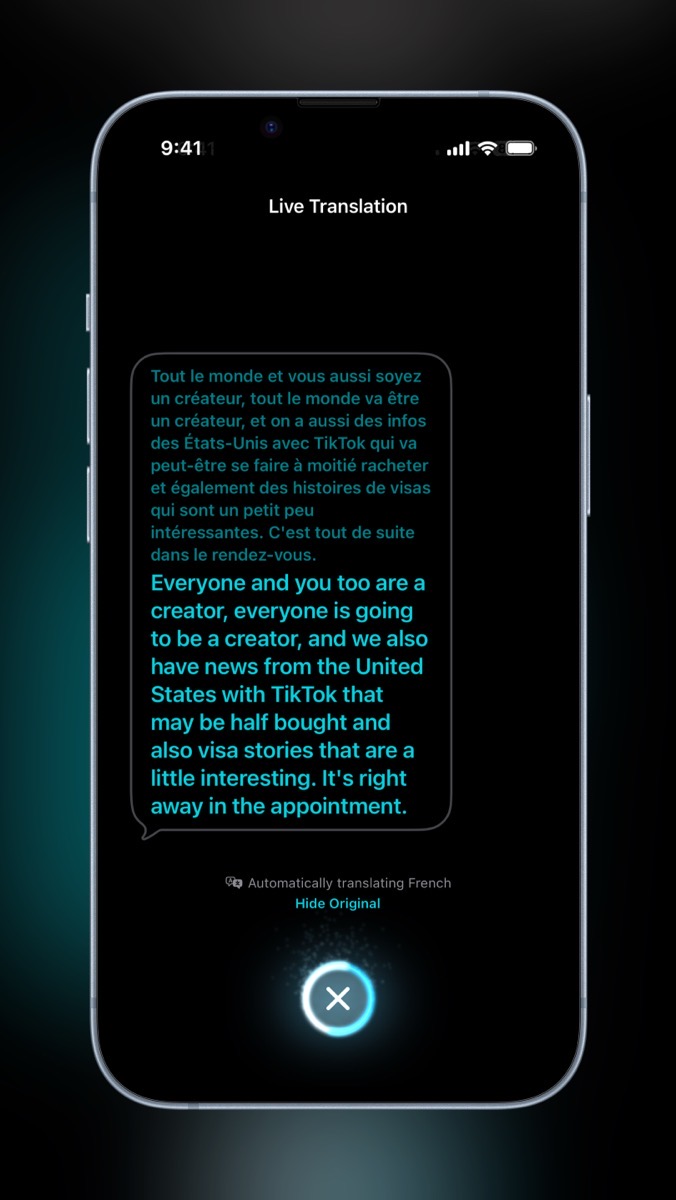
I’d call it a success, now that I understand how it works! The one thing that was disappointing was that Live Translation doesn’t let you save the transcription of your conversation. As soon as you tell it to stop translating, it goes back to the start screen for the Live Translation app. Imagine you stopped someone and asked for directions, and they gave you detailed instructions, and as soon as you walked away, the directions were gone. Seems like something they could and should add in the future. The only way I figured out how to save it was to start a video recording of my screen before starting the translation.
This and That
The Beats Fit Pros have one big advantage over AirPods Pro 3, and it’s that they have a physical button you push to play/pause and do other functions. With AirPods Pro 3, you have to squeeze to play/pause. You may ask why that’s an important distinction. If I’m doing dishes or doing something else where my hands are not available to pause my headphones, with Beats Fit Pro, I can easily tilt my head to one side and raise my shoulder up to push the button. It sounds like a clumsy gesture, but it’s really quite easy.
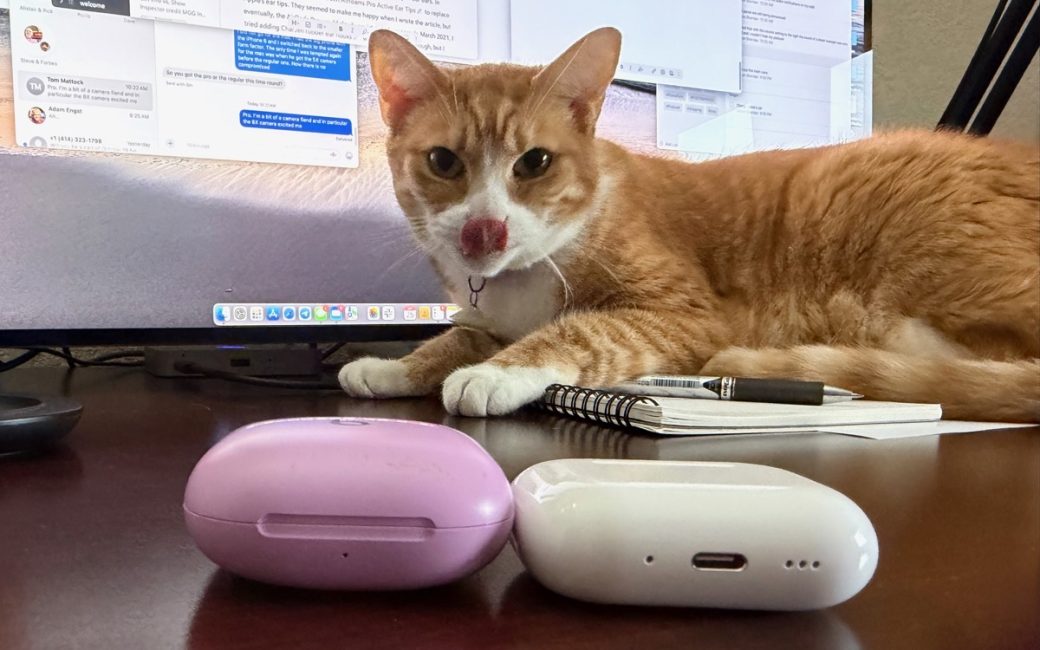
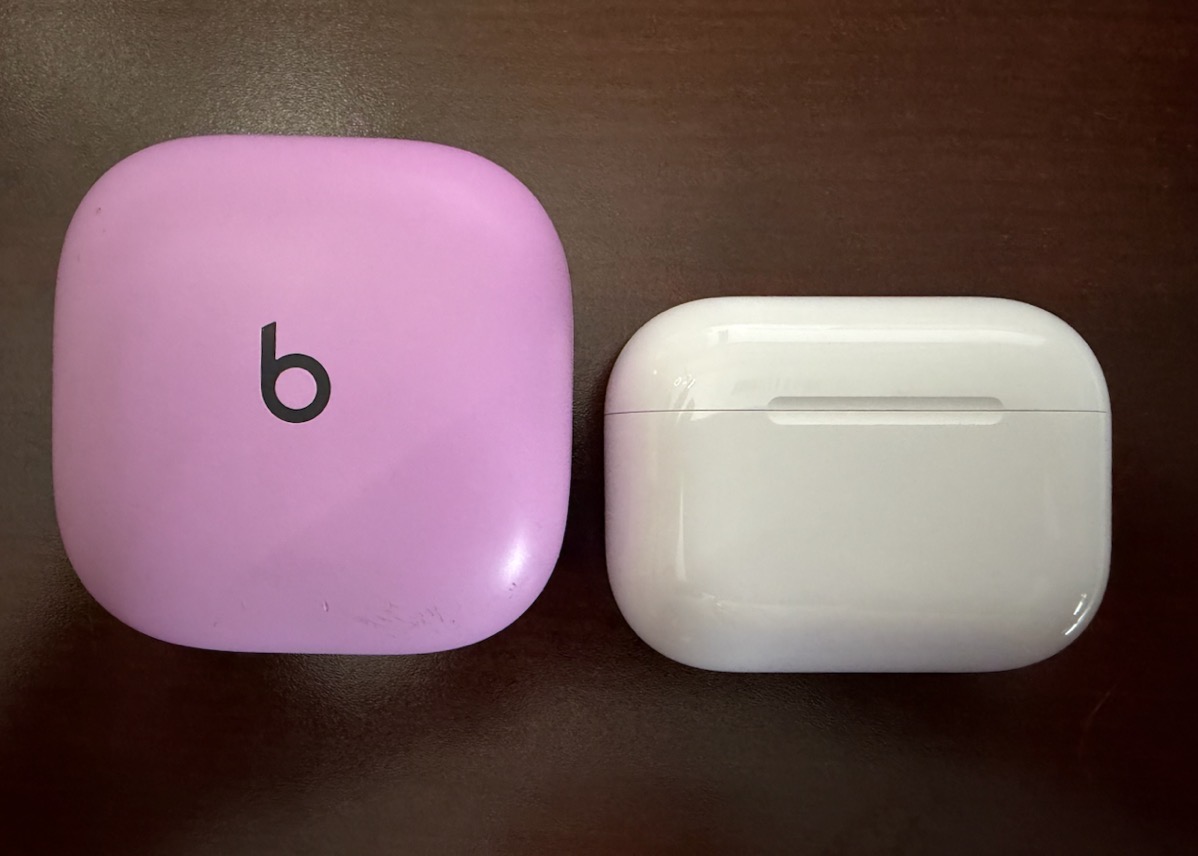
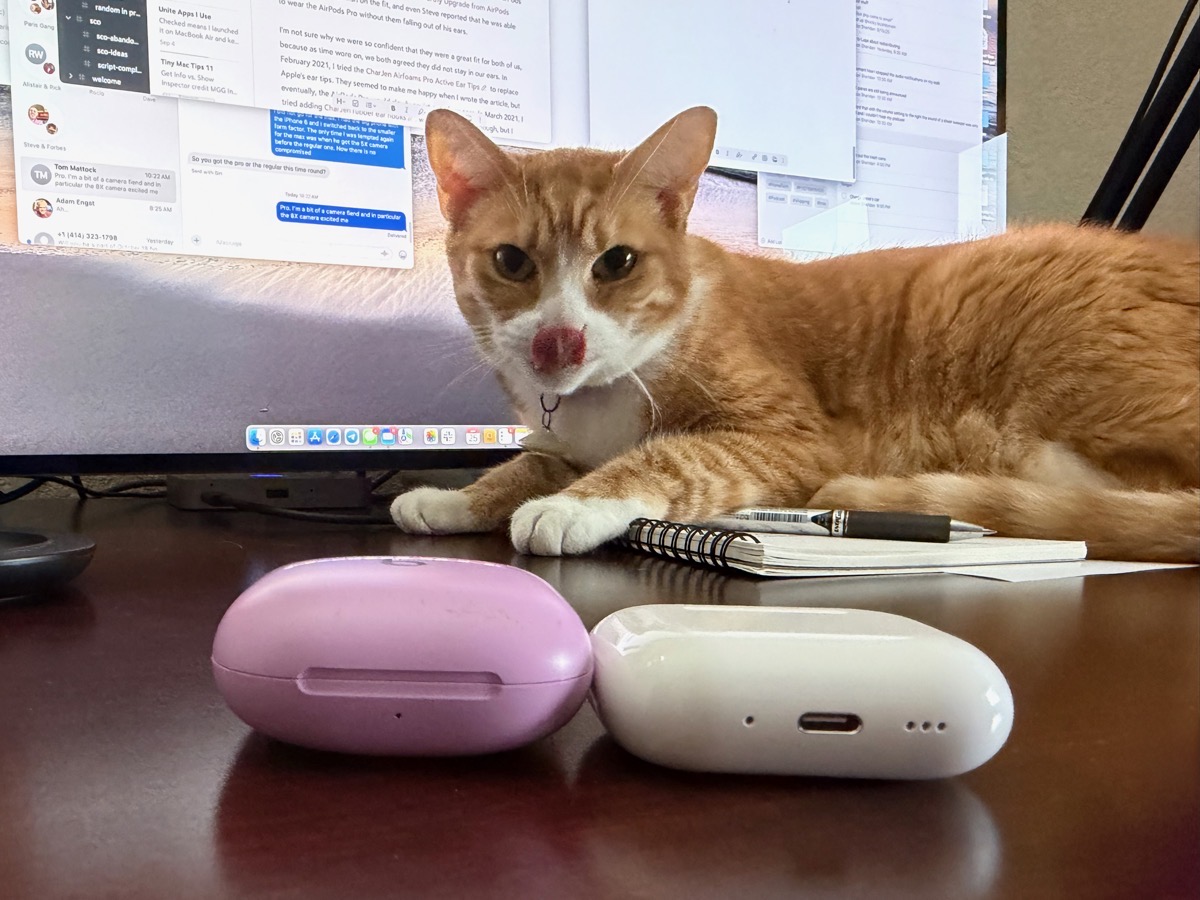
The case for AirPods Pro 3 is significantly smaller than the Beats Fit Pro case. I really like to keep my purse as minimalistic as possible, so I appreciate the smaller size. The Beats Fit Pro case is much taller and thicker than the AirPods Pro case.
I also appreciate that I can use Find My with the case for AirPods Pro. The earbuds themselves for Beats Fit Pro respond to Find My, but not the case. To be fair, losing a bud is more common than losing the case and the buds.
When you first select your AirPods Pro 3 in Find My, it will show you the case, left bud, and right bud as three separate items to find. I selected one bud, and I got a notification pop-up that said it could only play sound if I turned on Bluetooth. Bluetooth was already on, and my iPhone was connected to the AirPods. I tried a few more times, and then it would at least try to play a sound from the selected bud.
In repeated tests, I had inconsistent success in playing sound out of a single bud. The first time, it never worked. It just spun, telling me it would do it when it could find the device (which was sitting right next to me). The next time I tried, after many, many minutes, it did work. In my final test, it worked immediately. I don’t know if it was just having trouble finding them, and it wasn’t until the last test that it actually knew where they were, or what.
After all those tests trying to get the AirPods Pro 3s buds to make sound, that sound is so quiet coming out of the earbuds that I’m not sure playing sound would be all that helpful anyway. Perhaps if you dropped them on the desk next to you, or maybe in the couch cushions, you’d hear them. Overall, I recommend losing your AirPods Pro in the case rather than losing the individual buds because the case makes plenty of noise when you ping it.
Within Find My for AirPods Pro, you have the option to declare your accessory as lost and have your phone number and a brief message displayed. I know how that works on an iPhone or an iPad because they have displays — where does it display with AirPods Pro? Maybe it pops up on the finder’s phone?
Curiously, for both AirPods Pro and Beats Fit Pro in Find My, there’s a Settings button that doesn’t do anything at all. I double-checked this on Steve’s phone, also running iOS 26, and his Settings button in Find My for his Beats Fit Pro doesn’t do anything either.
Bottom Line
The bottom line is unclear. I’m tempted to say that I’ll be switching to the AirPods Pro 3 from Beats Fit Pro and that Apple have finally solved the fit problem for me. But you’ve heard me say that before, and I don’t want to be a liar (again). But I can say they fit me better than previous models, and they’re more comfortable than any of the previous models of AirPods Pro. The jury is still out on whether they’re better than Beats Fit Pro for me, but for now, I’m fairly happy.
Except Beats Fit Pro come in Stone Purple, and they’re very pretty.