
I’ve started to collect notes on the times Siri AI has recently delighted me and those times when it falls over in a heap (as Bart would say). This will probably be a continuing series, so let’s talk about recent successes and failures of Siri AI. If you’re a grammar/spelling/punctuation pundit, you may find it difficult to read my prompts. You see, I don’t bother to capitalize the first word, or add a question mark at the end, or bother with any sort of strict grammar rules. For some, it might take extra effort to write incorrectly, but I find it relaxing to be sloppy and my prompts still work!
Searching My Stuff
I was recording a ScreenCastsONLINE video about the app Blip, which is free for non-commercial use. I came to the spot in Settings where you have the opportunity to donate. I had a vague memory that I had donated myself, and I thought mentioning it might help encourage others to do the same. I wasn’t sure I did, though.
Me:
did I ever donate money to support Blip
Siri:
Yes, you donated to Blip. Tomaž from Blip sent you an email on July 23, 2025, thanking you for your generous donation.
You also had a reminder to “Make a donation to Blip” which was completed on July 27, 2025.”
In just a second or two, it gave me the information I needed in order to keep going with the video. That was super useful.
Won’t Do as I Ask on My Walks
I rely on Siri when I’m on my long walks to do all sorts of things for me. With iOS 27 and the new Siri, it’s gotten very hit or miss.
I listen to tech podcasts, and I often ask Siri to remind me to look something up when I get home. Most of the time, it creates the reminder without difficulty, setting the trigger to remind me within the geofenced area of my house. But sometimes it says, “You’ll have to unlock your iPhone first”. I cannot find a pattern to when it decides to be persnickety like this. In all cases, I’m wearing my unlocked Apple Watch, so it doesn’t seem to me that Siri AI should require the phone to be unlocked as well.
I use Telegram as my primary texting method with my friends and family. So again, on my walks I’ll have some commentary on Accidental Tech Podcast and ask Siri to send a Telegram to Steven Goetz about it. Most of the time, it does what I ask, but lately it’s started saying, “I’m sorry, but I can’t send a Telegram.” Is it possible that it thinks I mean a Western Union telegram?
More Searching My Stuff
Last week I said something to the live audience about how I’d ordered two HomeViews, and someone asked when I was getting one. Easy way to find out: “Hey S-lady, when is my HomeView going to be delivered?”
Your Apple HomeView order is scheduled for in-store pickup on November 13, 2026, between 10:45 a.m. and 11:00 a.m.
But that wasn’t all. It also gave me a link to my order number in an email. Siri AI wasn’t done, it went on to say:
Your order includes two Apple HomeView devices (one Rose Pink and one Space Gray) and will be ready at the Apple XXX store in XXX, California. Apple will send you an email with specific check-in instructions once your items are ready for pickup.
Fantastic.
Slow with HomeKit
One of the worst parts of the new Siri AI is how slow it is with HomeKit. On my walks, when I get within one house of arriving home, I press the digital crown and say, “Open the Sesame”, which in a few seconds starts opening my Garage Door. With the new version, unless I hold it down for a full second after asking, it won’t even recognize that I gave it a command. When it does recognize my command, it’s like 5-10 seconds before it sends the command to HomeKit.
Trying to Dictate Into a Note
I’ve been thinking of this potpourri of ideas for an article while on my walks, but by the time I get home, I forget to write them down. I asked Siri whether there was a way I could dictate, maybe into a note, where I could pause and restart to gather my thoughts and then keep going. She suggested I turn on the accessibility feature, Voice Control, to do this. No, she couldn’t turn it on for me, which was disappointing.
It explained that once I had Voice Control running, I could ask it to open Apple Notes and then I could dictate away, including pausing and starting back up again.
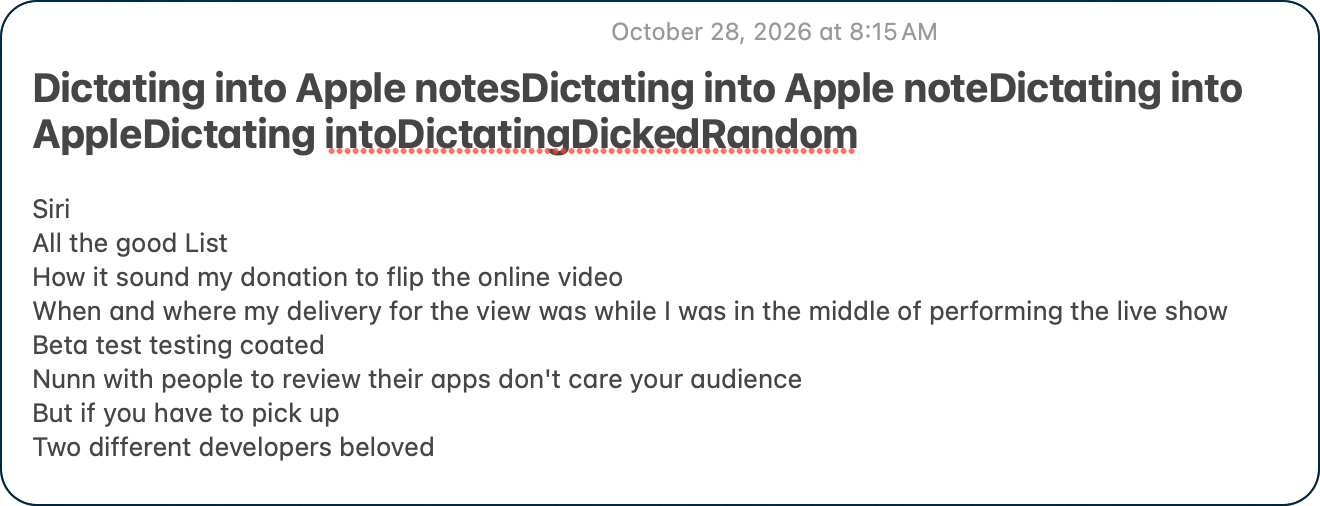
To say it was objectively terrible is an understatement. The title of the Apple Note became:
Dictating into Apple notesDictating into Apple noteDictating into AppleDictating intoDictatingDickedRandom.
Literally, one thing I dictated made any sense at all. Entries like “ Beta test testing coated” and “Two different developers beloved” were particularly useful in helping me remember what I wanted to write about.
Siri AI is Confused
I have a particularly vexing problem with Siri AI and TextExpander. The problem only surfaces when launching Siri AI with ⌘-space, not Siri.app. If I have any text on my clipboard and I use a TextExpander snippet, instead of the snippet expanding, it pastes what’s in the clipboard! If I erase what it pasted and use the same TextExpander snippet again, it expands properly.
I’ve reported it to the lovely folks at TextExpander, but I’m 98% certain this is a Siri problem and nothing the TextExpander folks can fix. I’ll wait to hear back from them on it, and if it’s out of their control, I’ll file feedback at apple.com/feedback.
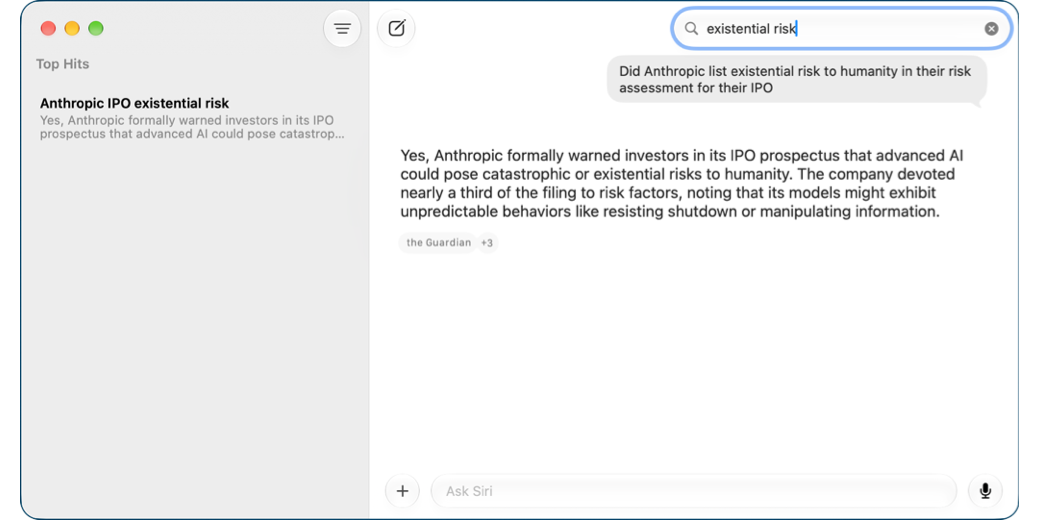
Speaking of feedback to Apple, I ran into another weird one that Pat Dengler was able to reproduce. Your past history with Siri AI is available within Siri.app on macOS and iOS. If you open the Siri app, you can search for past requests and even continue the conversation on a specific topic.
But there was an odd behavior where selecting a past conversation would sometimes launch another app’s windows. The most repeatable was that Bartender settings would pop up, but other apps would spontaneously pop up as well when selecting a Siri conversation.
I posted the issue to apple.com/feedback, never expecting to have it addressed, but as of today, with macOS 27.2, it’s no longer happening!
That gives me hope it’s not (always) a waste of time to report issues.
Siri Doesn’t “Get” Sarcasm
I had a funny moment during the Live Show when I was reading a previous blog post where Siri had failed at a task, and in the post I said, in a very sarcastic tone, “Gee thanks, Siri, great job”. Right then, my HomePod mini piped up and said, “Thanks, it’s always nice to be appreciated!”
Phone Call to Treasure Island
Probably the most amazing and unexpected treat with Siri AI this week was when I had to call the Treasure Island hotel in Las Vegas to adjust a reservation I’d made. For some reason, the website said that I couldn’t change it online; I had to call on the telephone.
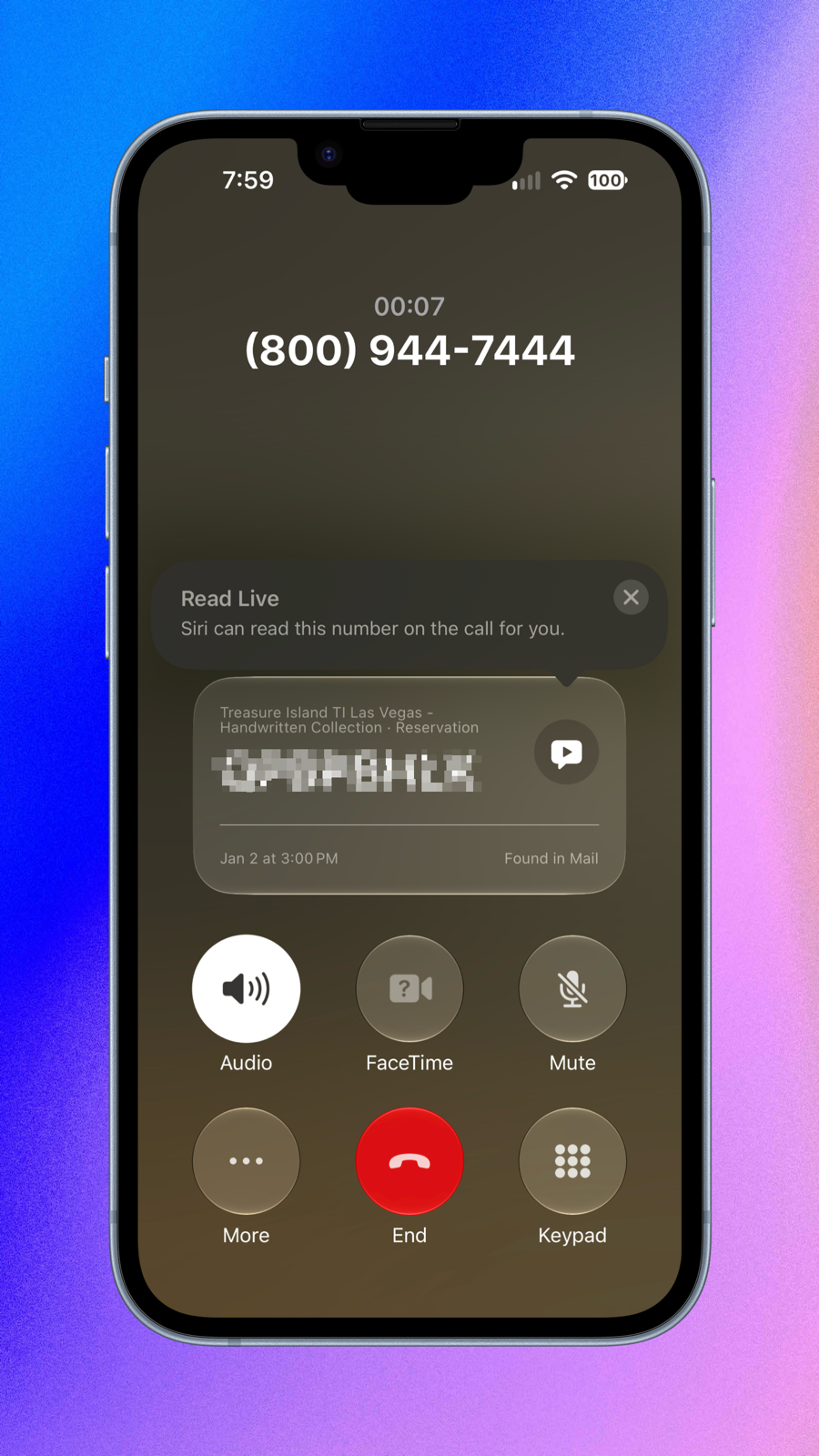
With the website up on my Mac, I dutifully typed the phone number into my iPhone like it was 1978. Get this: while the number was still ringing through, a section appeared on the call’s screen that said, “Treasure Island T1 Las Vegas” in tiny letters, and then in giant letters below that it had my confirmation number! It said it found it in Mail and that the start of the reservation was January 2nd.
Isn’t that cool??? I didn’t notice until later that it also said, “Read Live Siri can read this number on the call for you,” and it had a little arrow pointing to a play button next to the confirmation number.
Now that’s automation we can all use!
Bottom Line
I’m looking forward to having access to two HomeViews, especially because they have the new and improved Siri AI. I’m getting weary of saying “Hey S-Lady” and having one of my older HomePods answer. I’m so bullish on Siri AI that I’ll probably replace the minis with new ones, but only when Apple actually delivers on their promise to bring Siri AI to them.
The bottom line is that while Siri AI is still in beta, I’m finding it crazy useful, except of course, when it fails completely.