
As you probably know, I enjoy walking long distances for exercise. One of the reasons I like having a dog is so I have company on these long walks. I’ve been wearing an Apple Watch since 2015, and I love looking at the metrics for how far I walk, how fast I walk, how much elevation gain I have on my walks, and how many calories I’ve burned.
But on a fateful day on February 26th, a little dog named Guts raced in front of me, and I fell to the ground and broke my hip, bringing my walking adventures to a halt.
After three days in the hospital after surgery and 6 days in a rehab hospital, I was released into the wild with a walker. Unlike people who get a hip replacement, who are encouraged to put weight on their affected leg on the first day, I wasn’t allowed to put weight on it for 5 weeks. BTW, they encourage you not to call it the “bad” leg so you don’t hurt its feelings. On my walker, I was only allowed to do what they call toe touch weight bearing. This meant walking mostly on my right leg, but allowing my toe to touch on the affected side.
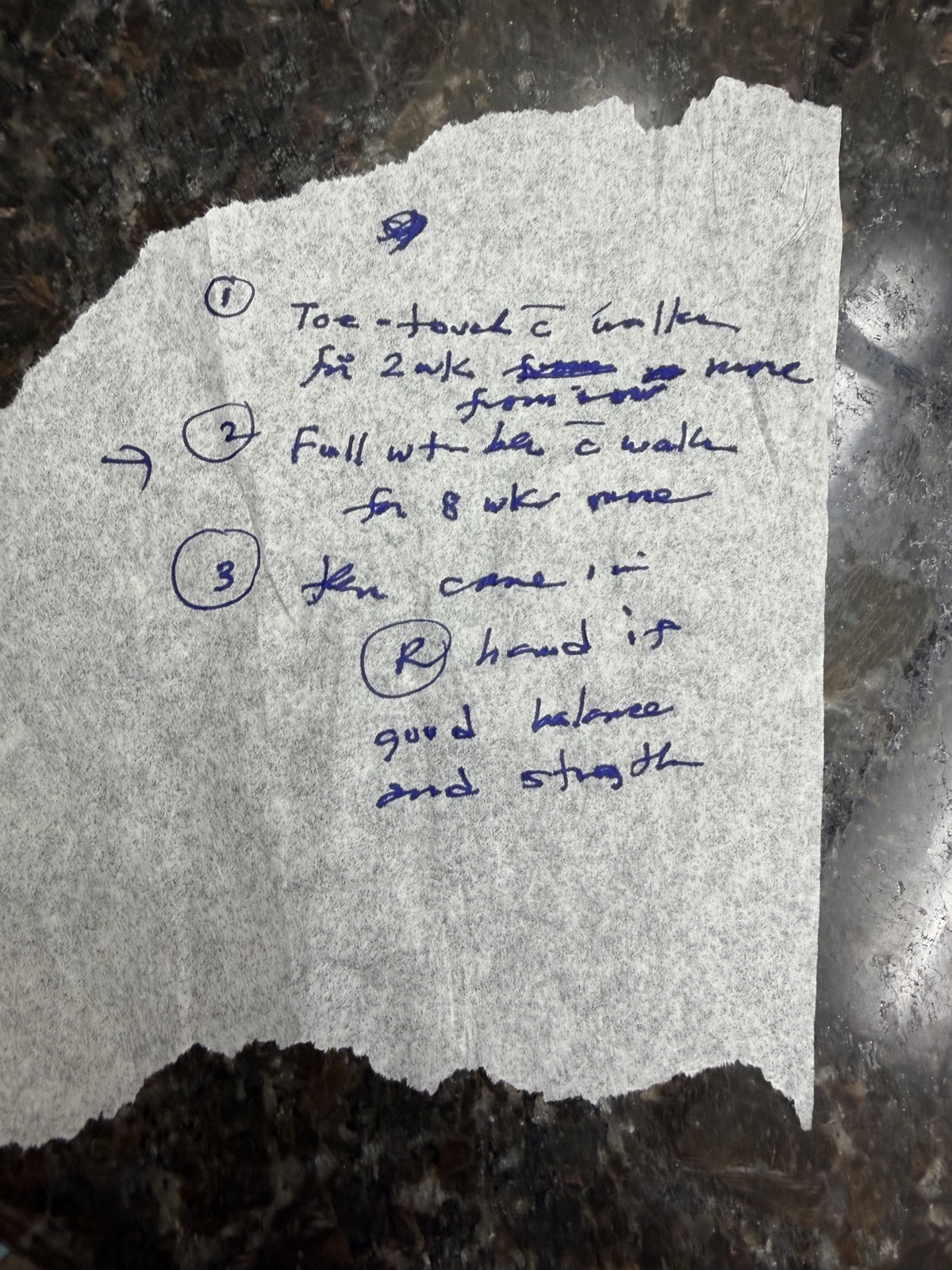
I’m not a fan of my surgeon, mostly because he’s really poor at explaining things, but also because he underestimates me. At my first appointment, 3 weeks after the injury, he told me I’d have to be on a walker for 8 more weeks and only then, maybe I could start transitioning to a cane. I literally sobbed at the prospect. He was very hard to understand, and in desperation, because of my questioning of the exact timeline, he decided to write it down for me. By hand … with a felt marker … on the tissue paper they put on the little bed in the exam room. I put a photo of it in the shownotes so you can fully appreciate how well it clarified things.
Anyway, after that dreadful appointment, I decided to stop worrying about what he said, work out hard, and do what my body felt it was ready to do.
Right around that time, at 3 weeks out, was when I gave you a tiny bit of tech about my walker and other tools. My walker was one of those grey aluminum frames my physical therapist, Kris, calls a “geriatric walker” with small wheels on the front and sliders on the back.
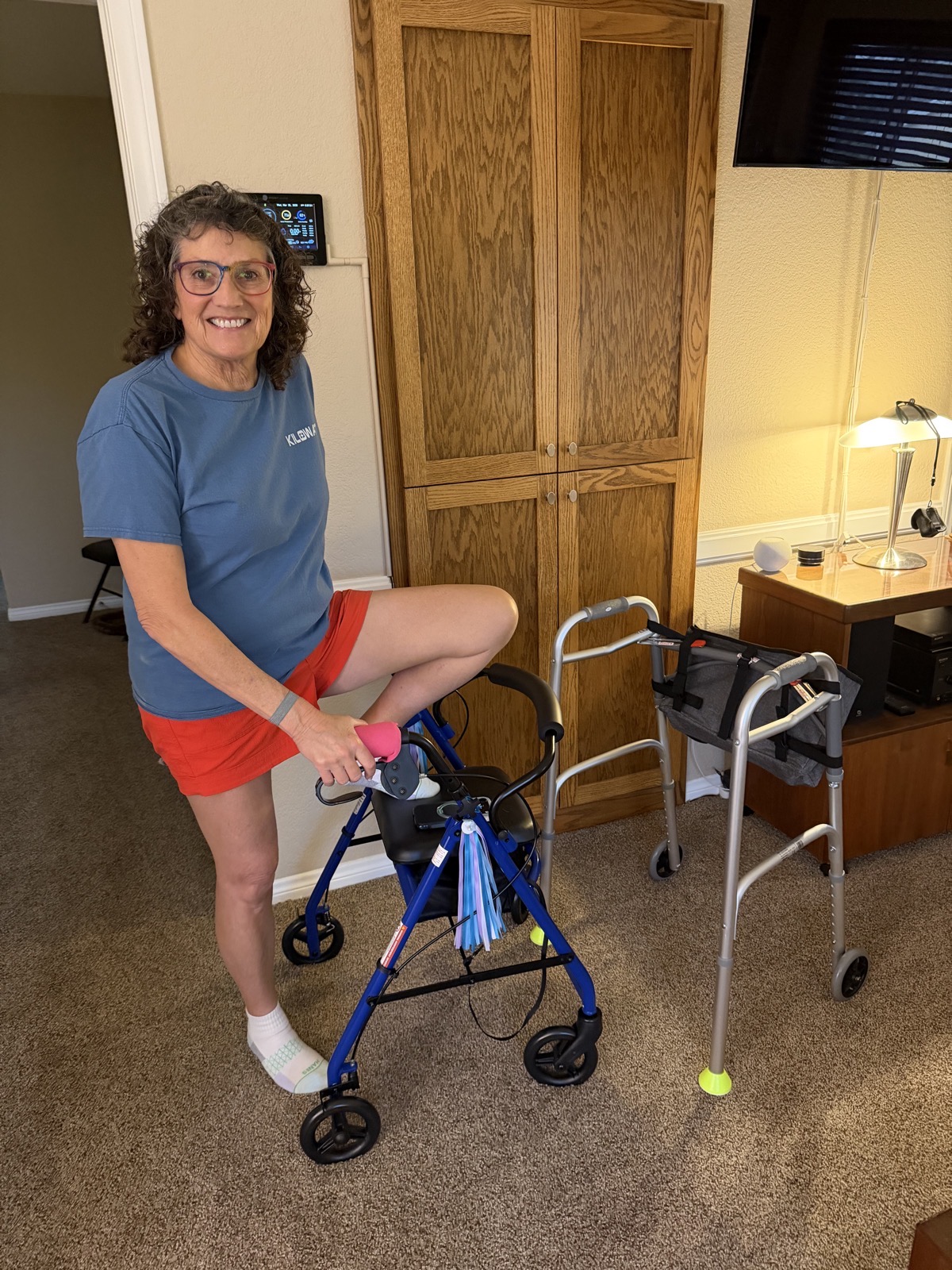
A week later, at 4 weeks, I upgraded my geriatric walker for a fancy rollator. This one is blue, has four large wheels instead of just two small ones, and it has a seat with a compartment under it so I could actually move from one room to the next carrying my laptop on the seat! I can’t tell you how freeing it was to be able to carry things.
I decorated it with pink squishy handles and some lovely butterfly streamers my granddaughter Kennedy sent me. Sandy and Kevin from the live chatroom sent me even more adornments — a purple bicycle bell and a bike horn. I hate to admit it, but I actually started using the horn to tell Steve when I was ready to be assisted downstairs.
At 5 weeks, my surgeon had cleared me to finally start putting weight on my affected leg, and I took my first baby steps. Boy, did that feel weird! Now I promise I’m not going to take you through every detail of my recovery, but I think the timeline will make the conversation about Apple Watch metrics more interesting, so bear with me for just a bit longer.
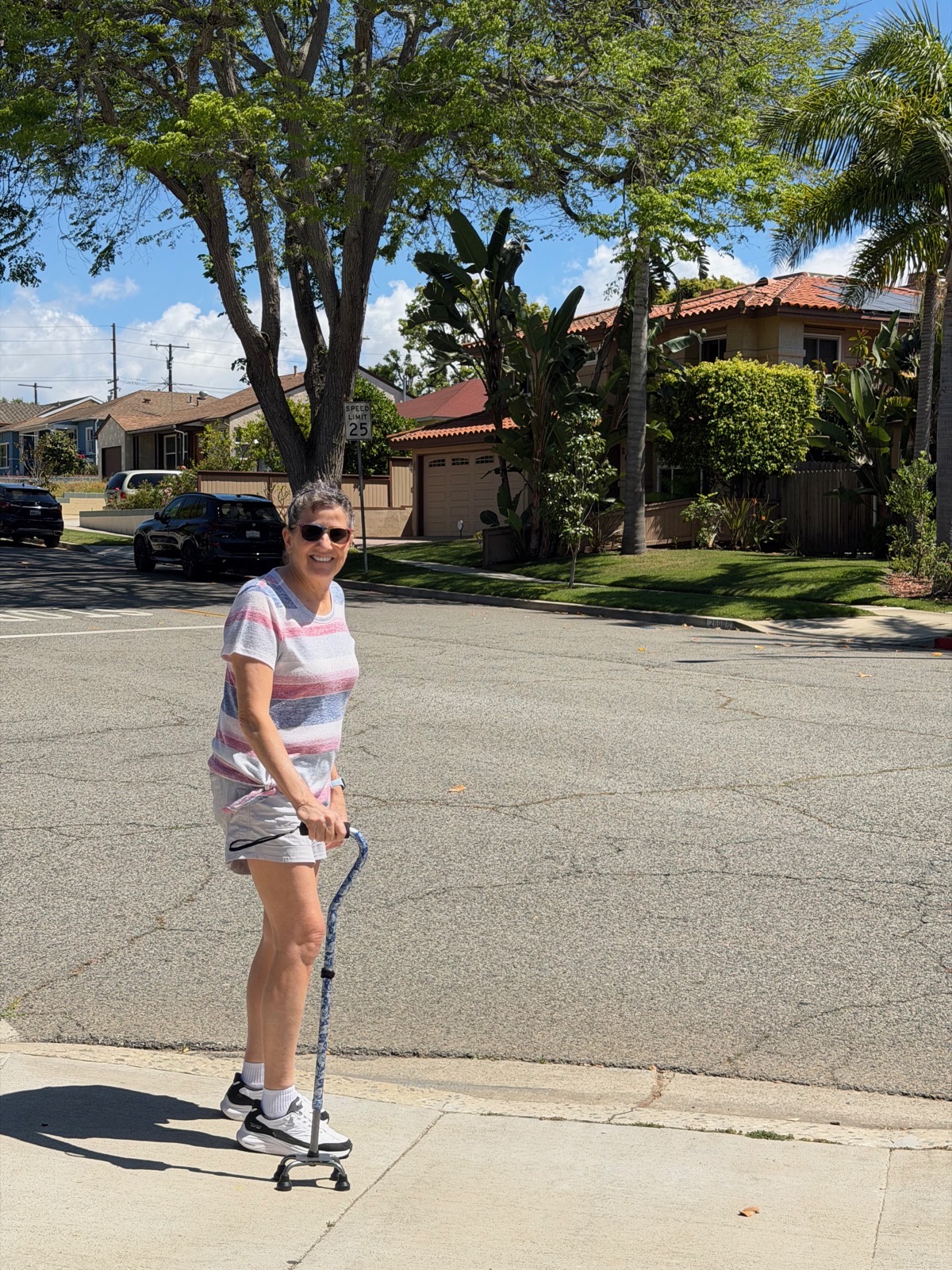
You’ll recall from earlier in the saga that at 3 weeks, the surgeon said I had to be on a walker for 8 more weeks for a total of 11 weeks from the injury. After one week of walking with the fancy rollator, I was feeling really comfortable walking. This was only 6 weeks after the injury, but I felt so strong that I disobeyed the surgeon’s instructions and started using a cane. I was 5 weeks ahead of his schedule.
My next appointment with him was at 7 weeks, and I was a little worried he might give me a hard time about being off the walker. His assistant put up my latest X-rays on the computer, and then switched the screen to show his notes where he had told me to be on the walker for 11 weeks.
I decided to do a wee bit of manipulation and switched the screen back to the X-ray. When he walked in, I was simply standing there using a cane. Instead of hollering at me, he just asked me to walk a few paces for him and said, ” You’re walking with a limp, and that’s just about right on schedule.” I call that a victory.
A week and a half later, at 8.5 weeks, I was out for a 1-mile walk, and for some reason, it occurred to me to lift up the cane and carry it. I ended up walking more than a half mile without using it at all!
After a week or so of carrying the cane while walking, I stopped using the cane altogether. That was at 9 weeks after the injury. Yep, 2 weeks before the surgeon said I might be allowed to start using a cane, I was already walking without one!
I give myself a lot of credit for this. Being in good shape when I got injured has made all the difference in my recovery. If I’d been heavy or not had a strong right leg and strong arms, I certainly couldn’t have recovered this quickly. I’m also motivated to push through this, doing the exercises and working hard with my physical therapist. I couldn’t speed up the bone healing, but I could definitely regain my strength with perseverance.
Apple Watch Metrics
I entitled this article, “Apple Health is Worried About Me”, so I’d better finally get on topic and talk about tech! I mentioned up front how much I enjoy the metrics collected by the Apple Watch and displayed in the Fitness and Health apps on iPhone.
Apple normally likes to send little words of encouragement, like “Great start!” But after I fell, I started getting little hints, like, “You haven’t exercised as much as you normally do by this time of day.”
The first thing I started monitoring in the Health app was my step count. In the months leading up to my fall, I was averaging about 13,000 steps per day. By March, it was maybe around 1000 steps, if that.
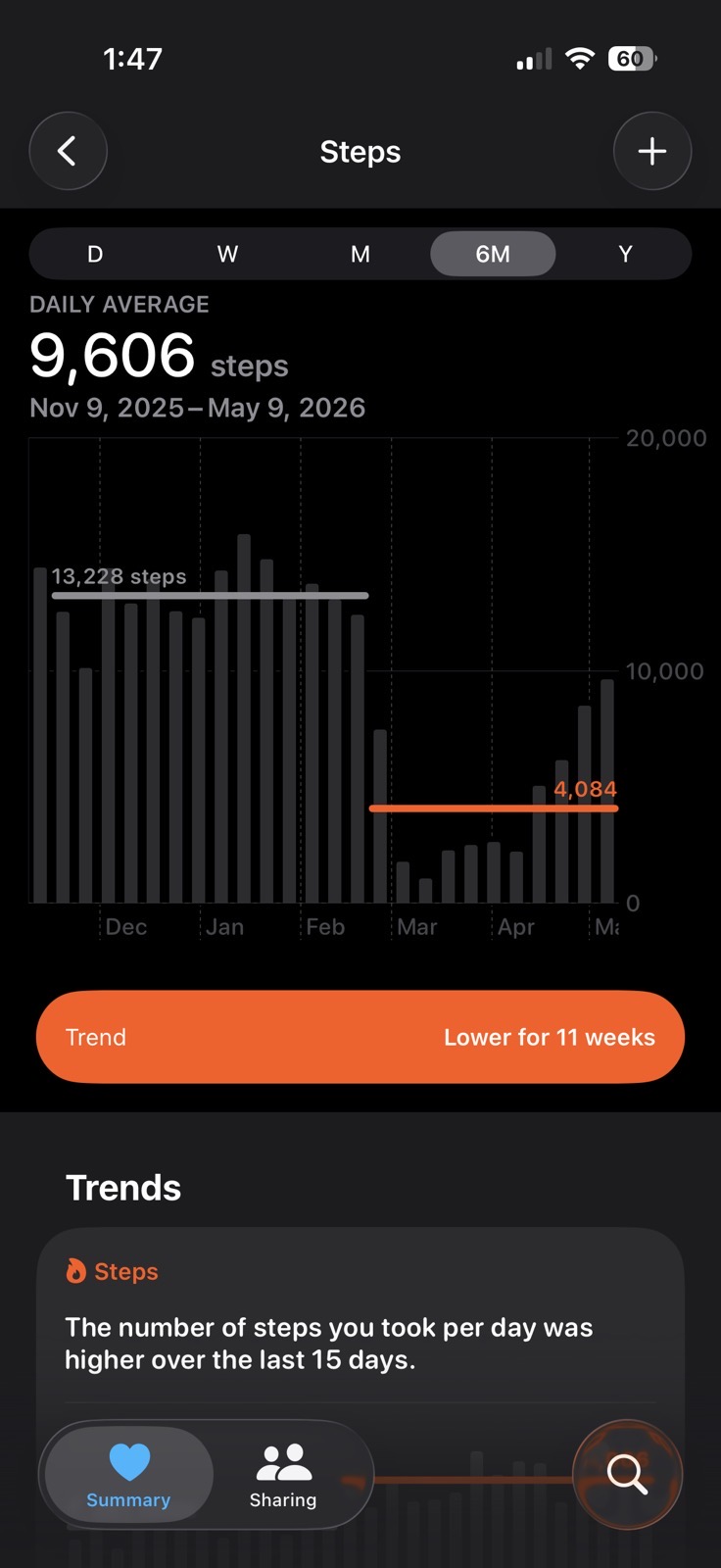
As I started to get stronger, walking longer distances with the walker, then the cane, and finally to full-on walking independently, I could see that step count starting to rise again. While that was encouraging, I was noticing that even though I can walk without too much pain, it’s still pretty painful to start walking. I would say it’s about a 4-5 on the pain scale of 1-10 when I first stand up, even after sitting for just 5-10 minutes. After 5 minutes of walking around, it drops down to maybe a 2, and I can go on a walk. I was discouraged.
Until I looked at the step count metrics again and noticed that for the month of May, I’m averaging over 9000 steps per day! That’s more like what many people who want to get in shape shoot for as an aspirational goal. And I’m only 11 weeks out from surgery.
Walking Steadiness
While Apple Health was concerned about my exercise level fairly soon after the fall, it was only recently that it alerted me to the fact that my walking steadiness was a concern. This is something I’ve kept an eye on since they first introduced it in Apple Health, because a change in walking steadiness can portend a fall. You see, I’ve always worried about falling on my own.
The alert from Apple Health said:
Low Walking Steadiness: Your Walking Steadiness is low and you may have an increased risk of falling in the next 12 months.
Since it doesn’t know why I was walking unsteadily, I think it’s grand that it gave me this notification.
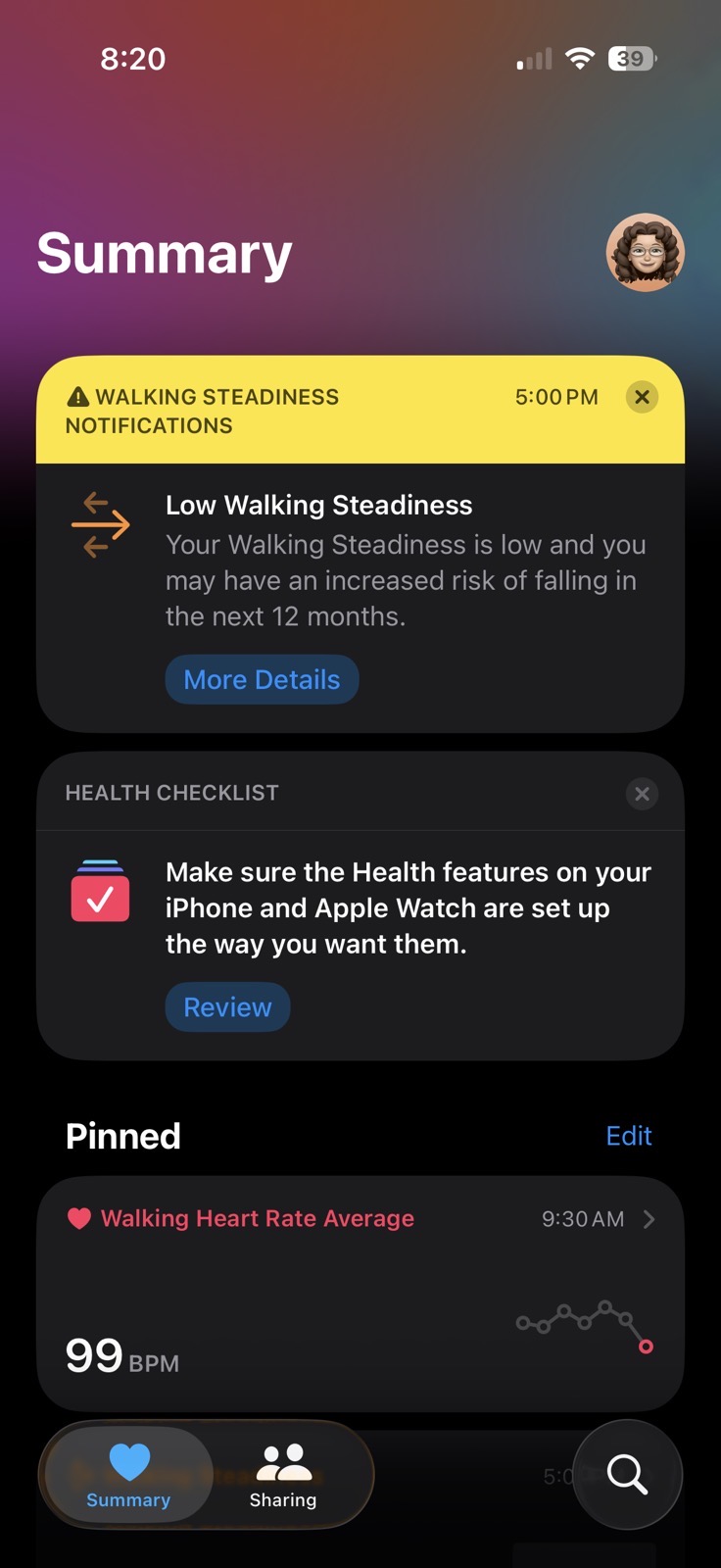
What surprised me was that it took so long to notice that I am not at all stable on my feet. I took a look at the walking steadiness graph for the last six months, and through February, it’s in the “OK” range (which is the best rating it allows), but there’s no data at all for the month of March, and it doesn’t start showing data till the week of April 5-11.
The datapoints from then on are very encouraging. Two weeks in April, it shows Very Low, but for the first two weeks in May, I’ve moved up into Low! I know that’s bad, but it’s progress, right? I think the walking steadiness metric is pretty interesting, but had I really become unsteady for reasons other than a massive injury to one leg, I think waiting 9 weeks to send me that alert is a bit problematic.
Walking Asymmetry
There’s a slightly different but related metric being tracked by the Apple Watch (or an iPhone if you’re male and blessed with the gift of pockets), and that’s called Walking Asymmetry. As Apple explains:
In a healthy walking pattern, the timing of the steps you take with each foot are very similar. Walking asymmetry is the percent of time that your steps with one foot are faster or slower than the other foot. This means the lower the percentage of asymmetry, the healthier your walking pattern. Uneven walking patterns, such as limping, can be a sign of disease, injury, or other health issues. An even or symmetrical walk is often an important physical therapy goal when recovering from injury. Your iPhone can record walking asymmetry automatically when you carry your phone near your waist—such as in a pocket—and walk steadily on flat ground.
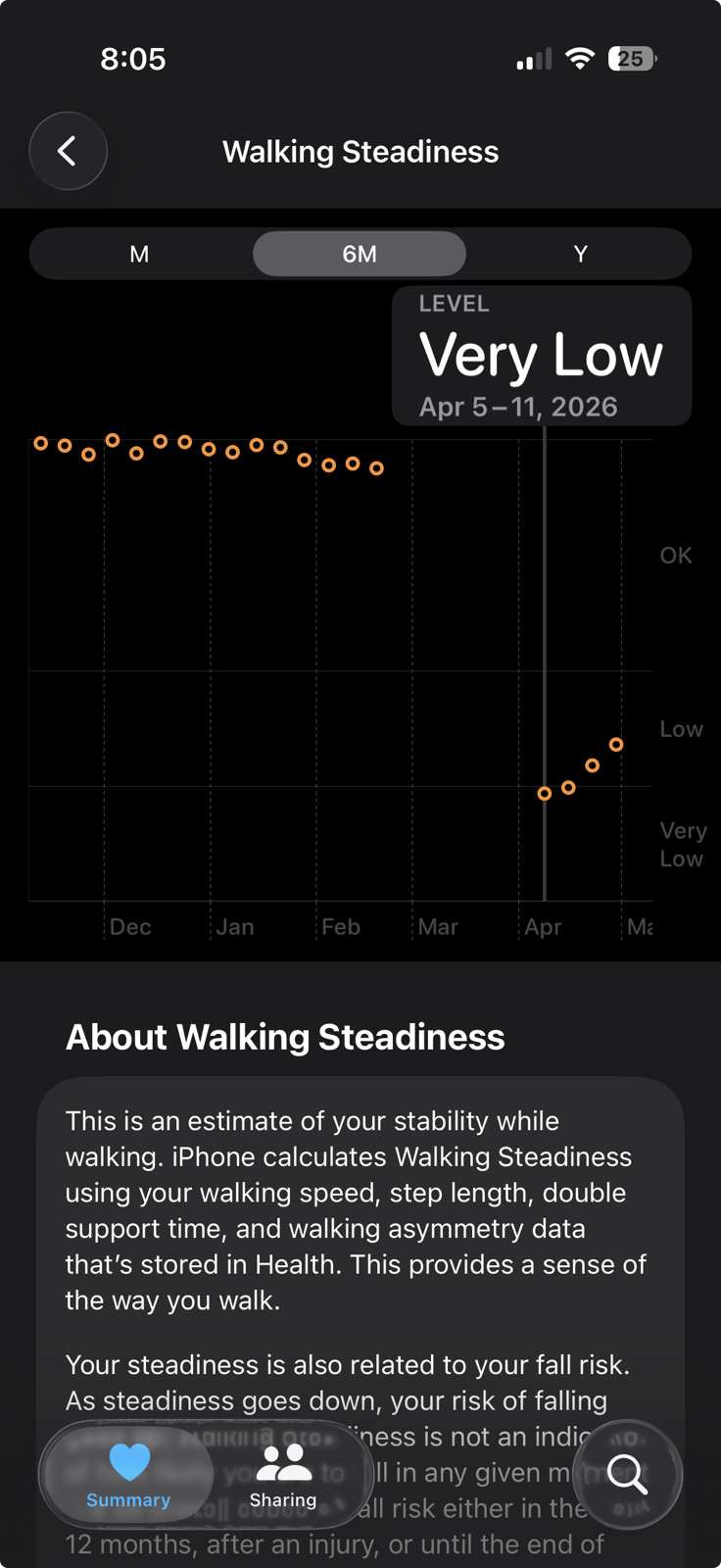
The graph for walking asymmetry is even more interesting than walking steadiness. The scale goes from 0-100%, you’re shooting for 0% asymmetry, aka 100% symmetrical. My walking asymmetry from December through February is was close to 0%, showing a data point for each week of the month. Oddly, in March, it only recorded data for 2 of the weeks. I think it didn’t have much data because it was rather hard to tell that I was actually walking before that. From there, though, it climbed steeply to 17%, 37%, and then peaked at 77.9% for the first week in April.
That date is interesting as it’s right around the time I took my first steps on the affected leg. The good news is I can see it dropping back down as steeply as it rose, and as of this week, my walking asymmetry is 2%. I’m very pleased with this as I’ve been making a significant effort not to limp when I’m on my walks. As the left leg is still much weaker than the right, it’s easier to limp, but it will slow down my progress if I give into it.
Unlike with Walking Steadiness, I didn’t get any warning about these stats, which doesn’t seem quite right, but at least in my case, this wasn’t at all a surprise.
Cardio Fitness — VO₂ Max
Another metric available in Apple Health is Cardio Fitness, which is measured in units of VO₂ Max. I found a detailed Apple technical document about VO₂ Max and how it’s measured that will tell you more than you’ve ever wanted to know about VO₂ Max, and how Apple estimates it using your heart rate, sex, weight, and peak heart rate. I pulled three quick quotes from the technical article:
VO₂ max is the maximum volume of oxygen an individual can extract from inhaled air and consume through cellular metabolism.
VO₂ max values are typically normalized for body mass and reported as milliliters of oxygen per kilogram of body mass in one minute (ml/kg/min).
Cardio fitness on Apple Watch is an estimation of a user’s VO2 max in ml/kg/min, made based on measuring a user’s heart rate response to physical activity.
I’ve never spent much time tracking and analyzing my VO₂ Max, but Apple Health shows a dramatic drop off from my usual 26.7 down to 21.2 after the accident. It appears from the graph that your body maintains its ability to absorb oxygen for a period of time after stopping exercise, because mine doesn’t drop until the second week in April, when the break was at the end of February.
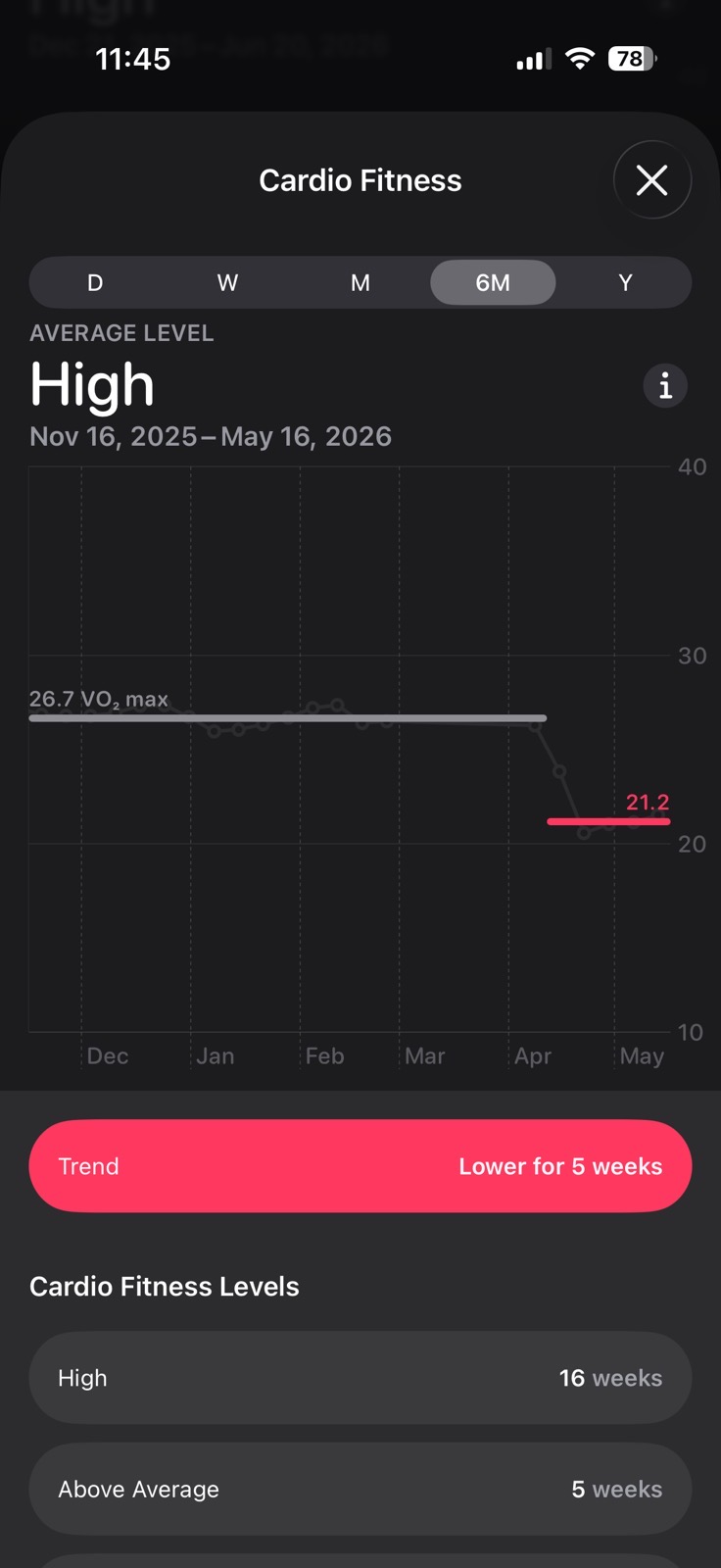
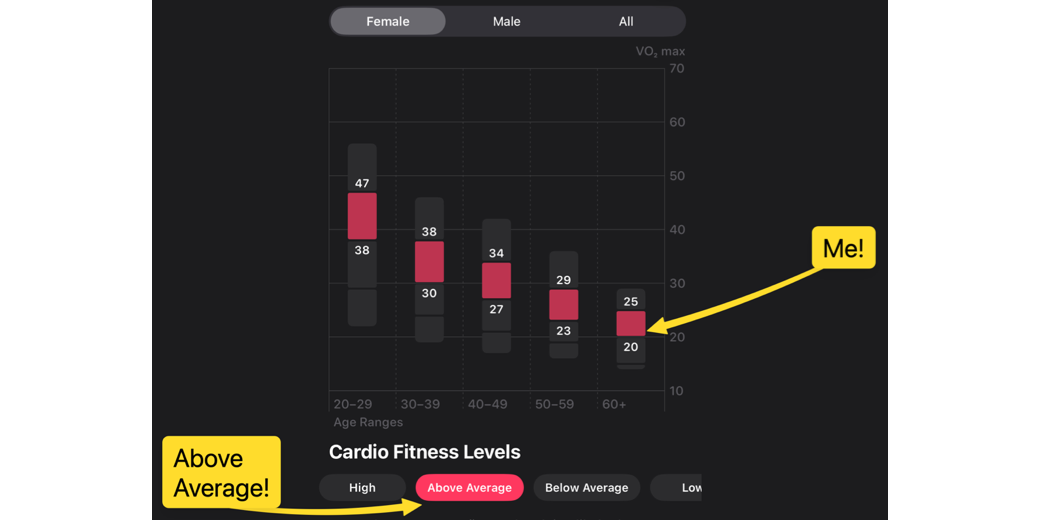
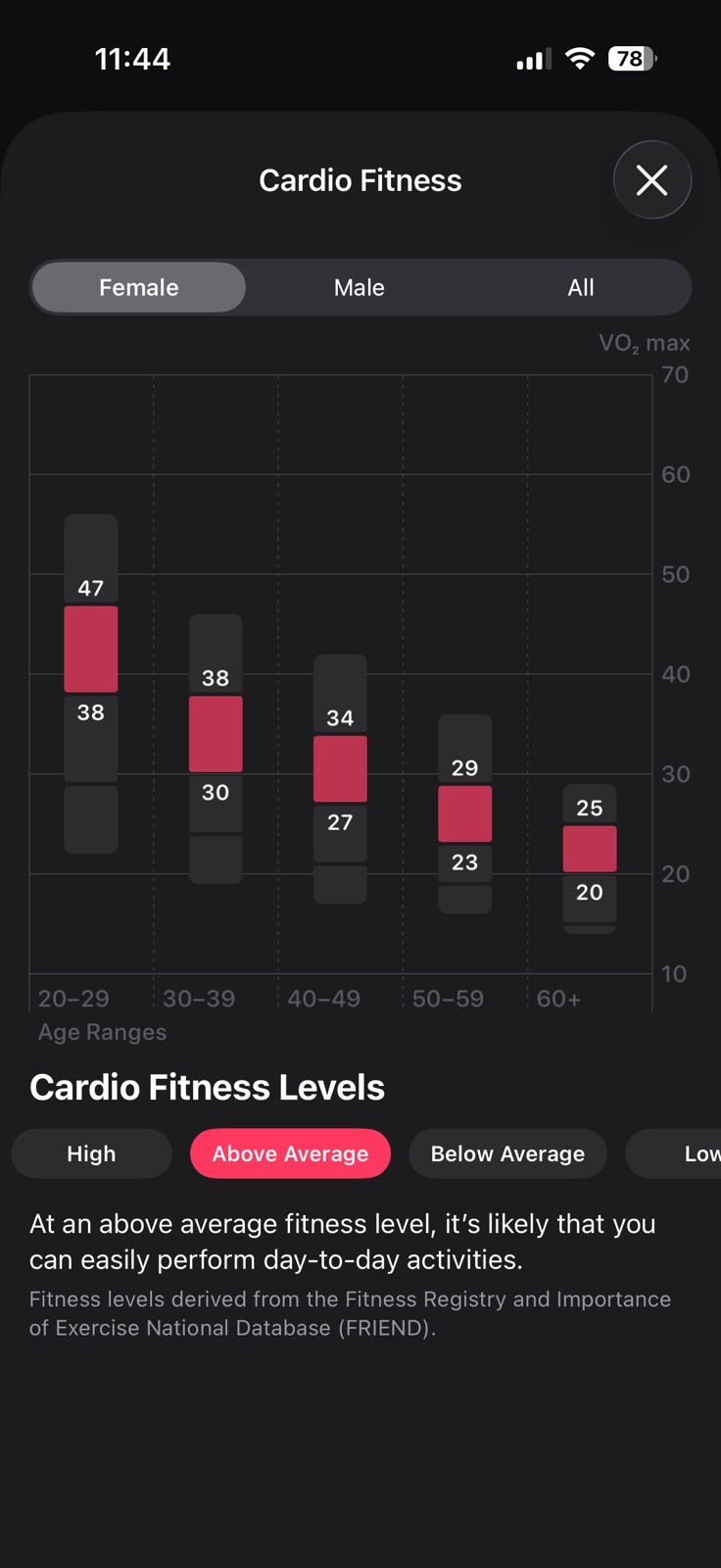
Unlike the other Health metrics that show improvement in the last month as I’ve been upping my exercise, my cardio fitness hasn’t yet recovered to my pre-injury levels. Interestingly, my newly lowered level of VO₂ max at 21.3 is considered Above Average. That got me curious about what the bands are on that performance metric. I poked the little “i” icon on the Cardio Fitness graph, and I was rewarded with a cool chart explaining Cardio Fitness levels.
There are three tabs across the top: Female, Male, and All. On the Female tab, the chart shows, by age ranges, what is considered Low, Below Average, Above Average, and High. I fall into the 60+ category, and it shows that VO₂ max between 20 and 25 is considered Above Average. My previous level of 26.7 is in the High section for cardio fitness level for my age group. I never used to pay attention to this metric, but now it has put a goal ahead of me that I want to reach.
If I understand what I read from the technical paper, I need to get my heart rate up to improve my VO₂ max, but I have to do that without increasing my chance of tripping! Maybe more hills…
Below Zone
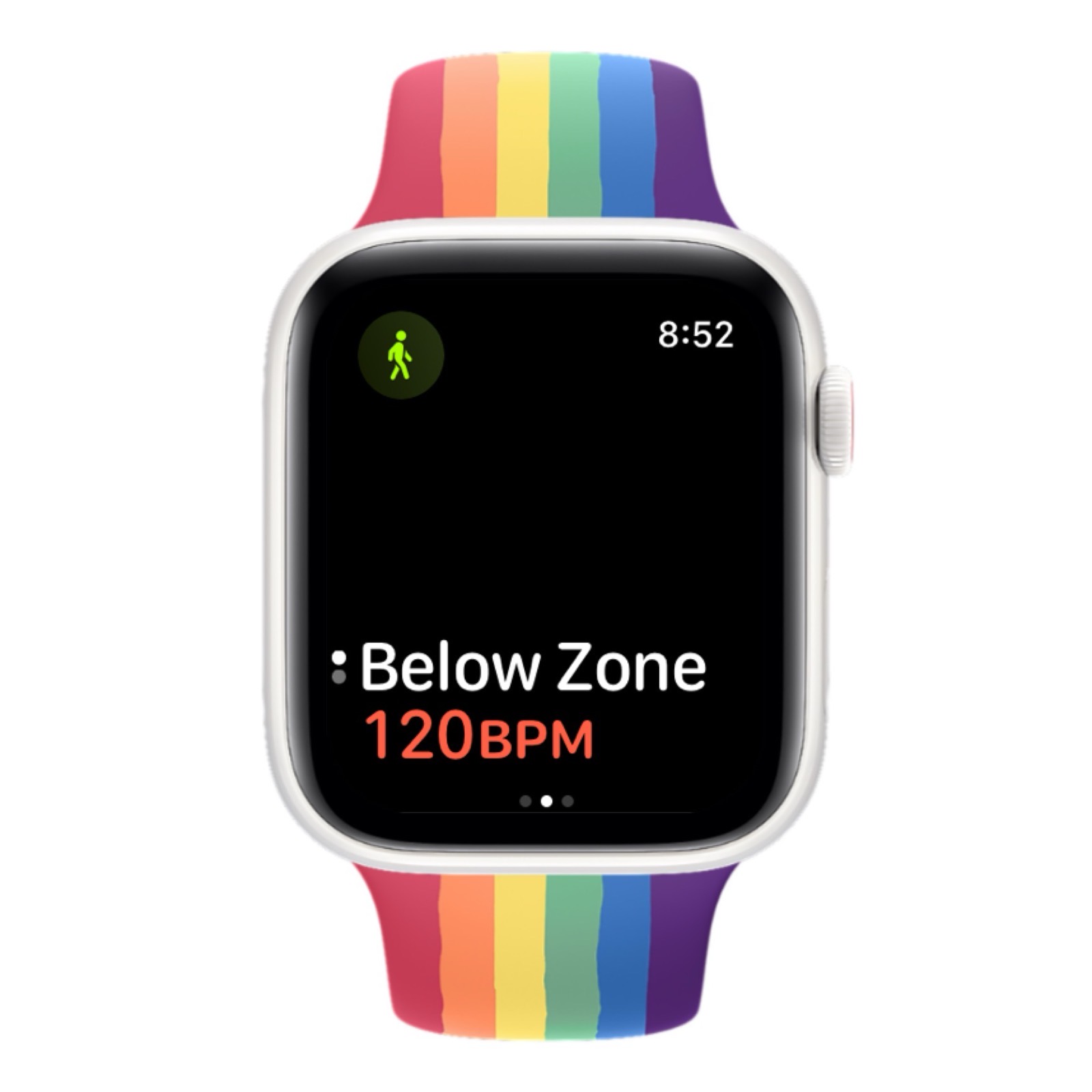
Apple’s disappointment in my activity levels has included an alert I get on my watch whenever I start out on my walking workouts. The alert says “Below zone”, and shows my current heart rate. Normally, since I’ve just started walking, this is something in the low 90s, but one day when it gave me the alert, it said 120 beats per minute was “Below Zone”.
I wasn’t really sure where it was getting this zone information, so I went hunting for an Apple support article that explained heart rate zones.
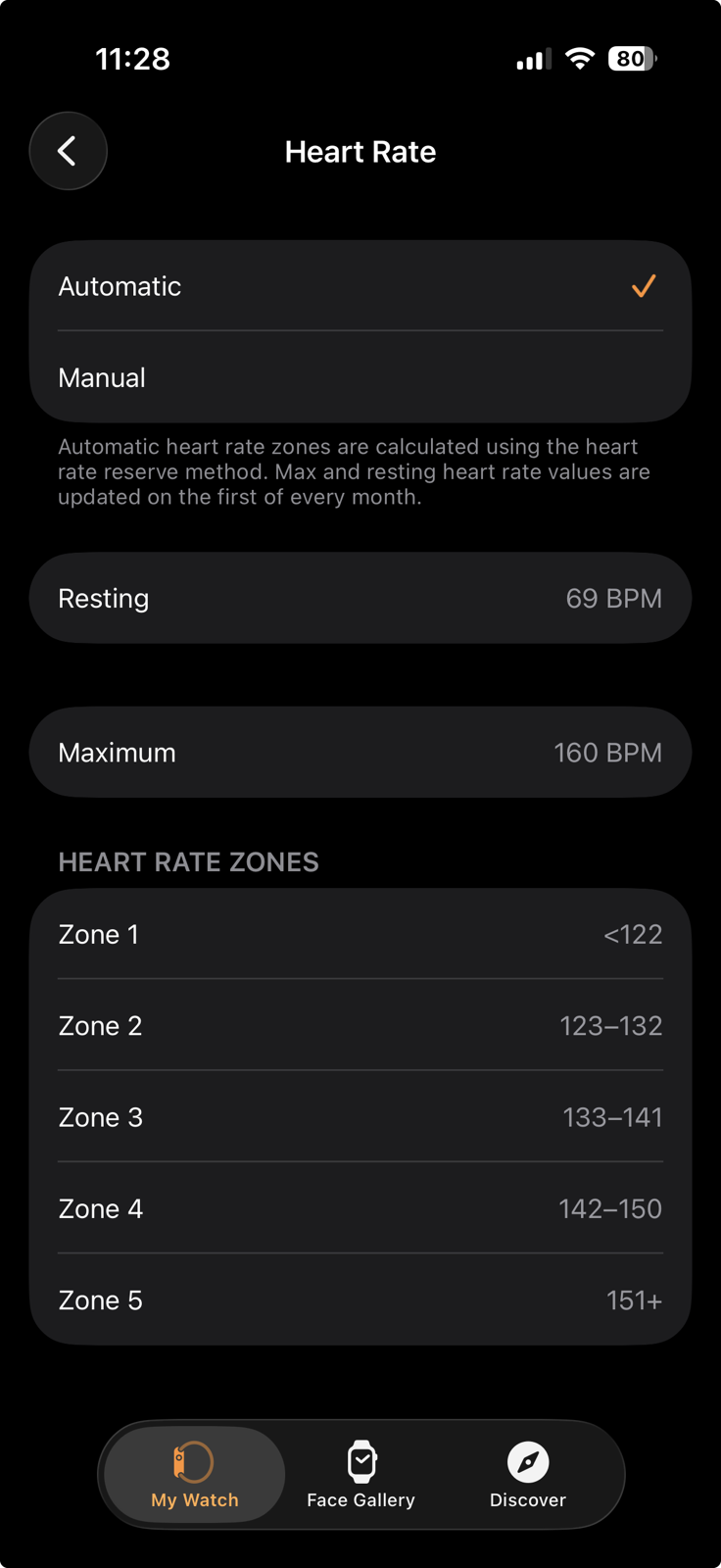
In the Watch app on iOS, if you navigate to Workout and then Heart Rate Zones, you’ll find where you can change the heart rate zones, which are what’s reporting this on my watch. At the top of the Heart Rate Zone page, you can choose between automatic and manual. Mine has been set to automatic. The page also says:
Automatic heart rate zones are calculated using the heart rate reserve method. Max and resting heart rate values are updated on the first of every month.
I suspect it hasn’t been updating mine on the first of the month because it says my resting heart rate is 69 beats per minute, which sounds reasonable, but it says my maximum is 160 beats per minute. I don’t believe I have hit that level even once since I stopped running and switched to walking a few years ago.
The Apple Support article goes on to say:
You can learn about the intensity level of your cardio-focused workout by viewing Heart Rate Zone information on your Apple Watch. Heart Rate Zones are a percentage of your maximum heart rate and are automatically calculated and personalized using your health data. On Apple Watch, Heart Rate Zones are presented in five segments—estimated effort levels ranging from easier to harder. By monitoring your Heart Rate Zone, you can make your workout more efficient and challenge yourself to improve your fitness.
On the Heart Rate page, below resting and maximum, there are five heart rate zones. Mine has Zone 1 as less than 122, Zone 5 at 151+. Let’s assume this is all wrong, and see what happens if I change it from automatic to manual. In Apple Health, I can see my walking average heart rate for the month ranged from a low of 88 to a high of 112. If I enter those two numbers for Zone 1 and Zone 5, all of the other zones are calculated to give me new ranges.
I have no idea what this will do for me and whether it will create new goals that will motivate me to work harder, but it was fun to play with the controls for Heart Rate Zones.
Bottom Line
The bottom line is that this injury and my sudden drop-off in exercise have motivated me to investigate more of the health metrics than I was paying attention to in the past. I’m a big believer in metrics, but only those that provide actionable information. Setting a step count goal and looking at the metrics on how you’re doing helps you to meet that goal. I’m even motivated by VO₂ max now. It’s possible I’ll start watching my heart rate zones and speed up to get my heart rate going, or maybe swing my arms more? I do watch my pace during my workouts, and I’m going faster than ever now (I broke a 21-minute mile on the strand down by the beach the other day), which helps with that too.
You may have noticed I haven’t mentioned the calories burned metric in all this. Let’s just say I’m at less than half of my goal right now and be quiet about that, ok?
The bottom line is that I’m doing quite well, all things considered, but I really don’t recommend breaking a hip, no matter how much fun it is to track your progress back to full fitness over time. If you see “break a hip” in a dropdown menu of options, choose something else, like “cat with irritable bowel syndrome” instead.
Allison, I’m a long time listener/reader and, when I don’t screw up, subscriber. I last communicated to express my sympathy for your injury. Just want to say how happy I am to see your recovery proceeding way beyond the timeframe the medical people suggested. I’m sure your prior health routine, particularly all the walking, made a big difference. I’d guess the medical experts base their comments on the average person. You (ta-da) are way above average.
Warm regards,
George
Oh, George, that makes me feel all warm and fuzzy! I am rather proud of myself, and I hope I can be an example to others on yet one more reason to take care of the amazing bodies we’ve been given.
Talk about a long-time listener, the first time you wrote to me was in 2012! You said you first heard me on the Mac Reviewcast. What great memories. You wrote because you heard me asking Dave Hamilton and John F. Braun about a problem with my iPod Nano and explaining how you had solved the same problem.
I’m so glad I don’t triage my mail very much, so I’m able to go back down memory lane like this.