
Allison interviews Manny Garcia from Satechi about their new accessories, starting with the EX1 and EX3 Slim Wireless Keyboards and a matching mouse. Both keyboards are cross‑platform with a toggle for macOS/Windows, priced at $49.99 (EX1) and $69.99 (EX3), while the multi‑device mouse is sold separately.
Manny highlights the mouse’s built‑in USB‑C receiver, removable rechargeable battery meeting new EU rules, front‑mounted USB‑C charging so it’s usable while charging, and an ambidextrous design. Manny then introduces a $399 Thunderbolt 5 dock with an SSD enclosure that offers high‑speed SD, USB‑A&C, 2.5 GB Ethernet, three Thunderbolt 5 outputs, and a host port that can charge a 16‑inch MacBook Pro at up to 140W via a 180W smart power supply.
Finally, Manny describes Satechi’s Find All product line: a passport cover, keychain, luggage tag, wallet card, and foldable glasses case with integrated Apple Find My tracking and wireless‑rechargeable batteries lasting around eight months per charge. Manny notes the system shows battery level via LEDs in the Find My app, but doesn’t yet send low‑battery alerts, which Allison flags as a potential usability gap for travelers.
Learn more at https://www.satechi.com/
Using a Screen Reader? click here
Transcript of Interview:
Allison: I love Satechi. I always try to stop by the Satechi booth at CES, and I’m here with Manny Garcia. We got a whole bunch of cool products to go through. What have we got going?
Manny: Today we’re debuting a couple of new products that we’re planning to launch. Some launched today, and some are going to launch this Thursday. The keyboards and the mouse are the products launching on Thursday. We have our EX1 and EX3 Slim Wireless Keyboards. Both of these keyboards are cross-platform compatible, so they can pair with the macOS ecosystem as well as Windows. They have a little toggle that lets you go back and forth between the different operating systems.
Allison: I like it when everybody can play. Why choose? Come on, we’re all friends now. That competition’s over. Let’s all have a good time. So this one, the little one, what do you call that one?
Manny: That one is the Slim EX1 Wireless Keyboard.
Allison: So the Slim EX1 looks like a smaller form factor without the full numeric keypad, right? But then this one?
Manny: This is the Slim EX3 Wireless Keyboard.
Allison: And that looks like the big Apple keyboard with the numeric keypad.
Manny: Correct.
Allison: What kind of price point are you looking at on these?
Manny: For the EX3, we’re looking at a $69.99 MSRP. For the EX1, it’s $49.99 MSRP.
Allison: Holy cow. So affordable.
Manny: Very affordable.
Allison: And then the littler keyboard comes with a mouse?
Manny: The mouse and the keyboard are sold separately as of now. We do plan on potentially coming out with a combo of both the EX1 and the EX3 with the mouse later this year. This Thursday they will be sold separately, however.
Allison: Okay, great. You tricked me by having them in the same box. So is there anything interesting about the mouse?
Manny: The mouse is a multi-channel mouse. It allows you to pair up to two Bluetooth devices at a time. It also comes with a 2.4 GHz receiver. Most receivers nowadays are still using USB-A. These new receivers actually integrate USB-C, so you’re using the latest technology to connect to your host devices.
Allison: Hang on. He popped the back off and it looked like he was going to go for a battery, but there’s a little USB-C adapter in it. That is so cute. Look how little it is.
Manny: There’s a little USB-C receiver.
Allison: Yes, and you’re not going to lose it.
Manny: You’re not going to lose it. It also offers a removable battery, which is very important this year. As of February, anything sold in Europe that has a lithium-ion battery is required to have that battery be removable.
Allison: Really?
Manny: If you’re going to be selling it in Europe.
Allison: That’s a good idea.
Manny: So we made sure to have that feature integrated into both the keyboard and the mouse so that we can sell them globally.
Allison: Okay. And is this rechargeable?
Manny: The battery itself is rechargeable. It recharges through a USB-C port on the front.
Allison: Wait a minute. It’s on the front, not underneath where it’s totally inconvenient? What a weird way to do it. I don’t even understand that.
Manny: You can’t use it if it’s underneath. We want you to be able to use it while you’re charging the mouse or the keyboard. Nice low-profile two-button mouse.
Allison: Also, it’s ambidextrous. So if you are left-handed or right-handed, you are able to map it so that you’re able to use it. Oh, even our left-handed friends can play.
Manny: Yeah, definitely.
Allison: Okay. So let’s talk Thunderbolt 5.
Manny: Yes. This product was actually released today as a pre-order on our website.
Allison: And it’s a dock, right?
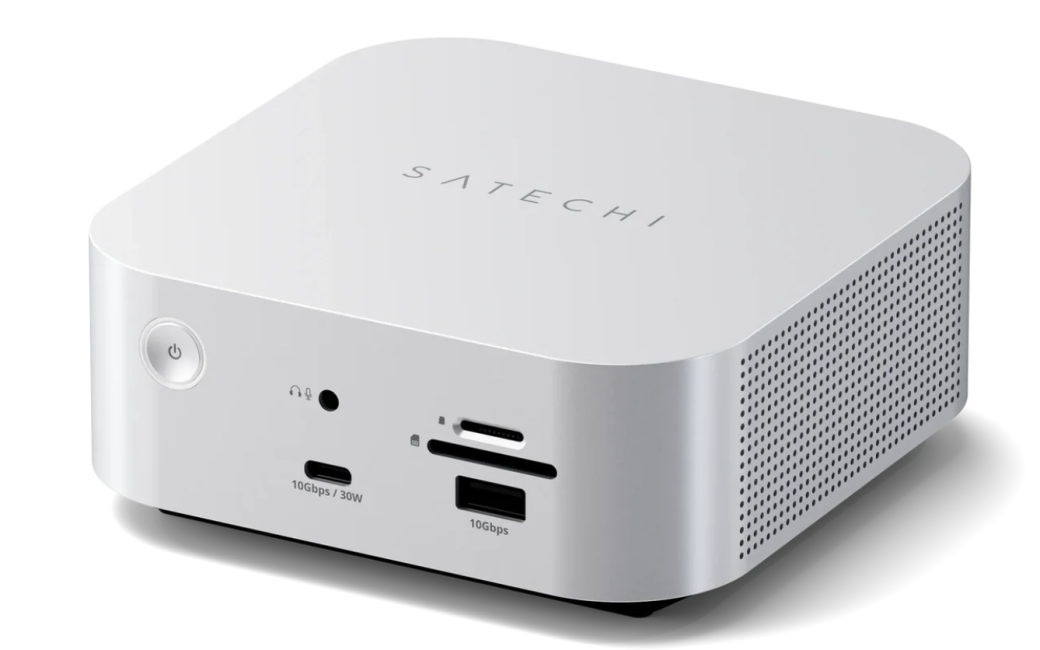
Manny: It’s a Thunderbolt 5 docking station with an SSD enclosure. Here you’re seeing our SD card readers, which can read UHS-II speeds up to 312 MB per second. We have a couple of data ports on the bottom, Type-A and Type-C, which can do 10 Gbps. The USB-C port actually has dedicated power up to 30W, so you’re capable of charging a phone, a tablet, and even a small portable laptop like a MacBook Air, for example. It has a 3.5 mm audio jack so you can connect wired headphones or a microphone if needed.
Allison: Or even big speakers connected that way.
Manny: Exactly. You can connect some speakers.
Allison: Okay. I’m going to flip it around. This basically looks like a Mac mini in form factor size.
Manny: Exactly. The form factor resembles the Mac mini. On the back, we do have a 2.5 Gb Ethernet port so you can connect directly to a wired connection. We have an additional USB-A and USB-C port for more data connections.
Allison: Both at 10 gig?
Manny: Correct. We have three downstream Thunderbolt 5 ports. Each one of these ports is capable of 15W charging. It can do 8K at 144 Hz, and it’s also capable of data transfer up to 80 Gbps.
Allison: And then the other one is to connect up to your display, right? Or your computer.
Manny: Correct. This is a host port that connects directly to your host device. This host port is also capable of charging up to 140W. So this is enough power to charge a large 16-inch MacBook Pro at its efficient speed.
Allison: You know, I was going to be real nice because I like Satechi, and I was going to go, “Oh, 30 watts. That’s really cute, but what about my MacBook Pro?” And I didn’t expect to see that. So, 140 watts.
Manny: 140 watts. This is powered by a 180W smart power supply. The power supply is smart enough to detect how much power is needed at any given time, and it auto-calculates how much power to give to the docking station.
Allison: So, I’ve got a dock I really like, but if I plug in my MacBook Pro and then I plug in my phone, it goes, “Oh yeah, no, I’m tired. I can’t do that.” But I could do my phone and my MacBook Pro with this.
Manny: You can do your phone, your MacBook Pro, your iPad, whatever it is you want to charge. There are multiple charging ports on the dock itself, and it’s able to allocate enough power to charge both your computer and all your connected devices.
Allison: You know, I know I’m supposed to care about HDMI and all these other weird ports, but I’ve got DisplayPort and HDMI. I have literally never used HDMI on my Mac. So this is now today’s ports, the right ports, the right configuration, and a lot of them. Okay. Is this going to cost me a kidney?
Manny: It’s going to cost you $399 before taxes.
Allison: Really?
Manny: The kicker behind this is because we are also including an SSD enclosure. The enclosure allows you to expand the storage of your host device without spending an arm and a leg upgrading the storage directly.
Allison: Wow. So this is an M.2 slot, right?
Manny: M.2 NVMe slot. It’s capable of hosting 2230, 2242, 2260, or 2280 size cards.
Allison: I just learned what that meant yesterday. Do you know, is that millimeters? What is that number?
Manny: It’s 22 mm by 30 mm, then 22 by 42 mm, and so on. The 22 is essentially the width of the card, and the last two numbers are the length of the card, with 80 being the longest.
Allison: Okay. I should have talked to you before I interviewed the people from Hyper yesterday because I was like, “What are those numbers?” Very, very good. So you can increase your storage and put it in the dock. This is fantastic. Now, you’ve got a fancy Thunderbolt 5 cable for us, too.
Manny: Correct.
Allison: Oh, I’m sorry. When is this going to be available?
Manny: This is available today for pre-order. We will start shipping toward the end of February or early March, and this is going to be specific to the US. We also plan on coming out with an EU version and an Australian version. Those will be coming a little later in the year.
Allison: Excellent. Let me ask you a very odd question. Am I allowed to stand this up on its side on my desk?
Manny: Great question. I would actually discourage that. The reason is because the product itself has active thermal cooling. There is an active fan here on the right side that pulls in air from outside. It cools the docking station along with the SSD enclosure to ensure that performance is always optimized, and then it pushes the air out through the left side. So if you were to put it on its side, you’re kind of blocking the airflow.
Allison: Plus the cat hair and everything. This is what happens when you get the right guy that you’re interviewing. That is fantastic. Okay. So anything else over here on the right side that we’re going to need to talk about? Anything new? Anything in the last six months?
Manny: All the new devices are pretty much from the docking station moving left. The devices you’re seeing over here are devices that we’ve released within the past year. We’re still receiving a lot of excitement around our FindAll and our On-The-Go collection.
Allison: Oh yeah. Talk to us about those.
Manny: We have a lot of different devices designed to help you track some of your favorite possessions. For example, we have our FindAll Passport Cover. This is designed so you can put your passport into this slot. You can add boarding passes, other documents you might need to carry with you, and some cards. It’s designed so you can pretty much have everything in one area.
Allison: Find My is built into this.
Manny: Find My is built into it. Right here you’ll be able to turn it on. Once it’s turned on, you’re able to pair it to your device using the Find My app, and then you’ll be able to track the actual passport cover. If you leave it behind, you’ll get a chime letting you know, “Hey, you forgot your passport. Come get it.”
Allison: I think we’re going to need this. So how do you charge this?
Manny: Unlike most common passport covers or FindAll products that require a little coin battery to be replaced, this actually has a lithium-ion battery inside that’s rechargeable via a wireless charger. You can throw this on any wireless charger, and it’ll charge the passport cover. The battery life lasts eight months on a single charge, so you technically only have to charge it once a year.
Allison: Let me ask a really important question, which is, will it tell me when the battery’s dying?
Manny: It’ll actually give you a little indication here. The LED light will turn red.
Allison: But no, that’s in my safe right now, and I’m not realizing it. I’m going to pull it out and not know that it’s discharged.
Manny: If you go into the Find My application, there’s a little battery icon on each device, and it’ll tell you where the battery is at.
Allison: It won’t send me a notification.
Manny: It will not send you a notification. It’s more of a visual.
Allison: I’m only asking because we got a wallet card for Steve, and it works great, but it didn’t tell us that the battery was dying. Then we went on travel and were looking for his wallet. We couldn’t find it, and it was like, “Oh, the battery’s dead.” Well, you didn’t tell me. We need notifications to remind us because we’re all idiots, right?
Manny: Some sort of notification definitely would be helpful.
Allison: Okay. But I guess we have to learn to check Find My before we leave the house, maybe. That’s a beautiful little case. I like that. That’s really nice.
Manny: This is our first product in our FindAll portfolio.
Allison: FindAll portfolio. I’ll get it yet.
Manny: We have four other products within that same portfolio. We have a keychain. You can hook that onto a backpack or pretty much anything else you’d like. It uses the same technology and also wirelessly charges.
Allison: Okay. I see. The passport cover is $60. The FindAll keychain is $30.
Manny: We also have a FindAll luggage tag. The luggage tag is designed for you to clip onto your luggage. It has a little flap that you can open and write some information in case it gets lost.
Allison: Oh, okay.
Manny: Same FindAll technology allows you to track everything.
Allison: What I like is that it doesn’t look like it’s a Find My device. It just looks like a luggage tag, a fancy luggage tag.
Manny: Very discreet. Correct.
Allison: Okay. And then you’ve got a credit card size one.
Manny: The FindAll card is designed for you to throw in your wallet. You can also throw it in your purse or your backpack.
Allison: That’s nice. It feels like glass, but it’s not heavy at all. And that one’s $30 also?
Manny: Correct. It also is wirelessly rechargeable.
Allison: So charge a Qi charger or whatever.
Manny: Correct. Very good. And then the last one in our portfolio is our FindAll glasses case.
Allison: Oh, come on.
Manny: When not in use, it’s very thin. When you do want to use it, you simply open it, pop these out, and close them. If you leave your glasses behind, or if you don’t know where they’re at at home, you can go into the app, give it a little chime, and then you’ll be able to find them.
Allison: I’m not saying that somebody in my family needs these right off the bat, but there’s a possibility there’s someone who doesn’t know where their glasses are. Mine are always on my face, though. Hey, we did that really smooth, didn’t we? Like we’ve done this before. We should work together.
Manny: I primarily use this for my sunglasses. I have a couple of pairs of sunglasses that sometimes I leave here and there. I always freak out that I’m losing them, so I use these to make sure that I know where they are at all times.
Allison: Definitely. So those are the FindAll vegan leather glasses case at $40. Nice and small, and then it folds out for the glasses. Well, I think we probably covered enough stuff unless there’s anything else on the table we need to do.
Manny: No. I think pretty much all the main products that you guys might be interested in, we went through. If you have any additional questions, please feel free to reach out to us. We’re more than happy to answer them.
Allison: All right, Manny. Satechi comes through every single year. Thank you so much for your time.
Manny: Of course. Thank you for coming by.
[…] CES 2026: Satechi’s New Product Arrivals […]